

Six months ago, Meera Iyer from Coimbatore was staring at her Seller Central dashboard in frustration. Her organic cotton bedsheet listing was getting 200 sessions a day, but her conversion rate sat at 5.8%. Great photography, keyword-rich title, competitive pricing — yet her Amazon bullet points read like a warehouse slip: “100% cotton. 300 thread count. Available in three colours. Machine washable. Queen size.”
After rewriting those five lines using the strategies you're about to learn, Meera's conversion rate climbed to 13.2% within three weeks. Same product, same price, same images. The only change was how she talked about her product in the bullet points.
Your bullet points are the bridge between a curious click and an actual purchase — where browsers become buyers or bounce. Let's fix that.
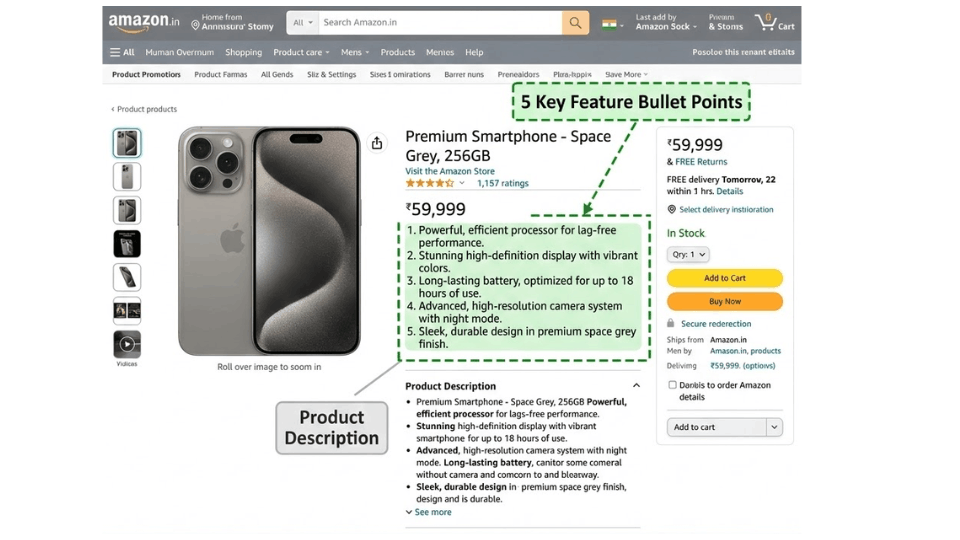
Why Amazon Bullet Points Make or Break Your Conversion Rate
What Bullet Points Actually Do in the Buying Journey
Think about how you shop on Amazon yourself. You click a listing, glance at the images, scan the title, and then your eyes land on those five short points next to the product photos. That's the moment of decision. Research suggests most online shoppers spend roughly 15 seconds deciding whether a product is worth their attention. Your bullet points are what they're reading during those 15 seconds.
Rajesh Menon from Kochi learned this the hard way. His stainless steel water bottle listing had bullet points that simply listed specifications. When he rewrote them to lead with benefits — “STAYS COLD FOR 24 HOURS” instead of “Double-wall vacuum insulation” — his conversion rate jumped from 7% to 15.4% in just four weeks. Same product, different words.
How the A10 Algorithm Uses Your Bullet Points
Amazon's A10 algorithm indexes your bullet points alongside your title and backend keywords. The catch is that Amazon only indexes the first 1,000 bytes across all five bullets. Anything beyond that is visible to customers but invisible to the algorithm. Every character carries dual weight: it needs to convince the shopper and signal relevance to Amazon's search engine. If you want to understand how the algorithm ranks listings end to end, our guide on how Amazon's algorithm works and how to rank higher covers the full picture.
The Real Cost of Lazy Bullet Points
Poorly written bullets actively cost you money. If your PPC campaigns drive clicks to a listing with vague, keyword-stuffed bullets, you're paying for visitors who leave without buying. Your ACoS climbs, your conversion rate drops, and Amazon starts showing your listing to fewer people. It's a downward spiral that starts with five lines of text you probably wrote in ten minutes.
Amazon Bullet Points Guidelines Every Seller Must Know in 2026
Amazon's Official Rules (Updated 2024-2026)
Before you write a single word, know what Amazon allows. Sellers get five bullet points per listing, while vendors get ten. Every bullet must start with a capital letter. Since August 2024, Amazon has banned emojis and special characters like ™, ®, and © from bullet points. You cannot include pricing, shipping details, promotional language, or warranty claims. Phrases like “eco-friendly,” “anti-bacterial,” and “anti-microbial” are prohibited and can trigger automatic suppression.
What Happens If You Break These Rules
Amazon's enforcement has gotten sharper. Violating guidelines may result in Amazon auto-rewriting your bullets using AI — and those AI versions are rarely persuasive. In serious cases, your listing gets suppressed entirely. Neha Gupta from Lucknow had her kitchen organiser listing suppressed for two weeks because she used “eco-friendly bamboo” in her bullets. Two weeks of zero visibility on a product doing ₹3 lakh monthly. The rules apply on Amazon.in just as strictly. For a full breakdown of what can get your account in trouble, read our guide on avoiding common Amazon policy violations.
Category-Specific Differences to Watch
Not all categories play by the same rules. Apparel listings often cap at 100-150 characters per bullet, while electronics may allow up to 500. Always check your Category Style Guide in Seller Central before writing.
The Character Limit Sweet Spot for Amazon Bullet Points

The Official Limits vs. What Actually Works
Amazon recommends 200 to 250 characters per bullet including spaces. Technically, you can use up to 500, but only the first 200 bytes per bullet get indexed by the search algorithm. The practical sweet spot for your amazon bullet points character limit is 150 to 200 characters — roughly two clean lines on desktop and still digestible on mobile.
Why Shorter Bullets Win on Mobile
Over 60% of Amazon shoppers in India browse on their phones. On mobile, only 70 to 80 characters are visible per bullet without tapping “see more,” and just three bullets display above the fold. Vikram Desai from Bengaluru was writing 400-character bullets packed with details. When he trimmed them to 180 characters and front-loaded benefits, his mobile conversion increased by 18%. If your most important information is buried in the second half of a long bullet, most mobile shoppers will never see it.
How to Write Amazon Bullet Points: The Benefit-First Framework
The Benefit → Feature → Outcome Formula
Every effective bullet follows a three-part structure. Lead with the benefit, follow with the feature, close with the outcome. A generic bullet like “Made from stainless steel, double-wall construction” becomes “KEEPS DRINKS HOT FOR 12 HOURS — Double-wall stainless steel insulation means your chai stays piping hot from morning commute to evening meeting.” Same product, completely different emotional impact.
Writing for the Scanner, Not the Reader
Start each bullet with a short ALL-CAPS phrase of two to four words that acts as a mini-headline. Shoppers scan these capitalised openers first and decide whether to read the rest. Keep sentences short and active. One idea per bullet. Anita Sharma from Jaipur tested this on her handmade skincare line and saw her click-to-purchase rate increase by 23% within a month.
Addressing Objections Inside Your Bullets
Dedicate at least one bullet to tackling common buyer concerns — sizing, durability, compatibility. Mine competitor reviews to identify what customers complain about, then proactively address those fears in your own bullets.
The 5-Bullet Template for Indian Amazon Sellers
A structure that works across categories: Bullet 1 covers your primary benefit or USP. Bullet 2 highlights a key feature with proof. Bullet 3 paints a use case or lifestyle fit. Bullet 4 handles the top objection. Bullet 5 builds trust through certifications or a confidence-building statement. This template walks the customer from interest to confidence naturally.
If you want a deeper understanding of how your listing elements work together — from title to images to backend keywords — the 3-Day Amazon Business Training breaks down the complete listing optimisation system that Indian sellers are using to build high-converting listings.
Amazon Bullet Points Examples That Actually Sell
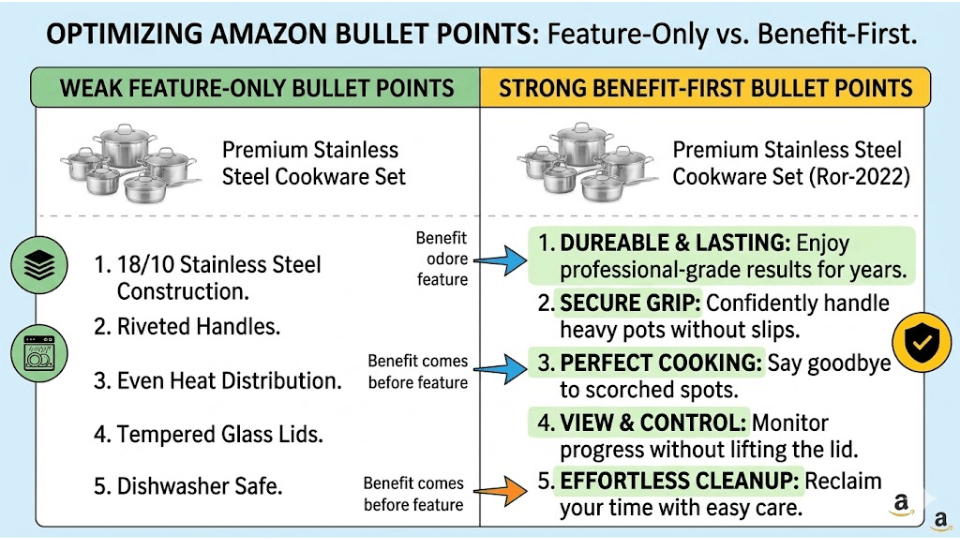
Good vs. Bad Bullet Points — Side-by-Side Breakdown
Consider a kitchen blender listing. A weak bullet reads: “Powerful motor. 3 speed settings. 1.5 litre jar. BPA free plastic.” It lists specs but gives no reason to care. A strong version: “BLEND SMOOTHIES IN 30 SECONDS — 750W motor with 3 speeds crushes ice, fruits, and nuts effortlessly, so your morning health routine never slows you down.” Same information, but the second makes the customer feel something.
Category-Specific Examples for Indian Sellers
For a stainless steel tiffin box: “LEAK-PROOF LOCKING LID — Silicone-sealed clips keep dal and curries secure in your bag, so you carry home-cooked lunch without spill worries.” For a phone case: “SURVIVES REAL DROPS — Military-grade corner protection tested at 1.5-metre drops keeps your phone safe from hand slips and bike mount falls.” These work because they use familiar Indian contexts.
What Top-Ranking Listings on Amazon.in Do Differently
The best sellers on Amazon India consistently front-load benefits, keep bullets between 150 and 200 characters, and use natural language with relevant keywords. Many dedicate one bullet specifically to addressing quality concerns — a smart move in a marketplace where trust with online shoppers is still being built. To see how the best listings combine bullets with other visual elements, check out our post on creating eye-catching Amazon listings.
Amazon Bullet Points SEO: Keywords Without the Stuffing
How Amazon Indexes Keywords in Bullet Points
Amazon's A10 algorithm indexes bullet point text alongside your title and backend search terms. The first 1,000 bytes across all five bullets count for search visibility. Keyword position within a bullet doesn't affect relevance — it just needs to appear. However, placing keywords early helps mobile readability since those are the words shoppers actually see.
The Right Way to Add Keywords to Your Bullets
Aim for one to two target keywords per bullet. Write for humans first, then weave in keywords naturally. Don't repeat keywords already in your title — use bullets for secondary and long-tail variations. Priya Nair from Chennai stuffed her hair oil listing with the same keyword phrase five times across her bullets. After distributing different keywords naturally, her organic ranking improved because Amazon's algorithm rewards readability alongside relevance.
Using Your Search Term Report to Refine Bullet Keywords
Your Search Term Report in the Amazon Advertising console is a goldmine for amazon bullet points SEO. Look for high-impression, low-click keywords that indicate relevance gaps. Identify high-converting terms not yet in your listing. Adding these to your bullets can unlock traffic you're currently missing. Our step-by-step guide on reading your Amazon Search Term Report like a pro walks you through exactly how to extract these insights.
If you're serious about mastering the Search Term Report and turning raw data into listing improvements, the 3-Day Amazon Business Training walks you through the exact process step by step.
Mobile-First Bullet Points: What Most Sellers Get Wrong
How Bullet Points Appear on Mobile vs. Desktop
On desktop, all five bullets appear next to your product images, fully visible. On mobile, bullets get pushed far below the fold, only three may show by default, and each is truncated to roughly 70 to 80 visible characters. Over 60% of Amazon India sessions happen on mobile — your desktop-optimised bullets may be invisible to the majority of your shoppers.
The Front-Loading Strategy for Mobile Shoppers
Put your most critical benefit or keyword in the first ten words of every bullet. The ALL-CAPS opener serves as the scannable headline mobile shoppers see before deciding to tap for more. Saurabh Jain from Delhi restructured his electronics accessories bullets to front-load benefits and saw a 22% increase in Add-to-Cart rate from mobile sessions. Every character counts for amazon mobile listing optimization when you're working within a 70-character visible window.
Amazon Bullet Points Best Practices: The Optimisation Checklist
The Pre-Publish Checklist
Before you publish, run through this check: each bullet under 200 characters, benefit-first structure, no emojis or prohibited phrases, one to two keywords per bullet without repeating title keywords. Then the mobile test — read just the first 70 characters of each bullet. If those words alone don't sound compelling, rewrite.
A/B Testing Your Bullet Points
If you're Brand Registered, Amazon's Manage Your Experiments tool lets you test different bullet versions. Change one variable at a time and run each test for at least two weeks. Deepak Agarwal from Ahmedabad ran three consecutive A/B tests on his home décor listings and found that simply reordering bullets — putting the most emotionally compelling benefit first — lifted conversions by 11%. For a deeper dive into the testing process, read our guide on running A/B testing in Amazon Seller Central.
When and How Often to Update Your Bullets
Review bullets every three to six months, or sooner if customer feedback shifts or seasonal search trends change. Use your Search Term Report and customer reviews as ongoing inputs to keep your copy sharp and converting.
FAQ: Amazon Bullet Points
How many bullet points can you have on Amazon?
Sellers get five bullet points per listing, and vendors can use up to ten. Use all of them — each one is an opportunity to persuade a shopper and rank for additional keywords.
What is the character limit for Amazon bullet points?
Amazon recommends 200 to 250 characters per bullet. The technical max is 500, but only the first 1,000 bytes across all five bullets are indexed. Aim for 150 to 200 per bullet for the best balance of readability and keyword coverage.
Do Amazon bullet points help with SEO and search ranking?
Yes. Bullet points are indexed by Amazon's A10 algorithm alongside titles and backend keywords. Natural keyword placement in bullets contributes to search visibility. Keyword stuffing, however, hurts more than it helps.
How do you write bullet points that increase conversion on Amazon?
Lead with benefits using the Benefit → Feature → Outcome formula. Address buyer objections, front-load for mobile visibility, and include keywords naturally. A/B test different versions to find what resonates with your audience.
Can you use emojis in Amazon bullet points?
No. Since August 2024, Amazon has banned emojis and most special characters. Using them can result in auto-editing by Amazon's AI or listing suppression from search results.
Should I use HTML formatting in my Amazon bullet points?
No. Amazon strips all HTML from bullet points. Use plain text with capitalised openers for visual structure instead.
Do bullet points affect my Amazon PPC performance?
Indirectly, yes. Better bullets improve conversion rate, which signals value to Amazon. This can improve your ad relevance score and lower your ACoS over time.
What's the difference between bullet points and the product description on Amazon?
Bullet points appear higher on the page and are designed for quick scanning of key features. The product description provides longer narrative space with secondary keywords. Both are indexed, but bullets typically have a greater impact on purchase decisions.
Conclusion: Your Bullet Points Are Your Silent Salesperson
Your Amazon bullet points work around the clock — the sales pitch that runs while you sleep. Most sellers treat them as an afterthought, but the ones who win treat every character as a chance to convince, rank, and convert. Lead with benefits. Write for mobile first. Use keywords like a conversationalist, not a stuffing machine. Follow Amazon's guidelines so your work doesn't get suppressed overnight. And test, refine, and update.
If you're ready to go beyond bullet points and build a complete Amazon business system — from product selection to listing optimisation to PPC mastery — join the 3-Day Amazon Business Training and learn the framework that Indian sellers are using to build profitable brands on Amazon. Your customers — and your bottom line — will thank you.
