
You are sitting with your laptop at eleven at night, two versions of a main image open side by side. One shows the pressure cooker alone on white, clean and obvious. The other shows it on a kitchen counter with steam rising and a bowl of dal beside it. Your cousin swears the lifestyle shot will sell more. Your designer swears the white background looks more professional. You have no idea, so you flip a mental coin, upload one, and spend the next two months wondering.
That wondering is exactly what Amazon Manage Your Experiments was built to end. It is Amazon’s own split testing feature inside Seller Central, and it lets you show two versions of the same listing to real shoppers at the same time, then tells you which one actually earned more sales. Not which one your family liked. Which one converted.
This post walks you through eligibility, where the tool sits, what to test first, how long to run it, and how to read the result without lying to yourself. By the end you will have a test running instead of an argument going.
What Split Testing Actually Does For Your Listing
Most listing decisions in Indian e-commerce are made on taste, and taste is expensive when you are paying for every click.
The guessing game most sellers are still playing
You change a title, sales go up, you assume the title did it. Meanwhile a competitor went out of stock, a festival week landed, and your ad budget rose by two thousand rupees. Without a controlled comparison you are attributing results to whatever change you happened to remember making. Amazon A/B testing removes that confusion by keeping everything else equal.
How Amazon compares two versions at once
The Amazon MYE tool serves version A to roughly half of the shoppers who land on your detail page and version B to the other half, in rotation, over the same days and the same traffic conditions. Both versions face the same competitors, the same pricing pressure, the same weekend dip. Whatever difference shows up in sales is far more likely to come from the change you made.
What a real test can and cannot tell you
A test tells you which version earned more units and revenue across the period. It will not tell you why, and it will not rescue a product nobody wants. Priya Deshmukh, who sells stainless steel lunchboxes from Pune, ran her first split test on a main image and found the lifestyle shot beat the white background by 11% in units over five weeks. The lesson she took away was smaller than the win: her buyers needed to see scale before they trusted the capacity claim.

Who Gets Access And What Amazon Checks First
Before you plan a testing calendar, confirm that your account and your ASINs clear the bar, because the tool only shows what it considers testable.
Brand Registry and the eligibility checklist
The core requirement for manage your experiments Amazon eligibility is brand ownership. You need a registered trademark and an active Amazon Brand Registry enrolment for that brand, plus a Professional selling plan. Here is what to verify before you go looking:
- Your trademark is registered and linked to an active Brand Registry account.
- You are selling on a Professional plan, not an Individual one.
- The ASINs you want to test belong to that registered brand in your catalogue.
- Those listings are active, in stock, and free of suppression or policy flags.
- The content you want to test, such as A+ modules, is already published and approved.
Work down that list first. Nine out of ten access problems are one unticked box on it rather than anything mysterious.
Why traffic volume decides your access
A test needs enough sessions to separate signal from noise, so Amazon only offers experiments on ASINs that receive meaningful traffic. A listing with forty sessions a week cannot produce a trustworthy answer in any reasonable timeframe. If your catalogue is new, build traffic first through ads and reviews, then test.
How to confirm your ASINs qualify
Open the experiments dashboard and look at the eligible ASIN list rather than guessing from your full catalogue. Rohit Nair, who sells Ayurvedic hair oils from Kochi, assumed his whole range qualified and found only three of his eleven ASINs listed. He pushed ad spend onto two more for six weeks, and both became eligible.
Finding The Tool Inside Seller Central
Knowing where the feature lives saves you twenty minutes of clicking through menus that all look similar.
The exact navigation path step by step
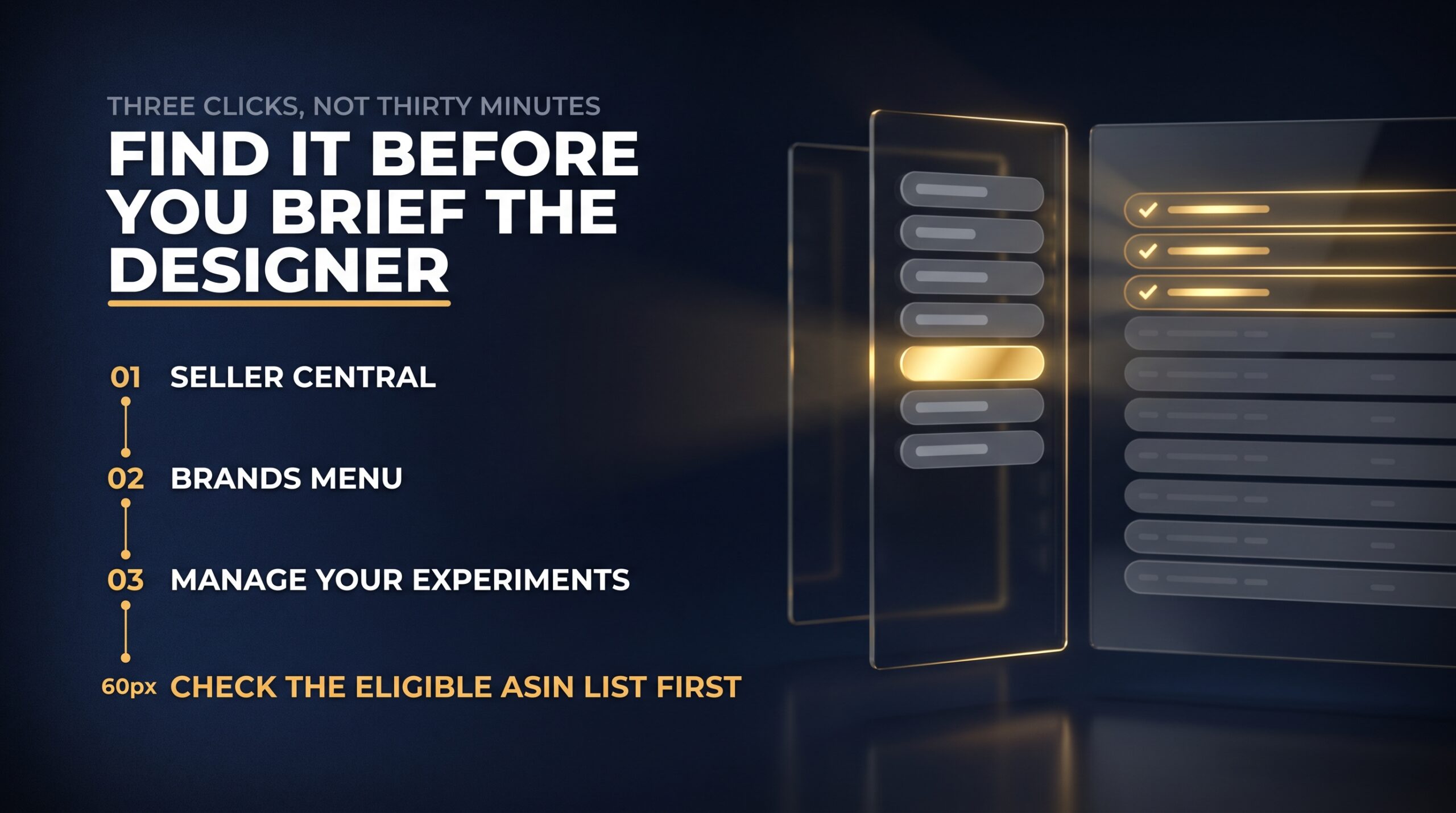
Log into Seller Central, open the Brands menu in the top navigation, and select Manage Your Experiments. The dashboard that opens shows any running or completed experiments and a button to create a new one. From there you pick the ASIN, choose the content type you want to test, build version B, and set your start date.
Reading the eligible ASIN list
The list shows which ASINs can be tested and which content types are available for each, so one product might offer an A+ test while another offers title or image. Check this before you brief a designer. There is no point commissioning six new lifestyle images for an ASIN that is not on the list yet.
What to do when an ASIN is missing
Missing ASINs usually trace back to low traffic, a listing that is out of stock, content still awaiting approval, or a product not properly associated with your registered brand. Fix the obvious ones, wait a week, and check again rather than raising a case immediately.
If you want a simple one-page eligibility and setup worksheet to run through before your first experiment, we keep one in the resources section at Aman Central. Print it, tick the boxes, and you will know in five minutes whether you are ready to test or ready to fix.
Choosing What To Test First
Not every element deserves a five-week test. Rank your ideas by how much of the buying decision they carry.
Titles that change how shoppers scan
Titles decide whether a shopper stops scrolling. An Amazon listing title image test usually starts here because the change costs nothing to produce. Test the order of information, not just the words: brand first versus benefit first, capacity first versus material first. Anjali Gupta, who sells cotton bedsheets from Jaipur, moved thread count from the end of her title to the third position and saw a 9% lift in units over four weeks.
Main images and the click decision
Your main image controls click-through from search, which means it controls how many people ever see the rest of your work. Test product-on-white against a compliant lifestyle-style hero image, or a straight-on angle against a three-quarter view showing depth. Keep the change bold. Two images that differ by a shadow will produce a result nobody can act on.
Bullet points, descriptions and brand story
Bullets and descriptions matter more for considered purchases where buyers read before deciding. Try benefits first against specifications first, or five tight bullets against five detailed ones. Brand story modules are worth testing once your top ASINs are settled, since they carry trust rather than information. Treat Amazon split testing listing copy as your second wave, after images and titles have given you their answers.
Running Your First A Plus Content Test
A+ content is where many Indian sellers get their biggest surprise, because the section they assumed nobody scrolled to turns out to be doing quiet work.
Building two genuinely different modules
An Amazon experiments A+ content test only works if the two versions make different arguments. Version A might lead with a comparison chart and technical specifications. Version B might lead with a usage sequence showing the product in an Indian home, then follow with the chart. Changing a header colour is not a test, it is a redraw.
Comparing mobile and desktop behaviour
Most of your traffic is arriving on a phone, so review both layouts before you launch. Modules that look balanced on a desktop preview often stack into an endless scroll on mobile, and the buyer never reaches your strongest image. Suresh Iyer, who sells power tools from Coimbatore, rebuilt version B with his comparison chart in the second module instead of the fifth and finished the six-week test 14% ahead on units.
Mistakes that waste a full test cycle
The classic waste is changing your price, running ads differently, or updating the title midway through an A+ test. Every one of those contaminates the comparison and you end up with a number you cannot trust. Freeze everything else, leave the test alone, and resist the urge to peek daily.

How Long To Run A Test Before You Trust It
Patience is the cheapest input in this whole process and the one sellers are least willing to spend.
The minimum window Amazon recommends
Plan for a run of around four weeks at minimum, and be willing to let a slower-moving ASIN run longer until the result settles. Shorter windows pick up weekly rhythms rather than real preference. A test that looks decisive on day six routinely reverses by day twenty.
Why festive spikes distort your numbers
Indian demand is not flat. A test running across Great Indian Festival or a Diwali build-up is measuring urgency, discount hunting and gifting behaviour, not your image change. Fatima Sheikh, who sells home fragrance from Hyderabad, launched a test three days before a sale event and ended it confused, then reran the same test in a quiet fortnight in January and got a clean 7% win.
Ending a test early and when it is justified
Stop early only when something is genuinely wrong: a compliance flag, a stock-out, an image that misrepresents the product, or a clear drop in sales on one version that is costing you real money. Curiosity is not a reason. Write your end date in your calendar when you launch, and treat it as fixed.
Reading Your Results Without Fooling Yourself
The dashboard gives you numbers. Your job is to avoid reading into them what you already wanted to believe.
Sales, units and conversion side by side
Look at units ordered, sales value and conversion together rather than picking the metric that flatters your favourite version. A version can win on units while losing on revenue if it pulls buyers towards a cheaper variation. Decide before the test which metric matters most for that product, and hold yourself to it.
What a probability score really means
Amazon shows a confidence or probability figure alongside the winner, which tells you how likely it is the difference is real rather than random. A 55% probability is a coin toss dressed up in a number. Meera Krishnan, who sells stationery from Chennai, waited an extra two weeks on a title test that sat at 61%, and by week six it had climbed high enough for her to publish the change without second-guessing it.
When the winner is nobody
Plenty of tests end with no meaningful difference, and that is useful information. It tells you the element you changed is not the bottleneck, so you can stop spending money on it and move to something that is. Keep the original, note the result, and test a bolder variation next time.

Turning One Winning Test Into A Testing Habit
One test gives you a lift. A testing habit gives you a catalogue that improves while you sleep.
Building a rolling test calendar
Map your top ten ASINs against twelve months and schedule something running at all times. When one test ends, the next launches the same week. Vikram Chauhan, who sells fitness accessories from Lucknow, kept three experiments running continuously through a year and lifted blended conversion across his eight best ASINs by 18%.
Applying wins across your catalogue
A win on one product is a hypothesis for the rest. If lifestyle imagery beats white background on your lunchboxes, test it on your water bottles before assuming it transfers. Buyers in different categories behave differently, so treat every carry-over as a fresh test rather than a done deal.
Keeping a record of every version tested
Maintain a simple sheet: ASIN, element tested, both versions, dates, result, confidence, decision. Six months later you will avoid rerunning a dead end that someone in your team has already disproved.
We have a testing log template and a set of hypothesis prompts for titles, images and A+ modules on the site. Copy it, fill in the first row today, and your catalogue will start accumulating knowledge instead of opinions.
Frequently Asked Questions
What is Amazon Manage Your Experiments?
Amazon Manage Your Experiments is the split testing feature inside Seller Central that lets brand owners compare two versions of the same listing element with live shoppers. Amazon rotates version A and version B across your detail page traffic over several weeks, then reports units, sales and a confidence score so you can see which version genuinely performed better. It replaces guesswork with evidence drawn from your own buyers rather than someone else’s case study.
Who is eligible to run experiments on Amazon?
Eligibility rests on brand ownership and traffic. You need a registered trademark, an active Brand Registry enrolment, and a Professional selling plan, and the ASINs must belong to that brand in your catalogue. The listing also needs enough sessions for a meaningful comparison, plus healthy status: in stock, active, and free of suppression or policy issues. Amazon shows you an eligible ASIN list inside the tool, so check that rather than guessing from your full catalogue.
How long should an Amazon A/B test run?
Plan on roughly four weeks as your floor, and longer for slower-moving ASINs where weekly sales are thin. Short tests capture day-of-week patterns and random fluctuation rather than real shopper preference, which is why early leaders so often reverse. Set your end date when you launch and leave the test alone until then. If the confidence figure is still low at the end, extend rather than publishing a change you cannot defend.
Can you A/B test Amazon product images and titles?
Yes, and these are usually the highest-impact places to start because they drive the click before anyone reads a word of your copy. Test your main image against a clearly different alternative, such as product-on-white versus a compliant hero shot showing scale or use. For titles, test the order of information rather than only the wording: benefit first, capacity first, or material first. Make the difference obvious enough to produce a readable result.
How do you read Amazon experiment results?
Read units ordered, sales value and conversion together, then check the probability or confidence figure Amazon reports. A high confidence score means the difference is unlikely to be random; a figure near fifty percent means the two versions are effectively tied. Decide before launching which metric matters for that product so you are not tempted to cherry-pick afterwards. If nothing separates the versions, keep the original and test a bolder change next.
Can I run more than one experiment on the same ASIN?
Run one experiment per ASIN at a time. Overlapping tests on the same listing make it impossible to attribute a lift to any single change, which defeats the purpose entirely. You can, however, run separate experiments on different ASINs simultaneously, which is how experienced sellers keep three or four tests going across a catalogue. Queue your ideas for a single product and work through them in order of expected impact.
Does running an experiment hurt my organic ranking?
No. The tool is Amazon’s own feature and serving two approved content versions is a normal, supported behaviour rather than anything the algorithm penalises. What can hurt you is what sellers do around a test: going out of stock mid-run, letting listing health slip, or making unrelated changes that confuse both the result and your customers. Keep inventory steady and your listing compliant, and the experiment itself costs you nothing in ranking.
What should I do if my test result is inconclusive?
Treat it as a finding, not a failure. An inconclusive result tells you that element is not what is holding the listing back, so stop investing in it and shift your attention elsewhere. Record it in your testing log with dates and both versions so nobody on your team repeats it. Then design a bolder variation, or move to a different element entirely, typically from copy back towards main image or title.
Conclusion
The sellers who scale in India are rarely the ones with the best taste. They are the ones who stopped arguing about images at eleven at night and started letting their buyers decide. Amazon Manage Your Experiments hands you that ability the moment your brand is registered and your listings are carrying real traffic, and every test you run compounds into a catalogue that converts better than it did last quarter.
Pick one ASIN this week. Choose the element carrying the most weight, build a version B that is genuinely different, set a four-week window, and write the end date in your calendar.
If you want the full picture of how listings, traffic and conversion fit together, join the 3-Day Amazon Business Training and work through the system alongside other Indian sellers building the same thing.

4 Responses
Thanks a lot for the beautiful explanation which is easily understandable
I’m just a beginner, above content is very useful to me , Thank you, MR Aman
Thank you Aman for this insightful information, as a new amazon seller, I’ll definitely use this A/B testing.
Good to understand for beginners