

Two yoga mats sit in the same warehouse in Surat. Same 6mm foam, same anti-slip texture, same price on the page. One does forty orders a day. The other does four. The seller with four has rewritten his title three times, cut his price twice and doubled his ad budget. Nothing moves. What he has never looked at is the one dropdown he filled in during his first week of selling, when he was in a hurry to go live and picked whatever sounded closest.
That dropdown is amazon category selection, and it quietly decides who ever sees your product. The category you assign tells Amazon which shelf your listing belongs on, which filters it responds to, which bestseller list it competes in, and which searches it is even eligible to appear in. Get it right and every rupee you spend on ads works harder. Get it wrong and you spend months blaming your photos.
Here is how the node system actually works in the India store, how to research the right one, what to do when yours is already wrong, and how to build a category plan you can defend a year from now.
Why your category choice decides your ranking
Ritu Malhotra sells hand-finished brass planters from Jaipur. For seven months she sat inside a general home décor node, averaging eleven orders a week. She moved the same ASIN into an indoor planters subcategory, changed nothing else, and within six weeks she was doing thirty-four orders a week and holding a top-hundred rank in that subcategory. Her lesson was blunt: she had been competing against wall art and candle holders for attention that was never hers.
What the category actually controls on a listing
Your category decides which attribute fields Amazon shows you, and those attributes are what the search engine reads. Pot diameter, material, indoor or outdoor use — these exist in a planter node and simply do not exist in a generic décor node. Fewer fields means fewer signals, and fewer signals means weaker relevance.
How shoppers filter their way to your product
A large share of buyers never scroll a plain search page. They tap a department, then a subcategory, then a price band, then a brand, and buy from what survives. If your node is wrong, you were eliminated before the first filter was applied and no report will tell you why.
The link between category and discovery
Amazon builds bestseller and new-release lists per node. Sit where the buying intent doesn’t match your keywords and your velocity gets measured against the wrong crowd, so the badges that drive free traffic and list placements never arrive. Category is not admin work; it is the address your shop trades from.

How Amazon organises products into browse nodes
Arvind Shetty in Mangaluru sells magnetic phone mounts for cars. He listed under mobile accessories because that is where phones live, and spent four months at roughly eighteen units a day. A customer question about dashboard fitting made him look again; he moved to a car interior accessories node and units climbed to forty-three a day inside eight weeks. His takeaway: the node follows where the product is used, not what it touches.
Department, category, subcategory and node IDs
Every product sits on a path that reads like a folder structure — department, then category, then one or more subcategories. Each step has a numeric browse node ID behind it. When sellers talk about an amazon browse node india path, they usually mean that full chain, not just the department name at the top.
Why one product can fit three different trees
A stainless steel water bottle can live in kitchen storage, in sports hydration, or in school and office supplies. All three are defensible. Only one matches the keywords your buyers actually type and the price they expect to pay. Pick by buyer intent, not by what the product is made of.
Where India nodes differ from other marketplaces
Node names and depth are not identical across Amazon stores. A path you copied from a US listing may be named differently, sit deeper, or split into two subcategories on amazon.in. Read the tree from the India store itself, using live search pages and category navigation, rather than assuming a path transfers.
Finding the right node for what you sell
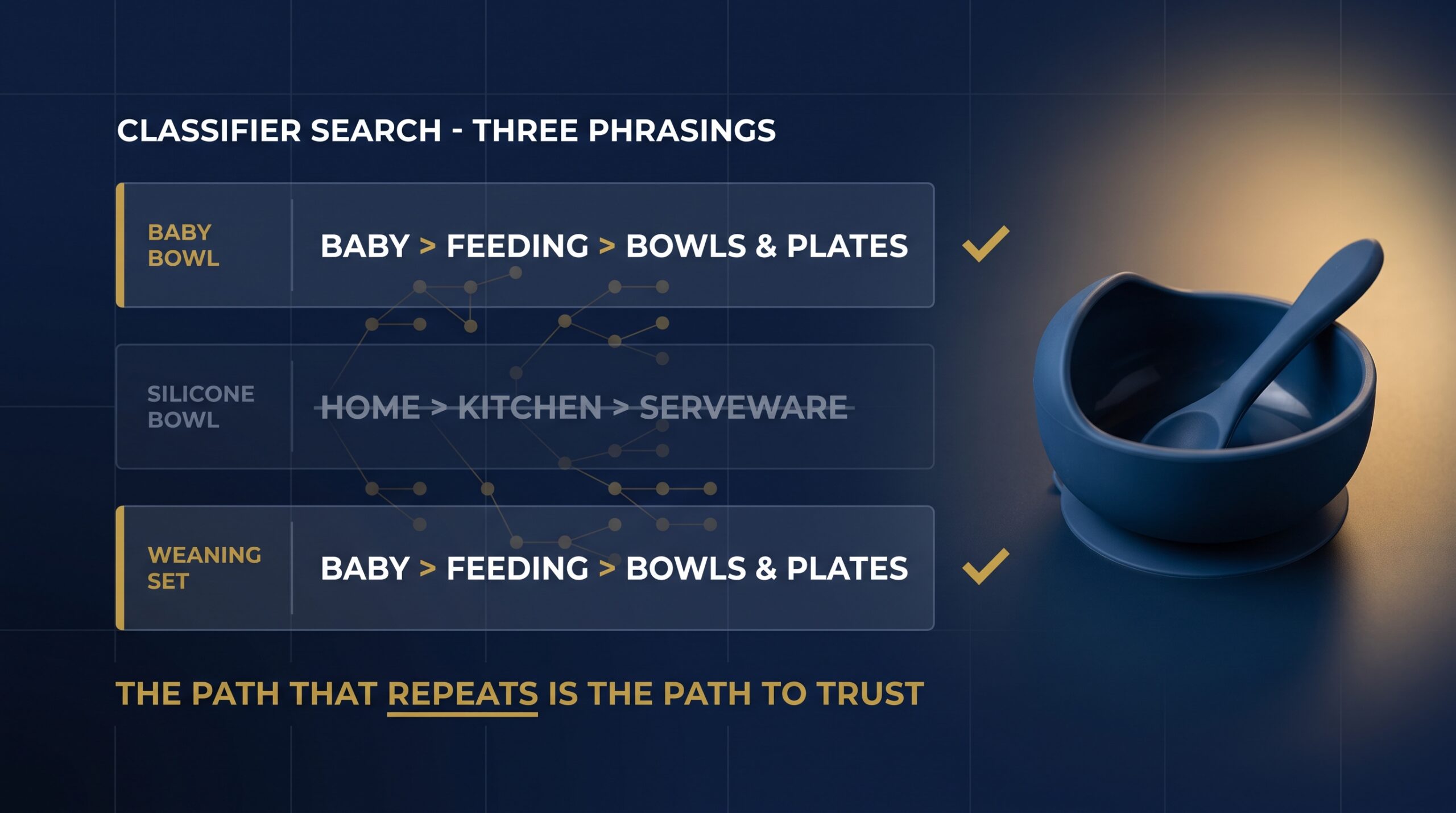
Sneha Kulkarni from Pune launched silicone baby feeding bowls and, on a friend’s advice, listed them under kitchen serveware. Sessions were healthy but conversion sat at 3 per cent. She reran her amazon product category research india from scratch, moved into a baby feeding subcategory, and conversion reached 11 per cent within five weeks on the same ad spend. Her lesson: traffic that cannot buy is not traffic.
Using the product classifier in Seller Central
When you start a new listing, the amazon product classifier seller central tool lets you search by product term and returns suggested category paths with their full hierarchy. Type three or four descriptions of the same product — “baby bowl”, “silicone bowl”, “weaning set” — and note which paths repeat. Repetition across phrasings is your strongest early signal.
Reverse-engineering nodes from top competitors
Open the five best-selling products that genuinely compete with yours and read the bestseller rank lines in the product details block; each one names the node it belongs to. If you want a fuller method, this walkthrough on how to reverse-engineer a competitor’s listing pairs well with the checks below:
- Confirm at least three of your five competitors share the same subcategory path.
- Check that the node’s filters match attributes you can actually provide.
- Compare the price band of the top twenty listings against yours.
- Count how many listings carry more than 500 reviews — that is your entry difficulty.
- Verify the node appears in the left-hand filter rail on your main keyword search.
Anything that fails two or more of these deserves a rethink rather than a hopeful upload.
Sanity-checking your pick against live search
Search your primary keyword as a customer would, then apply the category filter for your chosen node. If your competitors survive that filter and the results look like your product, you have chosen correctly. If half the page looks unrelated, keep looking.
If working through node research with someone checking your logic sounds easier than guessing, join the 3-Day Amazon Business Training and bring your product list along.
Where Amazon category selection goes wrong
Faisal Ahmed in Hyderabad sells protein bars. He deliberately listed them in a thin snack subcategory, won a bestseller badge in eleven days, and celebrated. Three months later he was still doing forty units a week while competitors in the mainstream sports nutrition node did four hundred. He switched, lost the badge, and crossed 300 units a week within two months. Small pond, small fish.
Chasing a soft category to fake a bestseller badge
A badge earned in a node nobody browses converts nobody. Amazon shows the badge, but the underlying traffic is not there, and your ads then have to buy every single session. The badge is a result of demand, not a substitute for it.
Copying the wrong competitor node
Plenty of sellers copy a path from a product that looks similar but sells to a different buyer. A ₹299 phone case and a ₹2,499 rugged case can sit in different subcategories for good reason. Copy from competitors whose price, use case and keyword set match yours, not merely their product photo.
Letting bulk uploads guess the node for you
Flat-file uploads with a vague product type value let Amazon place the ASIN wherever it thinks best. On a thirty-SKU upload, that means thirty guesses. Deciding how to choose amazon category before you touch a spreadsheet takes an afternoon; unpicking thirty misplaced ASINs takes weeks and costs ranking history on every one.
Categories that need approval before you list
Meenakshi Iyer in Coimbatore planned an ayurvedic skincare launch for Diwali and started her approval application eight days before her stock landed. It took nineteen days to gather the right invoices and certificates, and she missed the entire festive window — roughly ₹4 lakh of planned sales. She now begins category applications the day she places a purchase order.
Gated categories and what approval usually asks for
Some categories are restricted, which means you must apply before your listings go live. The listing flow tells you when approval is required and what the application expects: typically recent supplier invoices showing a minimum purchase quantity, supplier contact details for verification, and clear product images matching what you intend to sell.
When Brand Registry changes what you can access
Brand Registry needs a registered or pending trademark in the relevant jurisdiction. It unlocks brand-level tools and changes how much control you hold over your listing content — including how your products are classified and how quickly corrections stick. If you own a brand, start the trademark process early; it takes longer than any listing task you will do this year.
Documents to have ready before you apply
Keep a folder with your GST registration, supplier invoices from the last ninety days, brand authorisation letters where you are not the manufacturer, and any compliance certificates your product genuinely requires — food, cosmetics, electronics and children’s products all carry their own paperwork in India. That folder turns a three-week wait into a three-day one.

Fixing a category that was set wrong
Harpreet Singh from Ludhiana discovered his cushioned sports socks had been sitting in a generic hosiery node for fourteen months. He corrected the classification, kept all 612 reviews, and saw organic sessions rise 68 per cent over the following six weeks. The correction itself took eleven minutes. The fourteen months of lost rank did not come back.
Editing the node yourself on an existing listing
To change product category amazon seller central style, open Manage Inventory, choose Edit on the ASIN, and work through the product type and category fields in the listing editor. For several SKUs at once, download the relevant category template, update the product type and recommended browse node values, and upload the partial-update file. Fix one ASIN first and watch it before you touch the rest.
When you need a case with Seller Support
If the field is locked, if the ASIN belongs to a catalogue record you don’t control, or if the change reverts after a day, open a case. Attach the current node path, the path you want, your reasoning, and two competitor ASINs already sitting in the target node. Cases with evidence get resolved; cases with opinions get closed.
Protecting reviews and history during the move
Reviews, ratings and order history stay with the ASIN — you are reclassifying, not recreating. What shifts is your rank context, since you now compete in a new list from a standing start. Do not create a fresh ASIN to “start clean”, and do not change category again for at least a month while the data settles.
Category corrections, gating applications and node research go faster with guidance, which is what the 3-Day Amazon Business Training is built around.
What the wrong category does to BSR and ads
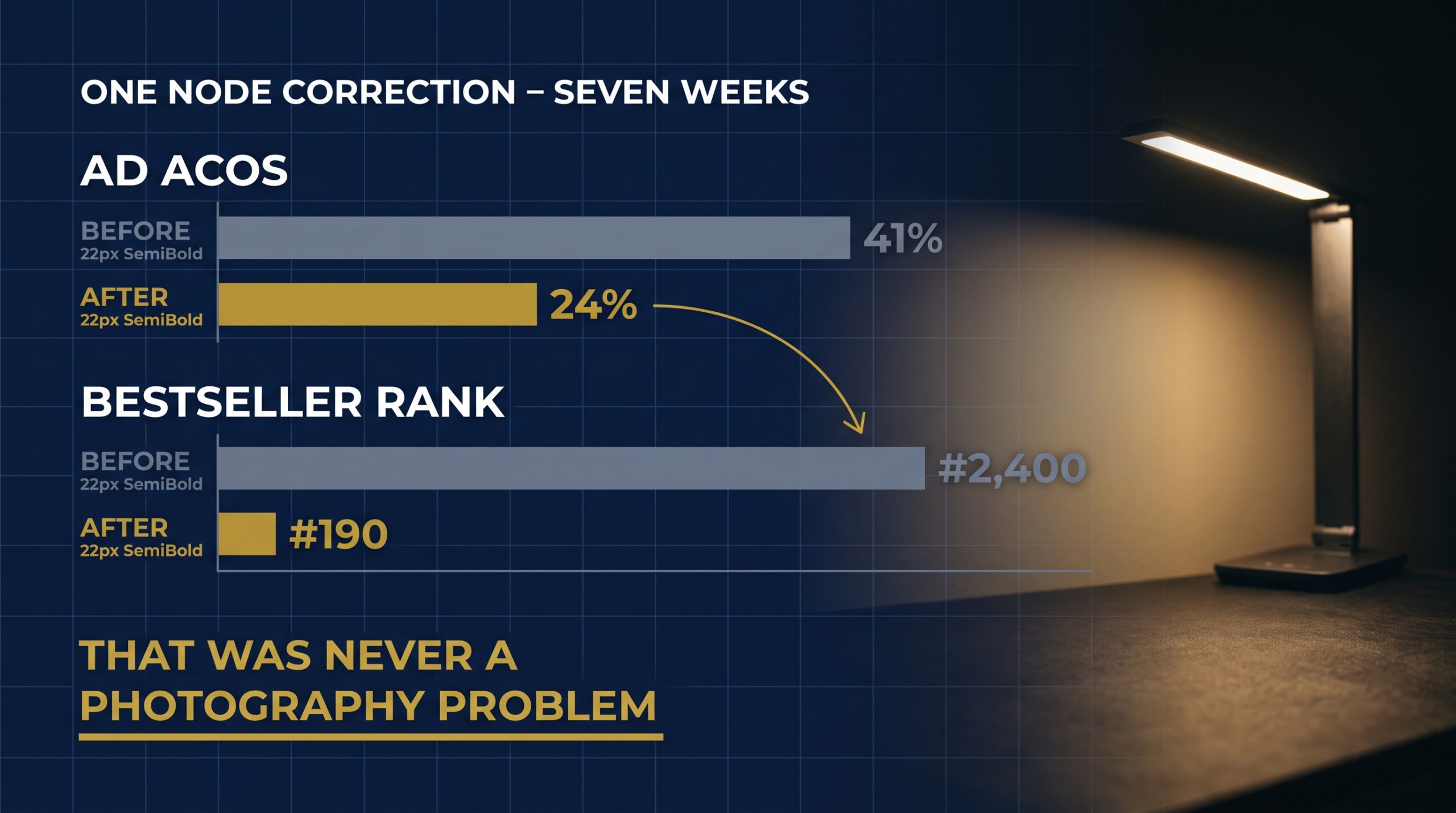
Debashish Nandi in Kolkata could not understand why his LED desk lamp held a bestseller rank of 2,400 while selling steadily. The lamp sat in a broad home lighting node stuffed with bulbs and ceiling fixtures. After he moved it to a desk and table lamps subcategory, his rank settled near 190 and his ad ACOS dropped from 41 per cent to 24 per cent in seven weeks.
Why your rank looks strange in a mismatched node
Bestseller rank is calculated inside the node you occupy. In a huge, loosely related node, genuinely good sales get measured against products selling ten times the volume for entirely different reasons, so your number looks poor and you never surface on a list a shopper reads.
How targeting and bids inherit your category
Automatic campaigns and category targeting both lean on your classification to decide which products and searches you appear beside. A mismatched node feeds your campaigns the wrong neighbours, so you buy clicks from shoppers with no intention of buying what you sell, and your bids rise to chase attention you cannot convert.
Reading the data before you blame creative
Before you rewrite your title again, pull your search term report and read it properly to check whether the queries driving spend actually describe your product. Then compare your conversion rate against the category average in Business Reports. High sessions with weak conversion and irrelevant search terms is the signature of a node problem, not a photography problem.
Building a category plan that holds up
Kavita Rathore in Indore sells stainless steel lunch boxes and runs a node review every quarter. In her January review she noticed a tighter subcategory forming around office tiffins, moved eight SKUs across, and lifted monthly revenue by 22 per cent over the next quarter. Her habit is simple: the catalogue changes, so the plan must be revisited.
Picking the subcategory where you can rank fastest
Sound amazon subcategory selection for ranking balances demand against defendability. Count how many listings in the target node hold over a thousand reviews; if it is more than half the first page, you are buying a long war. A node with real search volume and shallower review depth gets you to page one months sooner.
Mapping variations and bundles to one node
Every size, colour and multipack of the same product belongs in the same node. Split variations across two categories and you split your sales velocity, reviews and rank signals across two lists, halving both. If you are unsure how your family should sit together, read this guide on when to split or merge variations first; bundles follow the node of the hero item, not the accessory.
Reviewing your nodes each quarter
Put ninety minutes in your calendar every quarter. Pull the current node path for each ASIN, check the top five competitors on your main keyword, and note whether a new subcategory has appeared that fits you better. Sound amazon category selection is a decision you renew, not one you make once.
Frequently Asked Questions
What is Amazon category selection and why does it matter for ranking?
It is the process of assigning your product to a specific browse node inside Amazon’s catalogue. That node controls your attribute fields, the filters your listing answers to, the bestseller list you compete in and who reaches you by browsing. Rank is calculated within a node, so the wrong one measures you against an unrelated crowd.
How do I find the correct browse node for my product on Amazon?
Start with the classifier in Seller Central, searching three or four descriptions of your product and noting which paths repeat. Then open five genuine competitors and read the bestseller rank lines in their product details, which name their nodes directly. Finally, search your main keyword and apply the category filter to confirm your competitors survive it.
How do I change my product category in Amazon Seller Central?
Open Manage Inventory, select Edit on the ASIN, and update the product type and category fields in the listing editor. For multiple SKUs, download the correct category template and submit a partial update with revised product type and browse node values. If the field is locked or the change reverts, open a case with evidence.
Which Amazon categories need approval or Brand Registry to sell in?
Certain categories are gated and require approval before listings go live; the listing flow tells you when this applies. Approval generally asks for recent supplier invoices, verifiable supplier details, product images and any compliance certificate your product legally needs. Brand Registry is separate: it requires a registered or pending trademark and gives brand owners far more control.
Does the wrong Amazon category hurt my BSR and ad performance?
Yes, both. Bestseller rank is calculated inside your node, so a mismatched one measures you against products with entirely different demand patterns and buries your number. Automatic campaigns and category targeting read the same classification to decide where you appear, which means irrelevant clicks, weak conversion and rising ACOS. Check your search term report first.
Can one product be listed in more than one category at the same time?
A single ASIN sits in one primary node, though Amazon may associate it with related refinement nodes based on your attributes. What you should never do is create duplicate ASINs to occupy two categories — that splits reviews, velocity and rank signals across two listings and usually triggers a duplicate listing issue.
How long does a category change take to reflect on the live listing?
The edit itself usually processes within a few hours, though full re-indexing across search and browse pages commonly takes a few days. Bestseller rank in the new node takes longer to settle because it needs fresh sales data in that context. Change one ASIN, watch it for a fortnight, then roll out.
Should I pick a smaller subcategory just to win a bestseller badge?
Only if that subcategory has genuine search demand behind it. A badge in a node nobody browses looks impressive on your dashboard and delivers almost no traffic, so you go on paying for every session through ads. Choose the tightest node that still matches how your buyers search, then earn the badge on real velocity.
Conclusion
The node is not a form field you rush past on your way to going live. It is the address your product trades from, and it compounds — every week in the right subcategory builds rank, review velocity and ad efficiency that stack on each other, while every week in the wrong one quietly caps whatever you spend. Ritu, Arvind, Sneha and Harpreet all found the same thing: the fix took minutes, the delay cost months.
So go and check yours today. Pull the node path for your top five ASINs, compare them against the competitors you actually lose to, and be honest about what you find. If you would rather work through node research, gating applications and corrections with someone looking over your shoulder, come and take the 3-Day Amazon Business Training and bring your catalogue with you.
