
Your Amazon Listing Suppressed Overnight? What Happened
The Morning Your Sales Drop to Zero
Karthik Subramanian from Coimbatore had been preparing for festive-sale week for months. His stainless steel kitchen tool set was averaging 22 orders a day through FBA, and he had 600 units sitting in the fulfilment centre. On the second morning of the sale, his dashboard showed zero orders. His stock was fine and his ads were running, but when he searched for his own product on Amazon.in, it simply wasn’t there.
His Amazon listing was suppressed, and for the next few hours he assumed the worst. The good news is that most suppressions can be fixed in a single sitting once you know where to look.
What Does “Search Suppressed” Mean on Amazon?
A search suppressed listing is still active in your catalogue, but Amazon has hidden it from search results and category browsing because the detail page breaks one of its listing rules. Shoppers can still reach it through a direct link or the exact ASIN, but nobody searching “kitchen tool set” will see it. Your organic sales stop almost completely until the flagged issue is fixed.
Why It’s Not a Ban (and Why You Still Can’t Ignore It)
Suppression is a problem with one listing, not with your seller account. Amazon isn’t accusing you of anything; it’s waiting for missing or non-compliant information. The catch is that Amazon doesn’t always notify you, so many sellers lose three or four days of sales before they notice anything is wrong.

Suppressed, Inactive or Stranded: Which Problem Is Yours?
Before you fix anything, make sure you’re fixing the right problem. Seller Central uses three labels that sound alike but need completely different workflows, and mixing them up wastes the one day you have.
Search Suppressed: Live but Invisible
A suppressed listing is still switched on and buyable, but it’s hidden from search because of a content or data issue, such as a missing attribute, a non-compliant image or a title that breaks the rules. This is the easiest of the three to recover from, because you can usually fix it yourself by editing the listing.
Amazon Listing Inactive: Turned Off, Not Hidden
An inactive listing has been switched off entirely, so shoppers can’t buy it even with a direct link. The usual causes are a potential pricing error, a category that needs approval or a policy block. The fix runs through price alerts or an approval request rather than a simple edit.
Stranded Inventory: The FBA-Only Headache
Stranded inventory means your units are sitting in a fulfilment centre with no active offer attached to them. Harpreet Singh from Ludhiana found 140 units of his gym gloves stranded for five weeks after a listing went inactive, quietly collecting storage fees the whole time. Check Manage FBA Inventory for this one.
The 10-Second ASIN Test
Still unsure? Type your ASIN into the Amazon.in search bar. Zero results means the listing is suppressed. If your product shows up, it’s indexed, and slow sales point to a different problem, which we cover in our guide on how to recover a dead Amazon listing.
How to Find Suppressed Listings in Seller Central
The Search Suppressed and Inactive Listings Button
Go to Inventory, then Manage All Inventory. If any listing has a problem, you’ll see a “Search Suppressed and Inactive Listings” button near the top of the page. It only appears when there’s something to fix, so its absence is good news.
The Fix Your Products Page
That button opens the Fix Your Products page, which groups your listings by issue and shows Amazon’s exact error message for each one. A message like “‘[country_of_origin]’ is required but not supplied” tells you precisely which field to edit, and many fixes can be made inline without opening the full listing editor.
Listing Quality and Suppressed Listing Report
If five or more SKUs are hit at once, usually after Amazon changes a category template, fixing them one by one is slow. Download the Listing Quality and Suppressed Listing Report from Inventory Reports, fill the missing values in Excel and upload it back. Sneha Patil from Nashik cleared 38 suppressed bedsheet variations in one evening this way.
Build a Daily 2-Minute Check
Since notifications are unreliable, make this check part of your morning routine, alongside orders and ad spend. During sale events, check twice a day. Two minutes of looking costs far less than three days of not knowing.
Why Is My Amazon Listing Suppressed? The 7 Usual Causes
Almost every suppression traces back to one of seven causes. Once you recognise them, the error messages stop looking cryptic.
Missing Required Attributes (Including Country of Origin)
Every category has mandatory fields, and when one is blank the listing drops out of search. Indian sellers have an extra layer: Legal Metrology rules require country of origin, MRP, net quantity and manufacturer or importer details, and Amazon India has treated country of origin as mandatory since 2020. Meena Thomas from Kochi had her black pepper listing suppressed because the listing said 250g while the pack said 200g.
Main Image Violations
Your main image needs a pure white background and must show only the product. Text overlays, watermarks, props, lifestyle backgrounds or a model can all trigger suppression. Save those creative shots for your secondary images, and use these main image optimisation hacks to stand out within the rules.
Title Problems and the Amazon 75-Character Title Limit
Since July 27, 2026, Amazon caps titles at 75 characters, including spaces, in every category except media. Over-length titles can be rewritten by Amazon’s own AI, and repeated words, ALL CAPS and special characters still get flagged. Farhan Shaikh from Surat still had 140-character kurta titles from the old rules, and four were flagged in the same week.
Restricted and Promotional Words
Phrases like “best seller”, “free delivery” or “100% guaranteed”, and health claims like “cures” or “clinically proven”, can suppress a listing. This applies even when they’re hidden in your backend search terms.
Wrong Category or Product Type
When the product type doesn’t match your item, Amazon asks for attributes that make no sense and the listing gets stuck, like a yoga mat filed under a type that expects motor wattage.
Amazon Potential Pricing Error
Rohit Deshmukh from Pune raised his laptop stand’s price by ₹150 to cover higher freight costs, and within an hour the listing was deactivated for a “potential high pricing error.” Amazon switches off listings whose price jumps unusually against reference prices. Technically that’s an inactive listing, not a suppressed one, but the panic feels identical.
High Return Rates and the Andon Team
Amazon’s Andon team watches returns and complaints, and when an ASIN’s return rate runs well above similar products, it pulls the listing for review. There’s no published threshold; Amazon compares you with your category, so check the suggested return rate in Voice of the Customer. Swati Joshi from Indore saw returns on her Bluetooth earbuds climb to 14% after a bad batch, and an Andon email arrived the same week.
How to Fix a Suppressed Listing on Amazon, Cause by Cause
Fix only the field Amazon names and save; rewriting the whole listing at once can create fresh errors.
Attribute and Compliance Fixes
Open the listing from Fix Your Products, click Edit, fill in the flagged field and save. For Legal Metrology fields, the listing must match your physical pack exactly, because the FBA stock already in the fulfilment centre carries that label. Meena corrected her net quantity to 200g, and her listing was back by the next morning.
Image and Title Fixes
Re-upload the main image as a fresh file on pure white. For titles, lead with brand and product, stay within 75 characters, and move secondary details into your bullets. Priya Agarwal from Jaipur cut her brass diya title from 112 to 71 characters and was back in search within two days.
Clearing a Pricing Error Alert
Go to Pricing, then Fix Price Alerts. If your price is genuinely correct, confirm it and set a minimum and maximum price for the SKU so Amazon accepts it as intentional. Rohit set a range of ₹1,299 to ₹1,899, and his listing was live again that afternoon.
Answering an Andon Questionnaire Within 72 Hours
An Andon email comes with a questionnaire and usually a 72-hour deadline. Expect questions on whether your main image follows the guidelines, whether the physical product matches every attribute on the page, whether the unit count, components and MRP are right, and whether your packaging needs strengthening.
Reply in four parts: acknowledge the issue, explain your quality checks and what you’ll tighten, answer every question with photos or documents, and ask for reinstatement. Swati sent photos of her corrected batch with her QC checklist, and her earbuds were back within four days.
Whatever you do, don’t miss the deadline. In our experience with members’ accounts, an unanswered Andon review usually keeps the listing down for about a week before it returns on its own, minus its sales velocity and organic rank. Repeat pulls on one ASIN also escalate, so always reply.
How Long Until It Comes Back?
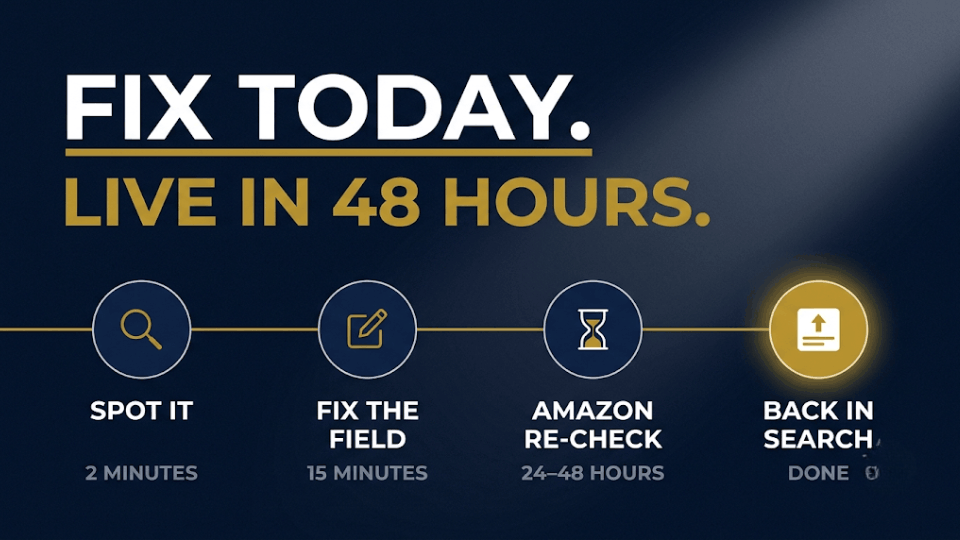
The fix takes minutes, but Amazon’s re-check usually takes 24 to 48 hours. Run the ASIN test the next morning, and escalate if it still hasn’t returned after 72 hours.
[IMAGE: Timeline from “Spot it” to “Fix the field” to “24–48 hours” to “Back in search”, in navy and gold] Alt text: Timeline showing how a suppressed Amazon listing is fixed the same day and returns to search within 48 hours.
Amazon Listing Suppressed After the Fix? Escalate It
When the Edit Won’t Save or the Error Comes Back
Sometimes you save the correction, see “submitted” and nothing changes. Usually another seller’s data or Amazon’s catalogue is overriding yours, and self-service won’t solve that, so stop re-submitting.
Opening the Right Seller Support Case
Open a case under Products and Inventory, then Product page issue. Include the ASIN, the exact error text, a screenshot and what you’ve already tried. Ankit Verma from Lucknow re-saved a “colour required” error for nine days; Seller Support fixed it within 12 hours of a clear request. If your case stalls, here’s how to escalate a Seller Support case.
Why “Delete and Relist” Is Usually a Bad Idea
Forum advice often says to delete and relist. For an established product, that can cost you reviews, rank history and the link to your FBA stock, so save it for brand-new listings.
To avoid these surprises altogether, our guide on creating eye-catching Amazon listings shows you how to set up titles, images and attributes properly.
What an Amazon Suppressed Listing Really Costs an FBA Seller
Lost Sales in Peak Week
At ₹1,200 a unit and 22 orders a day, Karthik’s three unnoticed days during the sale cost him about ₹79,000 in revenue. Those sales don’t come back; shoppers buy from whoever is visible.
Ad Spend You Can’t Get Back
Some campaigns keep spending on a hidden ASIN while organic sales dry up, so check every campaign promoting it the moment you spot the problem.
Rank Recovery After Reinstatement
Your best-seller rank doesn’t snap back the day the listing returns. Days without sales weaken the signals Amazon uses to rank you, so expect one to three weeks of rebuilding.
How to Keep Your Listings From Getting Suppressed Again
A Pre-Upload Listing Checklist
Before you publish or edit any listing, run through these five checks:
- The title is 75 characters or fewer, with no repeated words or promotional phrases.
- The main image is on a pure white background with no text, props or watermarks.
- Every required attribute in the category template is filled in.
- Country of origin, MRP, net quantity and manufacturer details match the pack.
- Backend search terms contain no restricted claims or competitor brand names.
It takes five minutes per listing and catches most suppressions early.
The Weekly Listing Health Routine
Divya Reddy from Hyderabad blocks ten minutes every Monday to review suppressed listings, inactive listings, stranded inventory, price alerts and return rates in Voice of the Customer. Since she started last March, she hasn’t lost more than a day of sales to a hidden listing.
[IMAGE: Weekly checklist on a desk calendar marked “Monday”: suppressed, inactive, stranded, price alerts, return rates, all ticked] Alt text: Weekly Amazon listing health routine checklist for FBA sellers in India

Frequently Asked Questions
What does “search suppressed” mean on Amazon?
It means Amazon has hidden your listing from search and browse because the detail page is missing required information or breaks a listing rule. The listing is still active and reachable by direct link or ASIN, but shoppers won’t find it in search until you fix the flagged issue.
How do I fix a suppressed listing on Amazon?
Go to Inventory, then Manage All Inventory, and click “Search Suppressed and Inactive Listings.” Read the exact issue on Fix Your Products, edit only that field and save. The listing usually returns within 48 hours.
Why is my Amazon listing suppressed?
The usual reasons are missing required attributes, a non-compliant main image, an over-length title, restricted words, a wrong product type and an unusually high return rate. Indian sellers also get caught when Legal Metrology details like country of origin or net quantity don’t match the pack.
How long does it take for a suppressed listing to come back?
After the correct fix, Amazon usually re-evaluates the listing within 24 to 48 hours; confirm by searching your ASIN on Amazon.in. If it hasn’t returned after 72 hours, open a Seller Support case with the ASIN, error text and screenshots.
Suppressed vs Inactive vs Stranded: What’s the Difference?
A suppressed listing is active but hidden from search. An inactive listing is switched off, often because of a pricing error, an approval issue or an Andon review. Stranded inventory is FBA stock with no active offer attached. Each has its own fix path.
Does Amazon notify you when a listing is suppressed?
Not reliably. You might get an email or alert, but often you won’t, and many sellers only notice when sales drop. A daily look at the Search Suppressed and Inactive Listings button is the safest habit.
What Is an Andon Cord Email From Amazon?
It’s a message from Amazon’s Andon team saying your listing has been pulled for review after customer complaints or high returns. It includes a questionnaire on your product, images and packaging, usually with a 72-hour deadline. Answer every question with evidence and ask for reinstatement; an unanswered review costs you sales and ranking.
Is My FBA Inventory Affected by a Suppressed Listing?
Your units stay safe in the fulfilment centre, but they stop selling while storage fees continue. If the listing turns inactive, the stock can become stranded, so check Manage FBA Inventory too.
Conclusion
A suppressed listing feels like a disaster when it happens, but it’s one of the most fixable problems on Amazon. Amazon tells you exactly which field is wrong; the real damage comes from the days you spend not knowing. Build the two-minute daily check, run the checklist on every listing, and you’ll catch most suppressions before they cost you a sale.
If you want this kind of control across your listings, compliance, inventory and ads, join our 3-Day Amazon Business Training. You’ll learn the systems that keep an FBA business steady, so you spend less time firefighting and more time growing. Your listings, and your festive-sale numbers, will thank you.
