

Ritika Nair opened Seller Central on a Tuesday morning in Coimbatore and stared at a number she had already seen for eleven weeks straight: zero. Her kitchen storage range had pulled ₹68,000 in a good month last year. Now the listing sat there — live, priced exactly as before, and completely silent.
If your Amazon listing is not selling and you have quietly stopped opening that ASIN, you are in a much bigger club than you think. Most sellers here do one of two things. They cut the price, or they walk away and decide the product was a mistake. Both are expensive, and both skip the step that actually decides whether the listing comes back.
A dead listing is almost never a dead product. It is an undiagnosed one. What follows is the sequence: three numbers to pull before you change anything, the root causes they point to, a 45-day recovery plan, and an honest threshold for when rebuilding beats reviving.
Why Your Amazon Listing Is Not Selling Anymore
The decay started long before you noticed it
Ritika’s sales did not fall off a cliff. They bled out over eleven weeks and she noticed in week nine. Impressions dropped first, then sessions, then orders, with weeks of quiet between each stage. Because she only watched the revenue line, a slow decline registered in her memory as something sudden and inexplicable. That gap between when a listing starts dying and when you notice is where most of the damage happens.
Why is my Amazon product not selling when nothing changed?
Because nothing changed on your side. Everything changed around you. Four new competitors entered your hero keyword. Amazon added required attributes to your category node and your listing quietly fell out of compliance without a single edit from you. Your keyword bracket got more expensive while your bids stood still.
What every month of waiting actually costs
There are two bills and sellers only see the first. The obvious cost is lost revenue. The one that hurts more is lost relevance — a listing dead six months is harder to rank than the same listing fixed in week two, because Amazon’s relevance queue keeps moving whether you participate or not. The fix is diagnosis, not effort.

Before You Touch Anything: The Three-Number Diagnosis
Arjun Deshmukh in Nashik spent ₹41,000 on new photography for his pet grooming brand before discovering the listing was not indexed for its main keyword. The pictures were beautiful. Nobody could find them.
Number one — sessions, or does anyone arrive?
Open Business Reports, then Detail Page Sales and Traffic by Child Item. Sessions tell you how many people reached your page. If a listing that used to sell now sits under roughly ten sessions a day, you have a visibility problem, and no copywriting will fix it.
Number two — unit session percentage, or do they buy?
This column is your conversion rate, and it is the most useful number in Seller Central. Healthy sessions with a unit session percentage under 8% means people are arriving and leaving. That is a listing problem, not a traffic problem.
Number three — organic rank on your top five keywords
Check it logged out, in a private window, on mobile. If rank has slipped while sessions look stable, you are living on paid traffic and the organic foundation is gone.
Reading the combination
Low sessions with healthy conversion points to visibility. Healthy sessions with weak conversion points to the listing. Both flat points to velocity. One rule sits above all of it: do not touch your price until this step is done. Cutting price resets what buyers think your product is worth, to solve a problem that was never about money.
Problem One: Your Listing Is Not Indexed or Suppressed
How to check if your listing is deindexed in 60 seconds
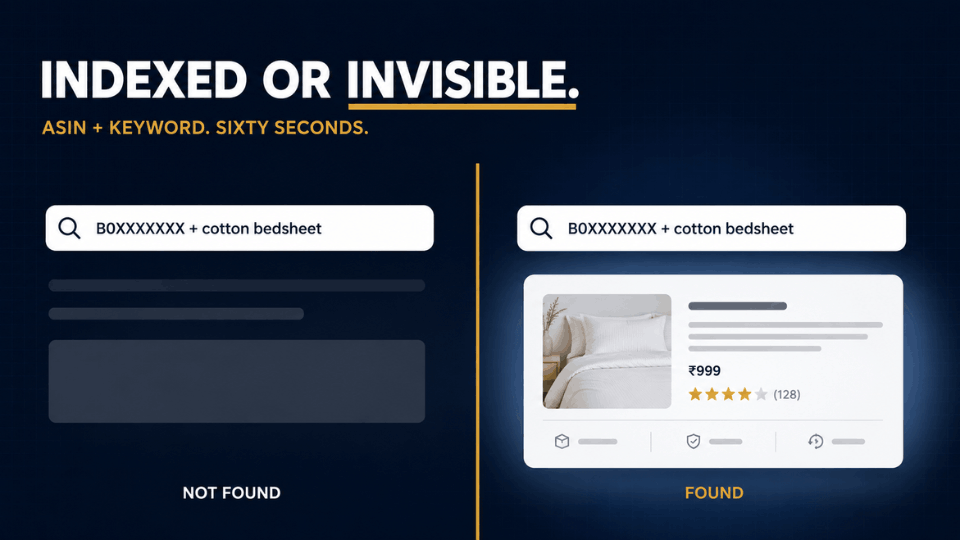
Type your ASIN, a space, then your keyword into the Amazon search bar. If your product does not appear, you are not indexed for that term and you are invisible to everyone searching it. Run this on all five head keywords. The unnerving part is that a deindexed listing looks perfectly healthy in Seller Central — active, in stock, no warnings.
Suppressed listings and the attribute trap
Amazon keeps adding required attributes to category nodes, so a listing that was compliant last year can fall out of compliance while you did nothing. Check Inventory, then Fix Suppressed Listings — and do not stop there. Fill every attribute field, not just the mandatory ones, because shoppers filtering by size, material or colour never see products with those fields empty.
Category drift and detached variations
Faizan Qureshi sells yoga mats out of Jaipur in three sizes. Last March one child ASIN detached from the parent. Reviews scattered, that size vanished, and his overall sales dropped by a third — while the listing looked fine. Compare your breadcrumb category against your top three competitors, and if you are unsure how your family should be structured, our guide on when to split or merge variations covers it.
Fix it once, then stop editing
Make your corrections, save, then leave the listing alone for fourteen days. Amazon rebuilds indexing confidence on consistency, and every fresh edit restarts that clock.
Amazon Listing Not Selling Despite Steady Traffic?
Your main image costs more than your price does
Your hero image is judged at thumbnail size, on a six-inch screen, beside competitors who have refreshed theirs since you launched. Meghna Barua’s bamboo tableware brand in Guwahati was converting at 4.1%. She rebuilt only the main image — cleaner background, product scaled larger, one clear use cue — and hit 9.3% in five weeks.
Review velocity beats review count
A listing with 20 reviews gaining three a week is algorithmically stronger than one with 200 gaining none. Amazon reads recent review activity as evidence of current relevance. If your reviews stopped arriving when your sales did, the two are feeding each other, and restarting a review request cadence is the cheapest lever you have.
The trust gap — delivery promise and A+ content
Indian buyers weigh delivery dates and return clarity heavily. Check whether your delivery promise slipped when your FBA inventory thinned — a two-day promise becoming a six-day promise flattens conversion on its own.
Change one thing at a time
Hero image first, then bullets, then A+ content, with ten to fourteen days between each. Changing everything at once means that if it works you will never know why, and if it fails you have nothing to roll back to.

When Amazon Sales Dropped Suddenly Because of Rivals
Go and look at the search results you live in
Open your hero keyword logged out and read the page properly. Count the listings above you that were not there a year ago, and note their review counts and price band. Sandeep Ahluwalia in Ludhiana found seven new cycling accessory brands above him, all under his price, all launched in the previous eight months.
The keyword bracket you can no longer win
If the top ten results for your main term all carry 500-plus reviews, you are bidding into a bracket your listing cannot currently win. Drop to adjacent long-tail terms that still carry real volume, rank there properly, then climb back toward the head term as velocity rebuilds.
Seasonality or genuine decline?
Before concluding anything, pull the same months from last year. Plenty of “dead” listings are simply sitting in their off-season, and our guide on reading 12-month demand before you buy will tell you which one you own.
For a structured way to run this audit, our walkthrough on how to reverse-engineer a competitor’s product gives you the exact sequence so you are not guessing at what changed.
The 45-Day Plan to Revive a Dead Amazon Listing
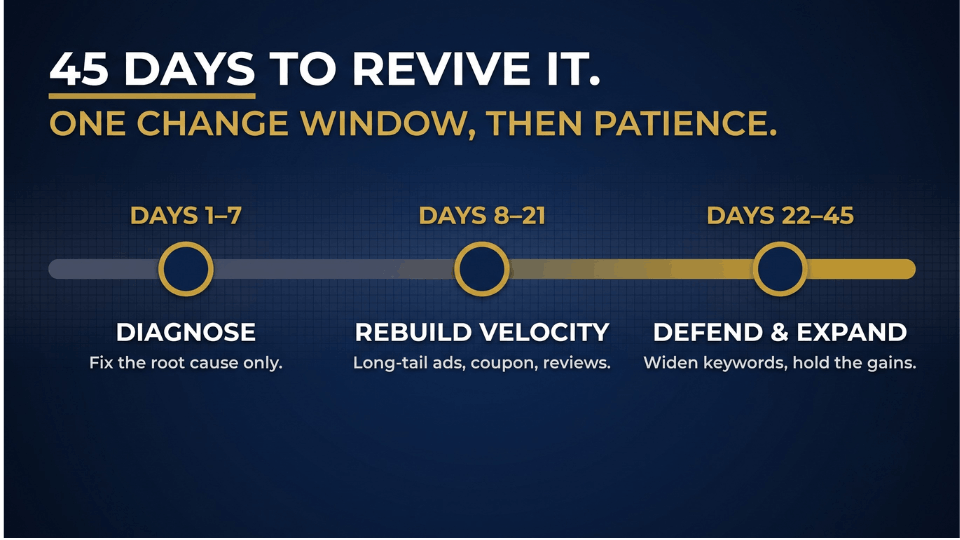
Kavya Iyer ran this on an ayurvedic haircare ASIN in Kochi that had done nothing for five months. It was back to eleven units a day by week seven.
Days 1–7 — fix the root cause and nothing else
Indexation, suppression, attributes, detached children. No price changes, no new campaigns, no image swaps. One change window, then hands off the keyboard.
Days 8–21 — rebuild velocity deliberately
Now you give Amazon fresh evidence that real buyers want this product:
- Launch tight exact-match campaigns on the adjacent long-tail keywords you identified, not the head term.
- Run a coupon rather than a price cut, so your reference price survives the recovery.
- Restart a review request cadence on every order that ships.
- Fix the single weakest conversion element you found earlier, usually the hero image.
Expect the first movement in sessions, not sales. Seeing sessions climb before revenue is a sign the plan is working.
Days 22–45 — defend, then expand
Once conversion holds steady, widen your keyword targeting and push back toward the head term. Check your three numbers weekly — not daily, which only tempts you into edits.
How long does recovery actually take?
Conversion fixes surface in ten to twenty days. Ranking recovery usually takes thirty to sixty. Most sellers quit around day twenty-five because nobody told them the second number.
What Not To Do: The Honeymoon Reboot and Other Myths
Can you restart the Amazon honeymoon period?
You will see this in every seller WhatsApp group: strip your bullets and description, wait an hour, then re-upload to reset relevance. Tarun Bhatia tried it on a desk organiser ASIN in Indore and spent six weeks recovering the indexing he had destroyed. There is no documented Amazon mechanism for resetting the honeymoon window, and our guide to how the honeymoon period actually works explains what it really is.
Panic-editing every three days
Consistency is an input Amazon rewards during recovery. A listing edited constantly reads as unstable, and each change resets the confidence you are trying to rebuild.
Cutting price as your first move
You reset buyer expectations permanently and hand away margin, usually to solve a visibility problem price was never going to touch. Price is a lever, not an opening move.
Still Not Selling? Relaunch the Product or Kill It
Should you fix this listing or create a new ASIN?
A concrete threshold instead of “it depends.” If conversion sits under 8%, your hero keyword is on page two or worse, your rating is below 4.3, and you have already worked the 45-day plan once — the maths favours a rebuild. Amazon has made a decision about that listing, and arguing costs more than starting clean.
What a real relaunch actually involves
It is not relisting. Choosing to relaunch a product on Amazon means a new ASIN, a rebuilt hero image set, a new title structure, a different keyword bracket and a real launch budget. Our 14-day launch plan that builds organic rank is the right document once you have made that call.
Salvaging the inventory you are sitting on
Nusrat Sheikh in Hyderabad cleared 640 units of a discontinued travel bottle through bundling and B2B pricing rather than removal orders, recovering most of her cost. Killing one ASIN with evidence behind you is a business decision, not a failure, and it frees capital for the launch that works.
Frequently Asked Questions
Why did my Amazon listing suddenly stop selling?
It usually did not. Impressions decline first, then sessions, then orders, often across six to ten weeks — what feels like a cliff is the moment you noticed. The cause is nearly always lost ranking, a compliance issue, or a new competitor.
How do I know if my Amazon listing is deindexed?
Type your ASIN and your keyword together into the Amazon search bar. If your product does not appear, you are not indexed for that term. Repeat for each main keyword. A deindexed listing still shows as active in Seller Central, which is why sellers rewrite copy nobody sees.
Should I fix my listing or create a new ASIN?
Fix first — a rebuild is expensive and slow. Move to a new ASIN only when conversion is under 8%, your hero keyword sits on page two or worse, your rating is below 4.3, and one full recovery cycle has already failed. Those four together mean history is working against you.
How long does it take for an Amazon listing to recover?
Conversion improvements show within ten to twenty days because they act on buyers directly. Ranking recovery is slower, typically thirty to sixty days, because Amazon needs sustained evidence. Plan for forty-five days and resist judging at week three, where most recoveries get abandoned.
Can you restart the Amazon honeymoon period?
No reliable method exists. The trick circulating in seller groups — deleting your listing content and re-uploading it — has no documented basis and can cost you indexing you already had. Treat the honeymoon window as a one-time event for new ASINs.
Does deleting and relisting an ASIN reset its sales history?
Not in the way sellers hope. Amazon retains ASIN-level history, and closing then reopening a listing can trigger indexing loss without giving you a clean slate. If you need a fresh start, create a new listing with new identifiers and run a full launch.
Will running PPC alone revive a dead Amazon listing?
Rarely. Ads buy traffic, but if conversion is broken you are paying to send buyers to a page that turns them away, teaching Amazon your listing does not deserve organic placement. Fix conversion first, then use ads to rebuild velocity.
Does going out of stock permanently kill a listing’s rank?
Not permanently, but damage scales with duration. A few days is recoverable. Several weeks means losing organic position and review velocity together, which is how stockouts become stalled listings. Restock, then treat it as a recovery rather than expecting your rank to return.
Conclusion
The sellers who bring a stalled ASIN back are not working harder than the ones still stuck at month six. They are working on the correct layer. Three numbers tell you which layer is broken. One root cause at a time. One change window, then forty-five days of patience while Amazon collects the evidence it needs.
Ritika’s kitchen storage listing, by the way, was suppressed on a missing material attribute. Twenty minutes of work, nine weeks of silence.
If you want to build this diagnostic habit properly and apply it across your whole catalogue rather than one panicked ASIN at a time, the 3-Day Amazon Business Training walks you through the full system, live. Your listings have more life left in them than you think.
