

Nithya Raghavan had just wrapped up her best festive season yet — a homeware brand out of Coimbatore, three years in, finally hitting ₹9 lakh a month. She opened Seller Central on a Tuesday morning expecting a routine check. Instead, she found a red banner sitting where her green checkmark used to be. Her Account Health Rating had dropped from 340 to 0 overnight, and she had eighteen hours before Amazon could deactivate her listings. Nithya hadn’t broken any rule she knew about. She just hadn’t been watching the one number that decides whether Amazon trusts you enough to keep selling. This guide breaks down exactly what that number means, how it’s built, and — more importantly — the early signals that show up long before it turns red.
What Is the Amazon Account Health Rating?
Your Amazon account health rating is the single score Amazon uses to answer one question: is this seller safe to keep active? It runs from 0 to 1,000, updates in near real time, and rolls up everything you’d otherwise have to check across a dozen separate reports — feedback, shipping, policy strikes — into one dashboard widget. Every seller starts fresh at 200 the day their account goes live, which is Amazon’s way of saying “innocent until a violation says otherwise.”
The 0–1,000 Score, Broken Down
Points move for one of two reasons: a policy violation lands and gets deducted, or you resolve one and get points back. Deductions typically run 2 to 8 points depending on severity, though a single critical issue can crater your score to zero in one shot, regardless of how healthy you were the day before.
Why Amazon Built AHR
Before AHR existed, sellers had to piece together their standing from scattered metrics pages, guessing which one mattered most. Amazon consolidated all of it into a holistic score precisely because isolated metric-watching wasn’t catching sellers before they crossed into suspension territory — which is exactly the gap this article is written to close.
Finding Your Score: A Walkthrough of the Amazon Account Health Dashboard
Most sellers only open this dashboard after something’s already gone wrong. That’s backwards. The amazon account health dashboard should be a five-minute daily habit, not an emergency room visit.
Where to Click in Seller Central
From your Seller Central home, go to Performance in the left sidebar, then select Account Health. Your score sits at the top of the Policy Compliance column, with three tiles beneath it breaking down customer service, shipping, and policy performance separately.
Reading the Color Codes
Green means healthy and unbothered. Yellow means Amazon is watching you more closely than you’re watching yourself. Red means the clock has started, and it’s a short one. Vikram Aiyer, who runs a mobile accessories store from Pune, told me he used to treat the yellow badge as background noise — until it turned red during his highest-revenue month and cost him nine days of live listings while he scrambled to appeal.
What Each Dashboard Tile Actually Tracks
The customer service tile reflects your Order Defect Rate. The shipping tile covers dispatch timing, cancellations, and tracking accuracy. The policy tile lists every open violation by name, with a direct link to fix or appeal each one — this is the tile most sellers never click until it’s too late. It sits alongside the other key metrics to monitor in Seller Central that most Indian sellers only glance at once a month.
The Three Pillars Behind Your Amazon Account Health Rating
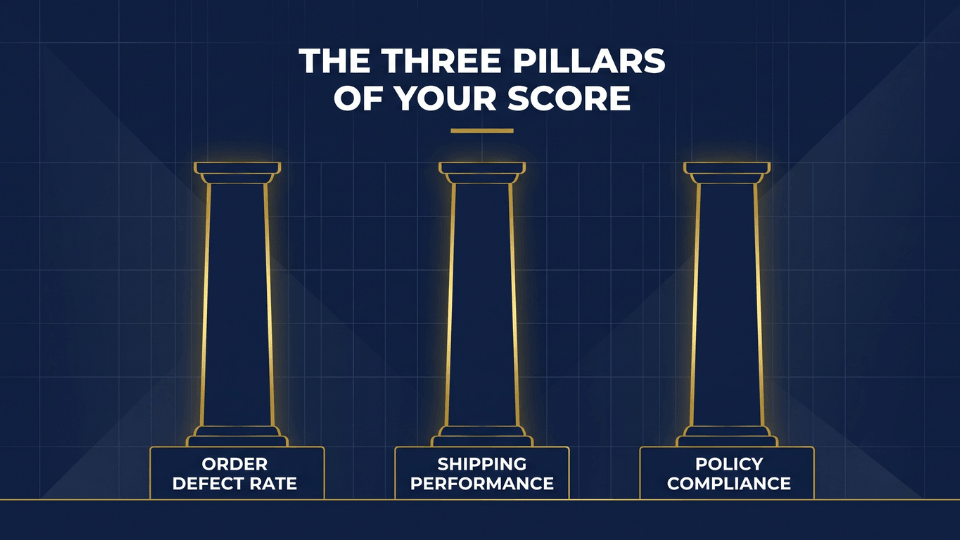
Everything feeding your amazon account health rating traces back to three buckets. Understanding them individually is what lets you catch a problem while it’s still a metric, not yet a violation.
Order Defect Rate (ODR)
Your order defect rate amazon score combines negative feedback, A-to-Z Guarantee claims, and credit card chargebacks into one percentage, and Amazon wants it under 1%. This is the pillar most tied to customer experience — a few angry buyers in a short window can move this number faster than sellers expect. If complaints already feel like your weak point, our guide on handling customer complaints without hurting account health is a natural next read.
Shipping Performance
This bucket covers late dispatch rate, pre-fulfillment cancellations, and valid tracking rate — all metrics that matter mainly if you’re fulfilling orders yourself rather than through FBA. Deepa Kulkarni, a stationery seller in Nagpur, watched her late dispatch rate creep past 4% during a courier strike and only noticed when her account health tile turned amber three weeks later.
If you’re on FBA, breathe easy here — since Amazon’s own fulfillment centers handle picking, packing, and dispatch, the shipping performance pillar is almost entirely out of your hands: no late dispatch penalties, no cancellation risk from a missed courier pickup, no tracking gaps to chase. For most private label sellers running FBA, this pillar sits quietly in the background while Order Defect Rate and Policy Compliance do the real work of moving your score.
Policy Compliance
Policy compliance covers everything from intellectual property claims to restricted product listings, and it’s where the biggest single-day score drops happen. A brand owner filing one IP complaint can do more damage to your amazon policy violations record than months of slightly-late shipments combined. Our breakdown of common Amazon policy violations to avoid is worth a slow read if this pillar feels like a black box.
How Amazon Scores Violations: Severity Levels Explained
Not every violation costs you the same amount, and knowing the difference changes how you prioritize your Tuesday afternoon.
Amazon grades violations across four severity tiers, and understanding where a specific issue lands tells you how urgently to act:
- Critical violations — like counterfeit claims or search manipulation — can drop your score straight to zero, no matter your history.
- High-impact violations, such as intellectual property complaints, cause significant point losses but don’t zero you out instantly.
- Medium-impact violations are isolated policy breaches that need attention but don’t signal a systemic problem.
- Low-impact violations are minor, easily corrected technical issues with a small point cost.
Once you know which tier a flagged issue sits in, you know whether to drop everything or simply schedule a fix before week’s end.
The 180-Day Rolling Window
Here’s the detail that confuses most sellers: your score can shift even when nothing new has happened. Amazon evaluates a rolling 180-day window, so old violations quietly age out and stop counting against you, while older high-volume order periods can also roll off — sometimes pulling your score down even with a spotless recent record.
A single critical violation can zero out months of clean selling in one notification.
If you want a structured way to catch these shifts before they become a red banner, our guide on how sellers get reinstated after suspension walks through the exact recovery checklist we use with clients — worth bookmarking alongside this one.
The Thresholds That Decide Your Fate
Numbers only matter once you know what they trigger. Here’s exactly what each zone of the amazon account health rating scale means for your ability to sell.
Healthy, At Risk, Unhealthy
A score of 200 or above shows green and is considered healthy, though it’s a floor rather than a target — a single new violation can push a score sitting just above 200 straight into risk territory. Between 100 and 199, your account displays a yellow “At Risk” banner, Amazon’s formal notice that current trends could lead somewhere worse. Below 100, the dashboard turns red and deactivation becomes a live possibility, not a hypothetical one.
Why 250 Is the Real Target
Sellers who maintain 250 or higher for at least six months — with no more than ten days spent below that mark — become eligible for Account Health Assurance, a program that guarantees a 72-hour window to fix issues before deactivation instead of losing access instantly. Ramesh Pillai, who sells kitchenware out of Kochi, credits this exact buffer with saving his account when a supplier shipped a batch with damaged packaging that spiked his return rate overnight.
Leading Indicators: The Warning Signs Sellers Miss Before Suspension
This is the part almost nobody talks about. Suspension rarely arrives without warning — it arrives after warnings the seller didn’t recognize as warnings.
Metric Creep vs. a One-Off Violation
A single late shipment during a courier delay isn’t the problem. Three weeks of your late dispatch rate drifting from 1% to 3% to 4.2% is the problem, because it means something structural changed in your operation and Amazon’s system will eventually notice before you do.
Five Early Signals to Watch Weekly
Catching these early is the difference between a five-minute fix and a five-day appeal process:
- A steady week-over-week rise in negative feedback, even if each individual review seems minor on its own.
- Your order defect rate crossing 0.5% — well before it hits the 1% violation threshold.
- Buyer-seller messages going unanswered past 24 hours, which quietly damages response metrics.
- Any new A-to-Z claim, since even one unresolved claim can tip a borderline ODR.
- A policy compliance tile showing a new “warning” label, which precedes most formal violations by days or weeks.
Watching these five weekly takes less time than one appeal letter, and it’s the entire difference between reacting to red and never seeing it.
How to Improve Your Amazon Account Health Rating
Once you understand what moves the score, improving it stops feeling like guesswork and starts feeling like a checklist.
The Math Behind Fulfilling More Orders
Amazon adds 4 points for every 200 successfully fulfilled orders across the trailing 180 days, provided none of them generate a violation. This means consistent volume, not just clean operations, is part of what climbs your score — a seller doing 15 orders a day has a very different recovery runway than one doing two.
Appealing and Disputing Violations the Right Way
If a violation was issued in error — a false IP claim, a mismatched listing flag — filing a clear, factual appeal or dispute can reverse the point deduction entirely. Keep the tone specific and evidence-led; vague promises to “do better” rarely move an Amazon reviewer, while a dated, documented explanation usually does.
Fixing Metrics Before They Become Violations
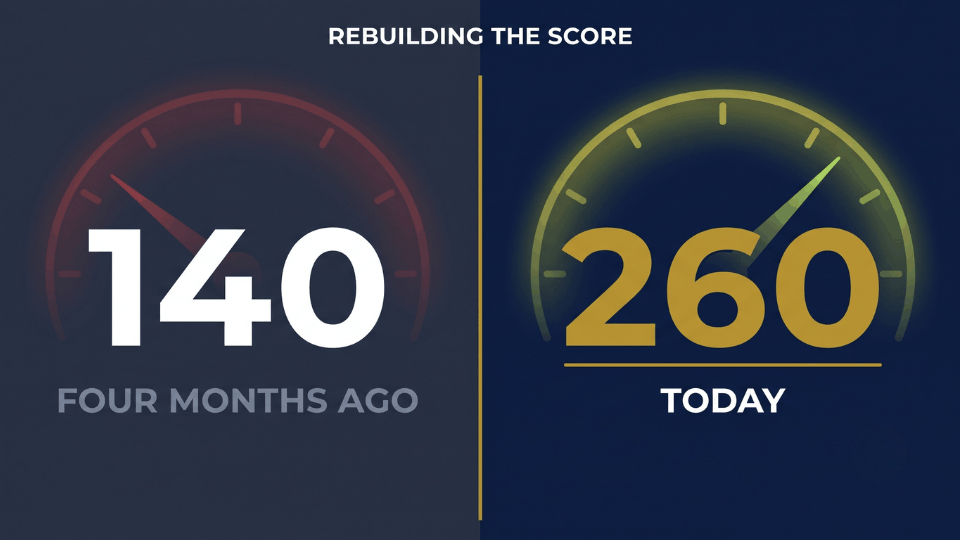
Priority order matters here. Address intellectual property and restricted product flags first, since these carry the heaviest weight, then work down through shipping metrics, then customer service response times. Sangeeta Menon, who runs a home fragrance brand from Ahmedabad, rebuilt her score from 140 to 260 in four months by tackling exactly this sequence instead of trying to fix everything at once.
Building a Weekly Account Health Habit
The sellers who never see a red banner aren’t lucky. They’ve simply made checking this dashboard as routine as checking their sales numbers.
A Simple Monday-Morning Dashboard Checklist
Pull up the Account Health page every Monday, before anything else. Note your current score, scan the policy compliance tile for anything new, and check whether your ODR or shipping metrics have moved more than half a point since last week. This five-minute habit is what catches metric creep while it’s still cheap to fix — the same discipline that keeps your IPI score above 400 and out of FBA storage limit territory.
When to Escalate to an Account Health Specialist
If a violation seems genuinely wrong, or your score drops without an obvious cause, request a call through the dashboard rather than guessing at fixes on your own. Specialists can’t override the algorithm, but they can clarify exactly which incident is driving the drop — information that’s often missing from the notification itself.

Frequently Asked Questions
What is a good Amazon Account Health Rating score?
Anything at 200 or above shows green and is considered healthy, but treat it as a floor, not a goal. Sellers aiming for real security push toward 250 or higher, since that threshold unlocks Amazon’s Account Health Assurance protection against sudden deactivation.
What happens if my AHR drops below 200?
Between 100 and 199, your account enters “At Risk” status with a visible yellow warning banner. Below 100, the dashboard turns red and your account becomes eligible for deactivation, so this is the range where same-day action matters most.
How is the Account Health Rating calculated?
Every seller starts at 200. Points get deducted when a policy violation lands, with severity determining the size of the hit, and get restored when that violation is successfully resolved or appealed. Critical violations bypass the gradual deduction entirely and can zero the score in one move.
How can I increase my Account Health Rating?
Fulfilling more orders without incurring new violations steadily adds points — roughly 4 points per 200 successful orders over 180 days. Resolving or successfully appealing existing violations restores whatever points they originally cost you.
What is Account Health Assurance and how do I qualify?
It’s a protection program for professional sellers who maintain 250+ for at least six months with no more than ten days below that mark. Qualifying accounts get a 72-hour window to resolve issues before Amazon considers deactivation, instead of facing it instantly.
Does AHR affect the Buy Box?
Not directly, but the metrics feeding it — ODR, late shipments, cancellations — absolutely do. A weak account health rating is usually a strong signal that Buy Box performance is suffering for the same underlying reasons.
Can FBA sellers ignore most AHR metrics?
Mostly, yes. Shipping performance metrics like late dispatch and valid tracking apply primarily to self-fulfilled orders, so FBA sellers can focus their attention on order defect rate and policy compliance instead.
How long does it take to recover after a critical violation?
There’s no fixed timeline, but expect weeks rather than days if deactivation actually occurred. Recovery starts once your appeal is accepted and accelerates as you accumulate new violation-free orders within the 180-day window.
Conclusion
Your amazon account health rating isn’t a report card you glance at after something breaks — it’s a set of vitals worth reading every week, the same way you’d check your sales dashboard. The sellers who avoid Nithya’s red-banner Tuesday aren’t the ones who never make mistakes. They’re the ones who catch metric creep while it’s still a yellow number, not a suspended listing. If you want a structured system for building this habit — instead of learning it the hard way at 2 AM before a deactivation deadline — our 3-Day Amazon Business Training walks through exactly this kind of operational discipline, alongside everything else that keeps a growing Amazon business standing on solid ground.
