

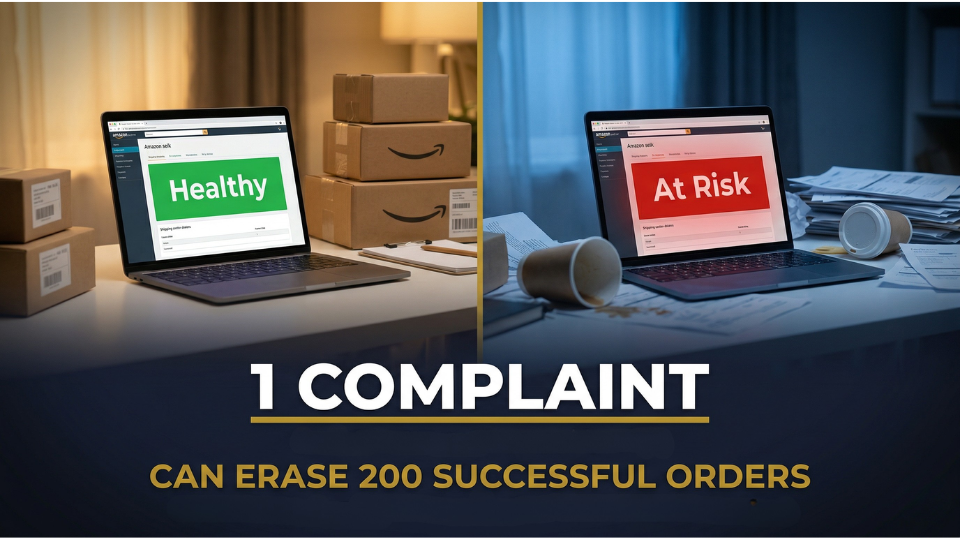
Last November, Priyanka Menon from Jaipur woke up to a notification that made her stomach drop. Her Amazon seller account had been flagged “At Risk” overnight. The cause was not a policy violation or a counterfeit claim. It was three unresolved Amazon customer complaints that had spiralled into A-to-Z claims, pushing her Order Defect Rate past the 1% threshold. She lost her Buy Box on two top SKUs, and daily revenue fell by 60%.
For Indian Amazon sellers, complaints are not just a customer service problem, they are an account health problem. This guide walks you through how to handle every type of complaint, protect your metrics, and turn frustrated buyers into repeat customers.
Why Amazon Customer Complaints Can Make or Break Your Seller Account
The Real Cost of Ignoring a Single Buyer Message
Amazon gives sellers a strict 24-hour window to respond to buyer messages. Miss that window, and the complaint escalates. An unanswered message becomes a negative review. A negative review becomes an A-to-Z Guarantee claim. And a successful A-to-Z claim lands directly on your Order Defect Rate, the single most important metric on your Account Health dashboard.
Kushal Shankar from Indore learned this the hard way. He went on a two-day trip without setting up message notifications. By the time he returned, two buyers had filed A-to-Z claims. His ODR jumped from 0.4% to 1.3% in a single weekend.
How Amazon Connects Complaints to Your Account Health Rating
Your Account Health Rating (AHR) is a score between 0 and 1,000 that tells Amazon whether your account is trustworthy. Every new seller in India starts at 200 points. The score rises slowly roughly 4 points for every 200 successfully fulfilled orders but drops fast when complaints arrive.
Amazon rolled out AHR to Indian sellers in August 2023. It evaluates three pillars: customer service performance, policy compliance, and shipping performance. Your dashboard colour-codes your status as green (Healthy), yellow (At Risk), or red (Unhealthy). When your rating turns red, Amazon may suspend your selling privileges within three days.
The Metrics That Move When Complaints Pile Up
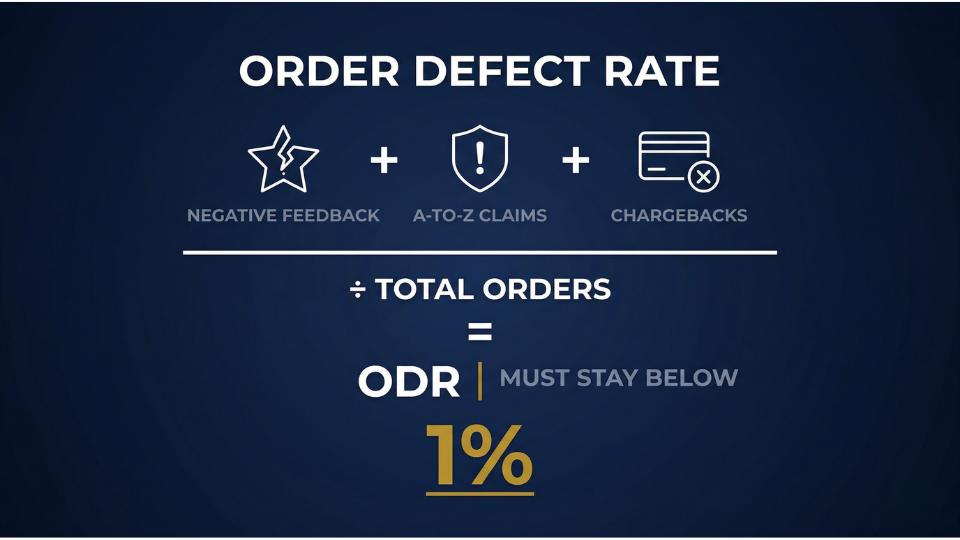
The Order Defect Rate (ODR) combines negative feedback, successful A-to-Z claims, and credit card chargebacks into a single percentage, measured over 60 days. Amazon requires your ODR to stay below 1%. Cross that line, and you face listing suppression, Buy Box loss, and potential suspension. For a deeper dive into what to watch, our guide on key metrics to monitor in Seller Central covers all the numbers that matter.
Amazon also tracks your Late Shipment Rate (under 4%), Pre-fulfilment Cancel Rate (under 2.5%), and Valid Tracking Rate (above 95%). One bad week can undo months of clean performance.
The Most Common Amazon Customer Complaints Indian Sellers Face
Product Quality and Condition Issues
Product condition complaints land directly under Policy Compliance on your Account Health page. Buyers who receive items that appear used, defective, or missing parts can trigger listing deactivations sometimes with a single complaint.
Pramod Yadav from Surat sells stainless steel kitchen accessories. A customer returned a container set claiming one lid was dented. Amazon classified it as a “product condition complaint defective,” and his listing was deactivated within hours. Pramod had to submit invoices and a corrective action plan before Amazon reinstated the ASIN five days later.
Shipping Delays, Wrong Items, and Packaging Failures
Sale events like the Great Indian Festival bring a surge of orders and a surge of shipping complaints. Late deliveries, incorrect items, and transit damage push your Late Shipment Rate higher and invite negative feedback that feeds into your ODR.
Listing Mismatch and Misleading Descriptions
When a buyer receives something that does not match the product page, wrong colour, smaller dimensions, different material they feel deceived. This perception gap is one of the most common triggers for A-to-Z claims. The fix is straightforward: audit your listings regularly and ensure every image and specification matches the actual product. If you want to tighten up your product pages, our article on how to avoid common Amazon policy violations is a good starting point.
Understanding the Order Defect Rate and Why It Matters Most
What Makes Up Your Amazon Order Defect Rate
Your ODR is built from three components: negative feedback (1-2 star seller reviews), successful A-to-Z Guarantee claims, and credit card chargebacks. Amazon measures all three across a rolling 60-day window as a percentage of total orders.
Sariga Haseen from Coimbatore sells handmade cotton bedsheets. Two chargebacks in one week – both from buyers claiming non-delivery, pushed her ODR from 0.5% to 1.1% on a base of just 180 orders. The smaller your order volume, the more a single complaint hurts.
The 1% Threshold — What Happens When You Cross It
Once your ODR crosses 1%, Amazon sends a performance notification. The consequences escalate quickly: listing suppression, Buy Box loss, and selling privilege suspension. Recovery requires submitting a Plan of Action (POA) identifying the root cause, corrective steps taken, and preventive measures for the future.
How to Respond to Amazon A-to-Z Claims Without Losing Money
When a Buyer Files an A-to-Z Guarantee Claim
A buyer becomes eligible to file an A-to-Z claim when they have contacted you through Amazon’s messaging system, waited 48 hours without resolution, and a qualifying condition is met – the item was not received within three business days past the estimated delivery date, the product arrived damaged or not as described, or a return refund was not processed.
Step-by-Step: Responding Within the 72-Hour Window
You have exactly 72 hours to respond before Amazon automatically rules in favour of the buyer.
- Navigate to Performance, then A-to-Z Guarantee Claims, and open the claim under the “Action Required” tab.
- Gather evidence shipping confirmation, tracking with delivery proof, and all buyer-seller messages.
- Write a factual, calm response with your evidence attached. Avoid emotional language.
- If the claim is legitimate, offer a full refund immediately to close it and demonstrate good faith.
Joesph William from Lucknow received a ₹2,300 claim for a speaker a buyer said never arrived. He submitted courier tracking showing delivery with a photo at the buyer’s door. Amazon denied the claim within days.
Appealing an Unfair A-to-Z Decision
If Amazon grants a claim against you unfairly, you have 30 calendar days to appeal. Attach invoices, delivery screenshots, and buyer correspondence. A successful appeal reverses the ODR impact entirely.
If you want to build a complaint-proof Amazon business from the ground up, the 3-Day Amazon Business Training covers the exact systems and SOPs that top Indian sellers use to keep their accounts spotless while scaling revenue.
Using Amazon Buyer Seller Messaging to Resolve Issues Before They Escalate
Setting Up Notifications and Response Templates
The fastest way to prevent complaints from becoming claims is to catch them early. Enable Seller Central notifications for all buyer messages on your phone and email. Then create response templates for your most common complaint types, delayed delivery, wrong item, damaged product, and refund queries. Templates save time, but always personalise them with the buyer’s name and order ID. Auto-responders do not count as valid replies in Amazon’s system.
De-escalation Scripts That Protect Your Amazon Seller Performance Metrics
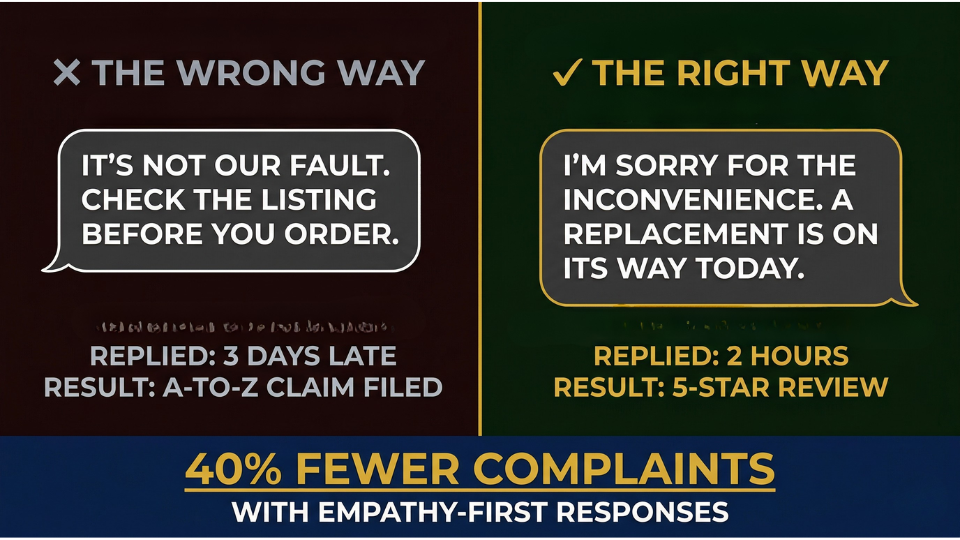
The most effective complaint responses follow a simple framework: Acknowledge, Apologise, Act. Start by acknowledging the buyer’s frustration. Apologise for the inconvenience. Then offer a concrete solution: a replacement, a full refund, or a partial credit.
Pavithra Reddy from Hyderabad trained her virtual assistant to respond to every complaint with a templated empathy-first message, followed by an immediate resolution offer. Within 60 days, her negative feedback dropped by 40% and her A-to-Z claims fell from three per month to zero. One critical rule: never share external links or contact details in your messages. Amazon prohibits external contact and violating this can trigger a separate warning.
How to Remove or Manage Amazon Negative Feedback
When Amazon Will Remove Feedback for You
Not all negative feedback has to stay on your profile. Amazon removes feedback containing obscene language, personal information, or content that is purely a product review rather than seller feedback. For FBA orders, Amazon takes responsibility for shipping-related complaints, so delivery-related feedback can be struck through. Request removal through Feedback Manager in Seller Central. For more strategies on this topic, check out our detailed guide on how to deal with negative reviews on Amazon.
Turning Negative Feedback Into a Recovery Opportunity
When removal is not an option, resolution is your next move. Contact the buyer through Amazon Buyer Seller Messaging, resolve their issue, and politely ask if they would consider updating their feedback. Never offer incentives — Amazon strictly prohibits exchanging discounts or gifts for feedback changes.
Deepak Joshi from Pune received a 1-star review on his resistance bands: “Wrong size, completely useless.” He messaged the buyer within two hours, apologised, and shipped the correct size the same day with no return required. The buyer updated her review to 5 stars. Track your feedback weekly — if the same product generates repeated complaints, fix the root cause rather than fighting individual reviews. Our guide on using customer feedback to improve your product walks you through exactly how to do this.
If you are looking for ready-made scripts and SOPs to handle every type of Amazon complaint, the 3-Day Amazon Business Training walks you through the exact templates and workflows used by sellers doing ₹50 lakh or more per month.
Monitoring Amazon Voice of the Customer and Account Health Dashboard
Reading the Voice of the Customer Page Like a Pro
Amazon’s Voice of the Customer tool is one of the most underused features in Seller Central. Navigate to Performance, then Voice of the Customer, and you will see a CX Health rating for every ASIN Excellent, Good, Fair, Poor, or Very Poor.
Sanjay Dileep from Ahmedabad discovered through this tool that 70% of returns on his portable charger were tagged “missing charging cable.” The cable was included but tucked under a cardboard insert. He added a bright sticker saying “Cable inside check under the insert” and complaints dropped to near zero within three weeks.
Weekly Account Health Check Routine for Indian Sellers
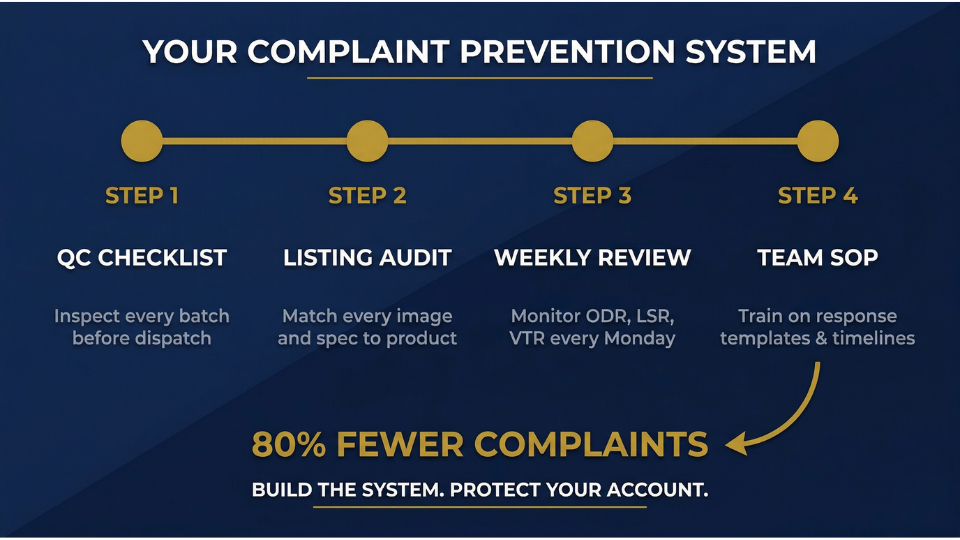
Build a Monday morning ritual around your Account Health dashboard. Check your ODR, Late Shipment Rate, Valid Tracking Rate, and AHR score. Review new policy violations and note their severity Critical violations can trigger deactivation within 72 hours.
For Indian sellers, the Amazon account health rating typically sits between 200 and 250 out of 1,000. Do not stress about pushing the number higher focus on maintaining zero active violations and keeping all metrics within thresholds. Keep your emergency contact information updated so Account Health Specialists can reach you if your score drops.
Preventing Amazon Seller Account Suspension Through Proactive Complaint Management
Building an SOP for Complaint Handling in Your Business
The sellers who avoid Amazon seller account suspension are not the ones who never get complaints – they are the ones who have a system. Document every complaint type and its resolution pathway. Train your team on Buyer Seller Messaging etiquette and response timelines. Run a weekly audit of returns, feedback, and A-to-Z claims. Maintain supplier invoices and authenticity letters for every SKU these are your first line of defence if Amazon questions your sourcing.
Quality Control and Listing Accuracy as Your First Line of Defence
Most product condition complaints are preventable. Pull random samples from inventory batches before shipping. Compare the actual product against your listing does the image match? Are the dimensions accurate? If returns are eating into your margins, our article on proven strategies to reduce Amazon return rates covers the operational fixes that work.
Nisha Lawrence from Delhi sells baby care products through FBA. After three “defective” complaints in one month, she implemented a five-point QC checklist: verify seal integrity, check label accuracy, confirm all components, inspect for cosmetic damage, and photograph each batch. Her complaints dropped by 80% the following quarter. Update your listings immediately whenever anything changes – new packaging, revised weight, updated colours.
Frequently Asked Questions
How do I handle customer complaints on Amazon without getting suspended?
Respond to every buyer message within 24 hours. Resolve issues before they escalate to A-to-Z claims. Monitor your Order Defect Rate weekly and keep it below 1%. Build a complaint handling SOP so your team can respond consistently even when you are unavailable.
What is Order Defect Rate (ODR) and how do customer complaints affect it?
ODR is the percentage of defective orders over 60 days, combining negative feedback, successful A-to-Z claims, and chargebacks. Every unresolved complaint that triggers any of these outcomes raises your ODR. Amazon requires it below 1%.
Can Amazon suspend my seller account because of customer complaints?
Yes. Repeated complaints spike your ODR above 1% or trigger policy violations like product condition complaints. Both lead to warnings, listing suppressions, and account suspension. Address complaints proactively before Amazon intervenes.
How do I respond to an A-to-Z guarantee claim on Amazon India?
Go to Performance, then A-to-Z Guarantee Claims in Seller Central. Open the claim under “Action Required,” gather evidence tracking, delivery confirmation, messages and submit a factual response within 72 hours.
What is a good Account Health Rating for Amazon sellers in India?
Most Indian sellers maintain an AHR between 200 and 250 out of 1,000, which is normal and healthy. Focus on zero active policy violations and keeping performance metrics within thresholds rather than chasing a high number.
How can I remove negative feedback from my Amazon seller account?
Request removal through Feedback Manager if the feedback contains obscene language, personal information, or is purely a product review. For FBA orders, Amazon strikes through shipping-related feedback. Otherwise, resolve the issue and politely ask the buyer to update.
What is Amazon Voice of the Customer and how does it help with complaints?
Voice of the Customer is a Seller Central tool showing a CX Health rating per ASIN with return reasons and buyer comments. Use it to identify products attracting complaints and fix root causes before they damage your metrics.
How long does Amazon take to resolve an A-to-Z claim?
After you respond within 72 hours, Amazon typically takes one to two weeks to decide. If granted against you, you have 30 days to appeal with supporting evidence.
Conclusion
Customer complaints are part of running any Amazon business. The difference between sellers who thrive and sellers who get suspended comes down to systems, not luck. Respond fast, resolve genuinely, monitor your dashboard weekly, and treat every complaint as data that strengthens your operations.
Your Account Health Rating is the lifeline of your business on Amazon India. Protect it the way you protect your inventory and cash flow. If you want the complete system for building a complaint-proof Amazon business — from sourcing and QC to customer service SOPs the 3-Day Amazon Business Training gives you the exact playbook top Indian sellers use to scale without risking their account health.
