

Last March, Balaji Sundaram from Tiruchirappalli thought he’d cracked Amazon ads. Over six weeks he trimmed bids on “cast iron tawa” and “dosa tawa”, and his cookware brand’s ACoS fell from 38% to 21%. He’d never paid attention to the TACoS vs ACoS debate, and he didn’t think he needed to.
Then he checked total sales. Monthly revenue had dropped from ₹6.8 lakh to ₹4.9 lakh, and his main keyword had slipped from page 1 to page 3. His campaign manager hadn’t warned him once.
ACoS tells you whether a campaign is efficient. It says nothing about whether your ads are building organic rank or simply renting sales you’ll pay for again next month. In this guide, you’ll learn how to calculate TACoS in Seller Central India, avoid a common GST mistake, set a TACoS ceiling from your own margin, and read both numbers together.
Why a Lower ACoS Can Quietly Shrink Your Business
What does ACoS actually measure?
ACoS is your ad spend divided by the sales Amazon credits to those ads. Spend ₹20,000, get ₹80,000 in ad-attributed sales, and your ACoS is 25%. It’s a clean measure of one campaign’s efficiency. Because it’s the number your campaign manager shows by default, though, most sellers treat it as the scorecard for all their advertising. It was never built for that job.
The organic sales your ad report never sees
Aditya Joshi from Bhopal runs a pet grooming brand. His console showed ₹1.8 lakh in ad sales at a 30% ACoS. His Business Reports for the same month showed ₹4.2 lakh in total sales. That means 57% of his revenue came from shoppers who never clicked an ad, and ACoS couldn’t tell him whether that share was growing or shrinking.
Does Amazon PPC help organic ranking?
Amazon doesn’t publish its ranking factors, but sellers see the same pattern again and again. Ad-driven sales appear to count toward a product’s sales velocity and conversion history for a keyword, and both feed how Amazon’s A9 algorithm ranks products. Pull those sales away and rank often follows. That’s exactly what happened to Balaji.

What Is TACoS on Amazon? Total Advertising Cost of Sales
ACoS looks at a slice of your revenue. TACoS looks at all of it. Total advertising cost of sales measures how much of your entire Amazon revenue goes to advertising, whether an order came from an ad click or an organic search.
The TACoS formula, worked in rupees
The TACoS formula is simple: total ad spend divided by total sales, multiplied by 100. The detail that matters is where “total sales” comes from. Not the ad sales figure in your console, but the full revenue number in Business Reports, covering organic orders, repeat buyers and shoppers who arrived from Instagram or WhatsApp.
TACoS vs ACoS on the same ₹50,000 spend
Kunal Shah from Surat sells stainless steel kitchen storage. Last month he spent ₹50,000 on ads and got ₹2 lakh in attributed sales, giving him a 25% ACoS. His total sales were ₹5 lakh, so his TACoS was 10%. His ACoS said each ad sale cost a quarter of its value. His TACoS said advertising cost a tenth of his business, with 60% of revenue arriving organically. One number grades the campaign. The other grades the business.
How to Calculate TACoS in Seller Central India
Seller Central doesn’t display TACoS anywhere, which is one reason so few Indian sellers track it. You’ll build it from two reports in about ten minutes.
Where to find total sales and ad spend
For total sales, open Reports, then Business Reports, then Detail Page Sales and Traffic, and note Ordered Product Sales. It’s one of the free Seller Central reports most sellers ignore. For ad spend, add up Sponsored Products, Sponsored Brands and Sponsored Display in Campaign Manager. Use the exact same date range for both, because a TACoS built on mismatched dates looks real and means nothing.
The GST mismatch that skews your TACoS
Amazon.in prices are GST-inclusive, so your sales figure can carry tax while your ads console typically shows spend before GST. Check both in your own account. If the bases differ, a TACoS that reads 9% on an 18% slab product is really closer to 10.6%. Anjali Nair from Thrissur, who runs a home décor brand, caught this only when her tracker wouldn’t match her accountant’s P&L. Now she uses GST-exclusive figures on both sides, every month.
Account-level vs ASIN-level Amazon TACoS
An account-wide number can hide a product in trouble. Anjali’s hero cushion covers ran at 6% TACoS while a new wall shelf sat at 31%. Matching each ASIN’s spend to its own sales shows which products carry the account and which lean on it.
Our TACoS tracker sheet turns this into a ten-minute monthly habit, with columns for spend by ad type, GST-exclusive sales, ACoS, TACoS and your total sales trend.
Break-Even ACoS: The Number That Sets Your Limits
Your TACoS only helps if you know how high it’s allowed to go, and that limit starts with break-even ACoS.
Calculating break-even ACoS with Amazon.in fees
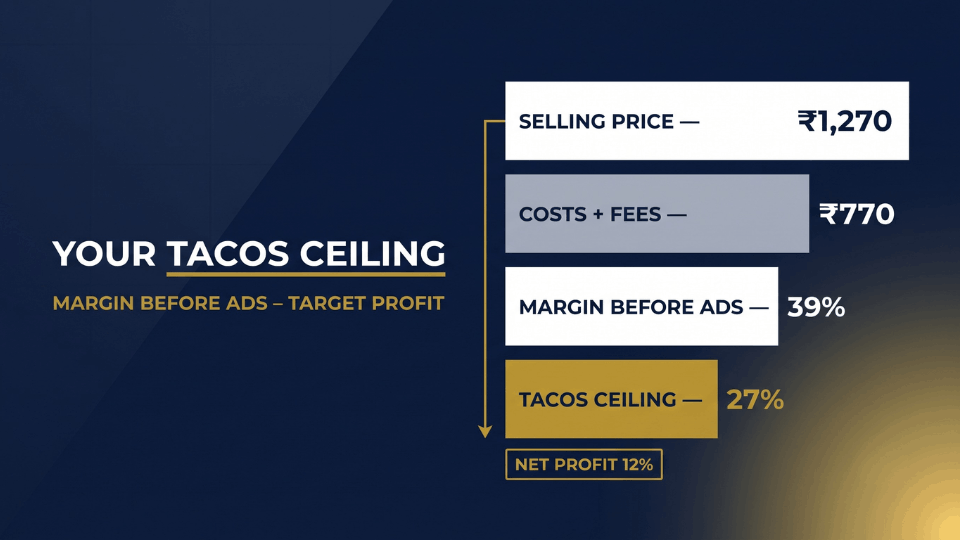
Break-even ACoS is simply your margin before advertising, which you can pull straight from your Amazon profit and loss statement. Deepak Yadav from Gurugram sells resistance bands at a GST-exclusive price of ₹1,270. His landed cost is ₹420, referral and closing fees come to about ₹260, and FBA fees add ₹90. That leaves ₹500, a 39% margin before ads, so his break-even ACoS is roughly 39%. Run your own numbers through Amazon’s fee preview, and include GST on those fees if you don’t claim input tax credit.
From break-even ACoS to your TACoS ceiling
Here’s the link most guides skip. Your net margin after ads is roughly your margin before ads minus your TACoS. Deepak wants to keep 12% as profit, so his TACoS ceiling is 39% minus 12%, which is 27%. A launch or rank push can run above 39% ACoS for a few weeks, as long as his account TACoS stays under 27%. The ceiling, not any single campaign, decides whether he’s making money.
Renting or Building? Reading TACoS vs ACoS Together
A single TACoS reading tells you little. Read it beside three months of total sales, and TACoS vs ACoS becomes a diagnosis. Most products fall into one of four patterns.
TACoS falling, total sales rising: you’re building
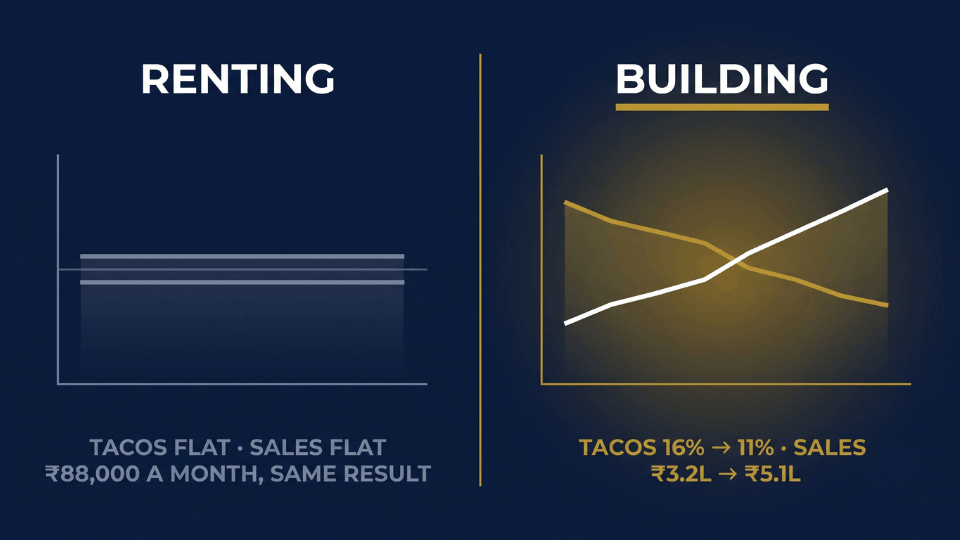
Pooja Deshmukh from Nashik sells organic baby bedding. Her ACoS sits at a scary 42% on a new keyword push. Yet over three months her TACoS dropped from 16% to 11% while total sales climbed from ₹3.2 lakh to ₹5.1 lakh. Her ad spend barely moved. The extra sales are organic, which means her ads are building rank she won’t have to buy again.
TACoS flat for months: you’re renting sales
Salman Ansari from Varanasi sells cotton kurtas. His TACoS has sat between 21% and 23% for eight straight months on sales of about ₹4 lakh. Every month, roughly ₹88,000 in ads buys the same sales again. Nothing compounds, and if he pulls the ads, the sales leave with them.
Both metrics falling with sales: you’re shrinking
This is Balaji’s pattern, and it’s the most dangerous because it looks like success. After his bid cuts, his TACoS fell from 17.6% to 9.8% alongside his ACoS. Monthly profit even rose by about ₹5,000 at first. By month three, organic sales had slid so far that profit dropped to around ₹92,000, down from ₹1.18 lakh.
Why is my TACoS increasing?
A rising TACoS with flat or falling sales means organic sales are eroding and ads are propping up the gap. Check for a new competitor, a rating drop, an FBA stockout or climbing CPCs. One caveat for Indian sellers: CPCs jump during the Great Indian Festival and Prime Day, so compare those weeks against last year’s event, not last month.
What Is a Good TACoS for Amazon Sellers in India?
TACoS targets by product stage
Agencies commonly cite 5–10% as a good TACoS for Amazon products that are mature, 10–15% for growing products and 15–25% for launches. Treat these as starting points, because most come from US brand portfolios. Indian price points are lower, so each click eats a bigger share of every sale.
Why your margin beats any benchmark
Swathi Rao from Mangaluru sells a ₹349 kitchen organiser with a 22% margin before ads. A “healthy” 12% TACoS would leave her just 10% before returns and storage fees. Her real ceiling sits in single digits, which is why the formula from earlier matters more than any borrowed benchmark.
Can TACoS be too low?
Yes. A TACoS below roughly 3% usually means you’re underinvesting. Competitors will happily take sponsored slots on your brand and category keywords, especially during festive sales.
Our TACoS ceiling worksheet does this maths for you. Enter your price, landed cost and fees, and it returns your break-even ACoS and a TACoS ceiling for each product stage.
How to Lower TACoS Without Killing Your Rank
Cutting spend is the lazy way to lower TACoS. The smarter way is growing organic sales.
Push ads on page-two keywords, then step back
Tanushree Das from Bhubaneswar sells insulated lunch boxes and ranked on page 2 for “insulated lunch box for office”. She ran ads on that keyword at about 45% ACoS for five weeks while tracking her organic position. Once she hit page 1, she cut those bids by 40% and sales held. Her TACoS fell from 19% to 13% in ten weeks.
Fix conversion before you add budget
Better images, stronger A+ content, sharper pricing and more reviews all lift conversion. That lowers ACoS, since the same clicks produce more orders, and lowers TACoS, since conversions support organic rank. More budget on a weak listing just makes renting sales costlier.
When a falling TACoS says it’s time to scale
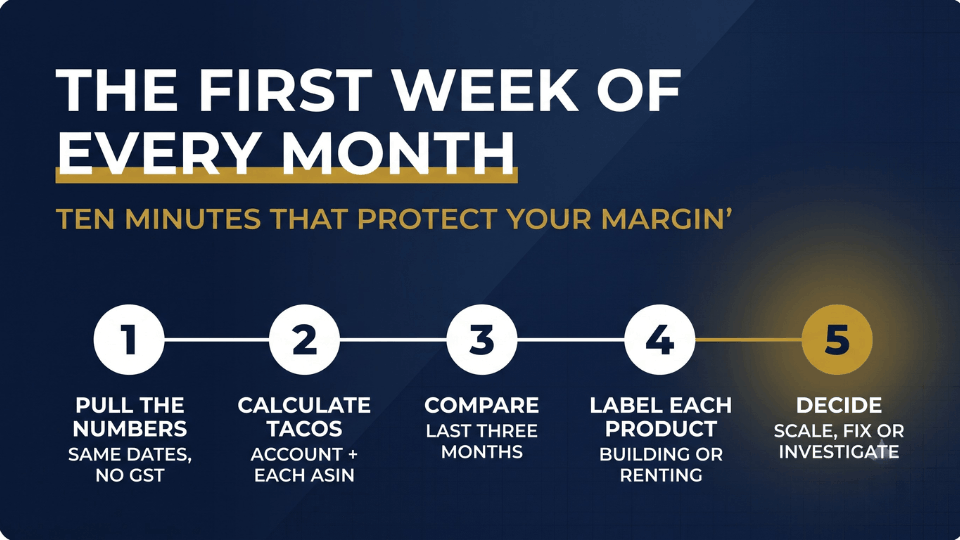
Scale when TACoS has fallen for two to three months, total sales are rising, and you’re still well under your ceiling. Nikhil Bansal from Chandigarh saw his bedsheet brand’s TACoS drop from 18% to 12% against a 24% ceiling, so he added ₹30,000 a month to test two new keyword groups. This monthly review keeps those calls clear:
- Pull ad spend and total sales for the same dates, excluding GST.
- Calculate TACoS for the account and each top ASIN.
- Compare each figure with the last three months and your sales trend.
- Label every product as building, renting, shrinking or eroding.
- Decide whether each needs more spend, a listing fix, restored bids or a closer look.
Run it in the first week of every month, and you’ll catch a struggling product long before your bank balance does.
TACoS vs ACoS: Frequently Asked Questions
What is the difference between ACoS and TACoS?
The difference is the denominator. ACoS divides ad spend by the sales Amazon credits to your ads, so it measures campaign efficiency. TACoS divides the same spend by your total sales, organic included, so it shows how dependent your whole business is on advertising. Use ACoS to manage campaigns weekly and TACoS to judge business health monthly.
What is a good TACoS on Amazon?
Commonly cited ranges are 5–10% for mature products, 10–15% for growing ones and 15–25% during launches. The more important test is your own margin: TACoS should sit comfortably below it and trend downward as organic sales grow. A product at 18% and falling is healthier than one at 10% and rising.
How do I calculate TACoS in Seller Central?
Seller Central doesn’t show TACoS directly. Take Ordered Product Sales from Business Reports and total spend across Sponsored Products, Sponsored Brands and Sponsored Display from Campaign Manager, using the same date range. Divide spend by sales and multiply by 100. Keep both figures GST-exclusive so the comparison stays fair.
Why is my TACoS increasing?
Your ad spend is growing faster than your total sales. Usually that means organic sales are slipping because of a new competitor, a rating drop, a stockout or rising CPCs. Before you react, rule out sale events like the Great Indian Festival, when higher CPCs push TACoS up temporarily across most categories.
Can TACoS be too low?
Yes. A TACoS under about 3% often signals underinvestment rather than efficiency. Competitors may be winning sponsored placements on your brand and category keywords, and you could be missing sales you’d capture profitably. The exception is a tiny niche your product already dominates, where little extra demand is left to buy.
Should I pause ads once my product ranks organically?
Not entirely, because organic rank still needs sales velocity. Trim bids gradually on keywords where you now hold a strong organic position, but keep defending your brand terms and testing new keywords. Watch your rank for two to three weeks after each cut, and restore spend quickly if it starts slipping.
How often should I check TACoS?
Make decisions monthly and glance at the trend weekly. Daily TACoS swings are mostly noise, driven by one large order or a busy weekend. A rolling 30-day view smooths that out, and comparing three consecutive months tells you which pattern a product is really in. Compare festive months with the same event last year.
Does ACoS vs TACoS work differently for Amazon India sellers?
The formulas are identical, but three things matter more in India. Prices include GST, so you need a consistent tax basis on both sides. Lower price points mean each click takes a bigger bite of every sale. And festive events cause sharp CPC spikes that can distort any month-to-month comparison.
Stop Renting Your Sales, Start Building Rank
Balaji eventually restored bids on his two core tawa keywords, and within seven weeks he was back on page 1. The lesson: a lower ACoS was never the goal. The goal is a business that needs fewer advertising rupees for every rupee of sales. That’s the real answer to TACoS vs ACoS: one grades a campaign, while the other, read beside total sales, tells you whether your ads are building something that lasts. This week, pull six months of numbers and label each hero product as building, renting, shrinking or eroding. If you want to learn how to read these numbers alongside your profit and decide when it’s time to scale, join our 3-Day Amazon Business Training. Your ads should be building your rank, not renting your sales.