
Manpreet Sandhu from Amritsar sells insulated steel bottles through FBA, Prime badge and all. One evening her cousin sent her a screenshot of the bottle that outsold hers two to one. It wasn’t Prime, it cost ₹200 more, and right under its Buy Box sat four sponsored products. None of them was hers. Every shopper on that page had already chosen a bottle like hers, and she had never bid to be there.
That is the gap Amazon product targeting fills. Instead of bidding on what shoppers type, you bid on the listings they are looking at: a competitor’s page, a whole category, or your own catalogue. In this guide you’ll learn how to pick the ASINs worth targeting, how to bid without draining your budget, and how to read your reports so you know which competitors you are actually taking sales from.
Product Targeting vs Keyword Targeting: Two Buying Moments
The searcher has decided. The browser hasn’t.
A keyword ad catches a shopper at the moment they type. “Steel water bottle 1 litre” tells you what they want, and your job is to look like the best answer on the results page. A product targeting ad catches them a step later, on one listing, deciding whether to buy it. They have already chosen the product type, the rough price and often the size. What they haven’t chosen is the brand, and that is the moment your ad gets to interrupt.
Why your Prime badge counts on a competitor’s page
On a product page your ad sits beside one specific listing, so price, stars and delivery are compared side by side. Amazon’s own research found that a Prime badge alongside an ad raises the chance of a click. If the page you’re targeting isn’t Prime and yours is, FBA is doing half your selling. Manpreet’s first fortnight of ASIN targets sold 23 bottles at a lower cost per order than her broad keywords, mostly from non-Prime pages priced above hers.
How Amazon Product Targeting Works in Campaign Manager
Amazon product targeting lives inside manual Sponsored Products campaigns. You choose it instead of keyword targeting when you create an ad group, and you can’t switch once the campaign is live or mix both in one ad group.
Exact vs expanded product targeting
Under the Individual products tab you can add suggested ASINs, search for them, or paste a list. Each ASIN goes in as Exact, which shows your ad only on that product, or Expanded, which also reaches similar products. Amazon launched the expanded option in October 2022 and updates those extra products dynamically, so you never see the full list. Exact gives you control; Expanded gives you reach.
Category refinements, including Prime shipping
The Categories tab targets an entire category, which you can narrow by brand, price range, star rating and Prime shipping eligibility. That last refinement is an FBA seller’s friend. Point one category ad group at listings that aren’t Prime-eligible, and your badge becomes the most visible difference on every page you appear on.
Where the ads actually appear
Most impressions land on product detail pages and non-search pages such as add-to-cart. Amazon also serves product targeting ads in search results where your target ranks near the top, which is why your placement report shows search impressions even without keywords.
How to Find Competitor ASINs Worth Targeting
Where to source candidates
Start with your auto campaign’s search term report: any term that looks like a ten-character code starting with B0 is a product page where your ad appeared, and the ones with orders are already proven. Then note every product on page one for your top three keywords. Brand-registered sellers can also use the Top Search Terms report in Brand Analytics, which shows the three most-clicked ASINs for each term.
The five-filter test
Aim for 10 to 15 ASINs per product, filtered in this order:
- Relevance: Would a shopper on this page plausibly buy yours instead? Same shelf, same occasion and same budget all count.
- Velocity: Skip anything under 100 on the “bought in past month” line; a page nobody visits can’t send buyers.
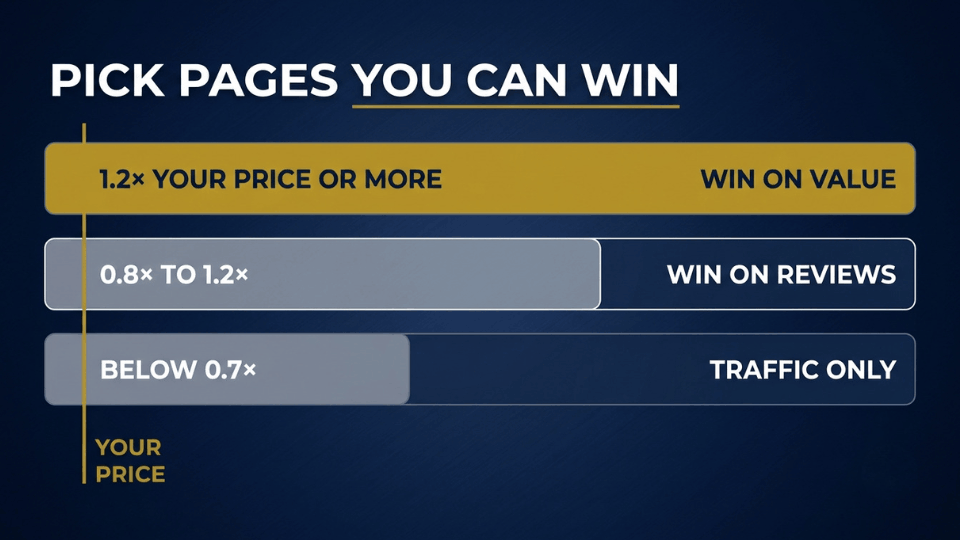
- Price position: Pages priced 20% or more above yours are your best targets, since you win on value. Near-parity pages work if your images or ratings are stronger; much cheaper pages get two or three slots at most.
- Beatability: Under 300 reviews is a strong target, and over 1,000 is a wall unless the product is a near twin. A rating of 4.3 or lower, or no Prime badge, gives your FBA listing an extra edge.
- Proximity: When two candidates tie, pick the one closest to your exact product.
Salman Ansari from Bhiwandi learned this the expensive way. His first bedsheet list had 40 ASINs, half of them big brands with 8,000-plus reviews, and ₹6,000 bought him four orders. After the filter he kept 13, and his cost per order fell by roughly a third.
Keep a shortlist sheet as you browse, with columns for ASIN, price, rating, reviews, monthly sales badge, Prime yes or no, price band and your reason for picking it. It forces a decision on every listing and becomes your benchmark later.
Category Targeting: Wide Reach Without the Waste
Refine before you launch
An unrefined category target puts you on every page in that category, including listings at a quarter of your price. Set a price range around your own and a minimum rating of 3.5 stars, and consider a second ad group limited to non-Prime listings. Then bid low: the lower side of Amazon’s suggested bid, or below it. Category targets spend fast, and this campaign’s job is discovery, not volume.
Excluding brands you can’t beat
After two weeks, the category campaign’s search term report lists every ASIN where your ad collected clicks. If one brand keeps showing spend and no orders, add it as a negative brand rather than switching off the whole category. Ishita Banerjee from Durgapur did exactly this for her ₹649 ceramic planters. Three premium brands were eating 40% of her category spend with one order between them. Once she excluded them, the same budget produced nine orders the next fortnight.
Three Amazon Product Targeting Campaigns for Day One
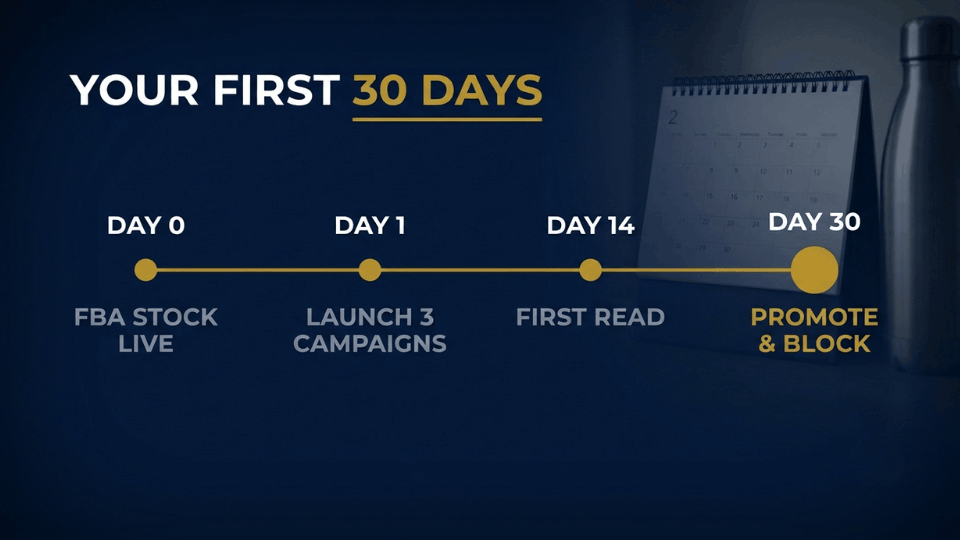
You don’t need to wait for reviews, but you do need sellable stock. Day one is the day your FBA units show as available, not the day you create the shipment. From then, three product targeting campaigns run beside the auto and keyword campaigns from our launch PPC structure, each with its own budget and placement adjustments.
Category discovery
This is the refined category target from the previous section: your widest net, your lowest bids, and a steady source of ASINs you hadn’t thought of.
Competitor ASINs on exact
This holds your 10 to 15 shortlisted ASINs, all on Exact. Aim for a mix: four or five near twins, five or six similar products priced above you, three or four at your price with thin reviews, and one or two cheap, fast sellers you cut quickly if they don’t convert.
Your own ASIN on expanded
Add your own ASIN as an Expanded target, and Amazon shows your ad on products it considers similar to yours. It works like a lookalike audience built from your listing. Gaurav Chauhan from Meerut found four of his eventual best targets for car seat organisers this way, none of which had appeared in his keyword research.
Product Targeting Bids That Don’t Bleed Your Budget
Start on the lower side of suggested
Campaign Manager shows a suggested bid for each target. Start on the lower side for competitor ASINs, and lower still for categories. If no suggestion appears, average the suggested bids from your other campaigns. Don’t calculate a launch bid from your margin; until a target has clicks and orders, there is nothing real to calculate from.
Set a separate product page adjustment
Placement adjustments work at campaign level, which is where separate campaigns pay off. If your placement report shows product pages converting well for your product targeting campaigns, a modest product pages adjustment buys more of those slots without touching your keyword campaigns.
When to raise and when to cut
Once a target has data, its right bid is your target ACOS multiplied by the sales each click brings in. Prasad Kulkarni from Hubballi sells yoga mats at ₹1,299. One competitor ASIN gave him 60 clicks and 4 orders, about ₹87 in sales per click, so at a 30% target ACOS it could carry a bid near ₹26. He still raised his ₹12 bid by 20% a week, not in one jump. Raise only targets that have sold, cut no more than half at once, and leave anything within 10% of its right bid alone. Not sure what your target should be? Our TACoS vs ACoS guide shows how to pick one.
Reading Which Competitors You Actually Win Against
Targeting report vs search term report
The targeting report scores every competitor ASIN and category clause you chose on spend, clicks, orders and ACOS. The search term report shows where your ads actually ran, including the specific ASIN pages behind your category, expanded and auto targets. Use the first to judge your picks and the second to find new ones. Our walkthrough on reading the search term report covers each column.
Win, lose or not yet
First, work out what one sale earns you: your price after GST multiplied by your margin after referral, closing and FBA fees. If that number feels shaky, start with your Amazon profit and loss statement. Lakshmi Narayanan from Madurai sells kids’ steel bento boxes at ₹899 with a 27% margin after fees, so each sale earns her about ₹205. After 21 days, three ASINs had produced 11 of her 16 orders at 22% to 28% ACOS. Five had each spent more than ₹205 without an order, and two had crossed ₹615, three times her earnings per sale. She paused those two, lowered bids on the other three, and gave the rest more time.
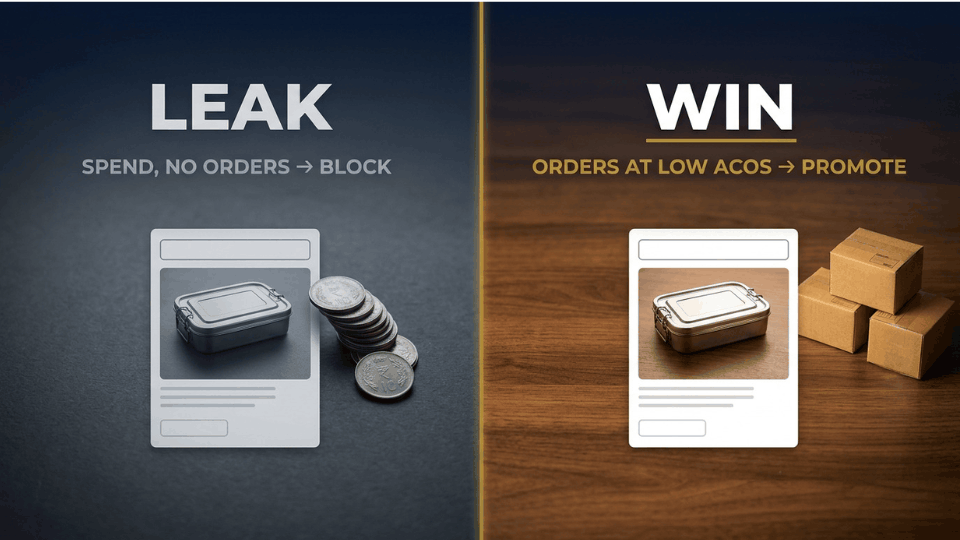
Promote winners, add negative product targets
An ASIN from your category or auto search terms with two or more orders at or below break-even ACOS moves into your competitor exact campaign. One that has spent more than a sale’s earnings with no order becomes a negative product target, which Amazon can take up to 96 hours to apply. If you use 1smart.link, the Ads Optimiser’s Search Terms tab recognises ASIN search terms and lets you do either from the same screen.
Four Mistakes That Make ASIN Targeting Look Broken
Targeting the category giants
The listing with 12,000 reviews and an Amazon’s Choice badge isn’t a target; it’s a donation. Spend where your offer looks better side by side, not where it looks like the underdog.
Putting competitor lists on expanded
Expanded on your own ASIN is a discovery tool. Expanded on a hand-picked competitor list dilutes the control you spent an afternoon building, so keep the shortlist on Exact.
Judging before day 14
Product targeting clicks convert in bursts. Give each campaign at least 14 days of data before you cut anything, and give a new negative target two weeks before deciding whether it helped.
Letting FBA stock run dry
Your product has to be in stock to be the featured offer, and without the featured offer your Sponsored Products ads stop. Kunal Bhatia from Jalandhar found a competitor ASIN that doubled his daily orders, and his FBA stock ran out nine days early. Plan reorders around your inbound lead time and the new sales pace; our guide to handling stockouts on Amazon covers the rest.
Frequently Asked Questions
What is product targeting on Amazon?
Amazon product targeting is a Sponsored Products option that lets you bid on specific listings or whole categories instead of search terms. Your ad appears on those product pages and in search results where the targeted product ranks near the top.
Is ASIN targeting better than keyword targeting?
Neither wins on its own, because they catch different moments. Keywords reach shoppers as they search, while ASIN targeting reaches them as they compare a specific product. Run both in separate campaigns, then move budget towards whichever brings sales at a lower cost per order.
Is it allowed to advertise on a competitor’s listing?
Yes. Targeting a competitor’s ASIN is a normal Sponsored Products tactic, and competitors can target your listings the same way. What you can’t do is use another brand’s name in your own listing, backend search terms or ad creative.
How do I find a competitor’s ASIN?
Open the product page and look at the URL: the ten characters after “/dp/” are the ASIN. It’s also listed in the product information section. For a faster list, check the ASIN-style entries in your auto campaign’s search term report.
How much should I bid on product targeting?
Start on the lower side of Amazon’s suggested bid for competitor ASINs, and lower still for categories. After two weeks, move each target towards its right bid: target ACOS multiplied by sales per click. Raise winners by about 20% a week, and only after an order.
Should I use exact or expanded product targeting?
Use Exact for your hand-picked competitor list, so you know which pages you are paying for. Use Expanded on your own ASIN to let Amazon find similar products you missed, then move the converters into the Exact campaign, where you control each bid.
Do I need FBA to use product targeting?
No. Product targeting works for Easy Ship and self-ship listings too, as long as your offer is in stock and holds the featured offer. FBA adds the Prime badge, which does its best work on non-Prime competitor pages.
How long should I wait before judging an ASIN target?
Give it at least 14 days and enough spend to cover what one sale earns you. Below that, a target without an order hasn’t failed; it hasn’t had a fair trial. Past one sale’s earnings with no order, lower the bid, and past three times that, pause it.
Conclusion
Keyword campaigns tell you what shoppers type. Amazon product targeting tells you whose listings they leave for yours, and on those pages your Prime badge often does the arguing for you. Start small: 10 to 15 filtered competitor ASINs, a low-bid category campaign and your own ASIN on expanded. Keep your FBA stock live, give the campaigns two weeks, then let your reports show you which competitors you genuinely beat. Promote those, block the leaks, and repeat every week.
If you want to see this whole ad system built step by step, alongside the product, listing and launch decisions that make it pay, join our 3-Day Amazon Business Training. You’ll walk away knowing exactly where your next rupee of ad spend should go.
