
Last March, Tanvi Desai from Surat sat staring at her Campaign Manager at midnight, completely stuck. Her bids were tuned, her negative keywords were clean, and she had even paused bids with day-parting. Yet her rayon kurta campaigns were still running at 44% ACOS, and every rupee of profit was disappearing into ads.
The problem wasn’t her bids or her keywords. It was where her ads were showing up. Most of her budget was going to spots that barely converted, while the one placement that sold well got almost nothing.
That’s what a top of search bid adjustment fixes. It’s a single setting inside every Sponsored Products campaign, and most Indian sellers never touch it. In this guide, you’ll learn how placements work on Amazon.in, how to read your placement report, and how to calculate the right adjustment in rupees, using your actual FBA margins. By the end, you’ll know exactly where your PPC budget should go.
Why Your Amazon PPC Placements Matter More Than Your Bids
One Keyword, Three Different ACOS Numbers
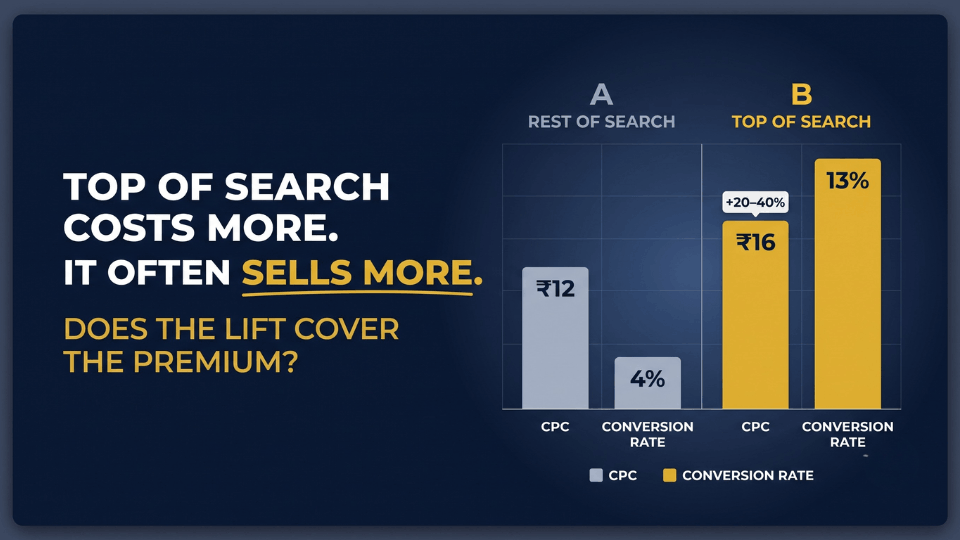
Here’s something most sellers don’t realise. The same keyword, at the same bid, can deliver completely different results depending on where the ad appears. For Tanvi, “rayon kurta for women” converted at 13% at the top of the first page, 4% further down, and 7% on competitor product pages. Same keyword, same bid, three very different ACOS numbers.
What Bid Strategies, Day-Parting and Negatives Can’t Fix
Bid strategies control how aggressively you compete. Day-parting controls when you spend. A proper negative keyword system controls what you pay for. None of them control where your ad lands on the page, and that is exactly where Amazon PPC placements come in.
Why This Matters More for FBA Sellers
If you use FBA, you have an advantage worth protecting. The Prime badge is most visible in the first row of mobile search results, which is where most Amazon.in shoppers browse. Tanvi’s FBA listings converted far better at the top than anywhere else, yet 70% of her spend was going to Rest of Search. Once she saw that, the fix became obvious.

What Is an Amazon Placement Bid Adjustment?
The Four Placements on Amazon.in
An Amazon placement bid adjustment is a percentage increase you add to your base bid for a specific spot where your ad can appear. On Amazon.in, there are four: Top of Search (the first row on page one), Rest of Search (every other search position, including page two onwards), Product Pages (detail page carousels and add-to-cart pages), and Amazon Business (B2B buyers).
How the 0% to 900% Range Works in Rupees
You can raise your bid by anywhere from 0% to 900% for each placement. If your base bid is ₹10 and you set a 50% Top of Search adjustment, Amazon can bid up to ₹15 when your ad competes for that spot. Every other placement stays at ₹10 unless you adjust it separately.
Amazon Bid Modifiers vs. Bidding Strategy
Amazon bid modifiers and your bidding strategy are two different settings that stack. Your modifier sets the placement boost, while your strategy decides how Amazon adjusts that bid in real time. One correction: many older guides say Rest of Search can’t be adjusted. Amazon now allows adjustments on all main placements.
Amazon Top of Search Placement: Why It Converts and What It Costs
Why Indian Shoppers Buy From the First Row
Most Amazon.in shoppers browse on their phones and rarely scroll far. They see the first results with a Prime badge and strong ratings, and buy. That’s why the Amazon top of search placement usually converts best.
The Premium You Pay in India
That conversion comes at a cost. Industry data from Indian PPC platforms puts average Amazon.in CPCs roughly between ₹7 and ₹19 depending on category, and Top of Search typically costs 20% to 40% more. The real question is never “Is Top of Search good?” It’s “Does the extra conversion cover the extra cost for my product?”
Does a Bid Adjustment Guarantee the Top Spot?
No. A higher adjustment makes you more competitive, but the auction and your listing’s relevance still decide who wins. A weak listing with a 900% modifier still loses.
Top of Search Impression Share: Measuring How Often You Win
Top of search impression share shows the percentage of eligible Top of Search impressions you actually won. Aditya Kulkarni from Nashik raised his steel water bottle campaign’s modifier to 200%, yet his share barely moved from 9% to 12%. His main image was losing clicks to sharper competitor photos. After a reshoot, his share climbed to 26% within five weeks, at a lower modifier.
Rest of Search vs. Top of Search vs. Product Pages
Rest of Search: Cheaper Clicks From Comparison Shoppers
When you compare rest of search vs top of search, the difference is shopper mindset. Shoppers further down are comparing prices and reviews. This placement works well if your price is competitive, or if you already rank organically at the top and want a second appearance.
Product Page Placement on Amazon: Defend and Conquest
Product page placement on Amazon lets you appear on detail pages, including your own and your competitors’. Appearing on your own listings blocks competitors from stealing near-ready buyers. Appearing on competitor listings works when you have a better price or more reviews.
When Product Pages Beat Top of Search
For higher-priced, considered purchases, product pages often win. Senthil Murugan from Coimbatore sells wet grinders priced above ₹4,000. When he checked his data, Product Pages were running at 17% ACOS while Top of Search sat at 33%. Buyers spending that much compare carefully, and his ad appeared exactly when they were evaluating options.
Before you change any modifier, you need to know your real margins. Our guide on reading your Amazon profit and loss statement shows you exactly what you keep after FBA fees, which is the number every placement decision depends on.
How to Read Your Amazon Placement Report Before Changing Any Bid
Where to Find It in Seller Central India
There are two ways to see placement data. Inside Campaign Manager, open any Sponsored Products campaign and switch to the placement view. For deeper analysis, download the Sponsored Products Placement report from the Reports section, which gives you up to 90 days of history.
The Four Numbers That Matter by Placement
Your Amazon placement report contains plenty of columns, but four matter most. Look at conversion rate, CPC, ACOS, and revenue per click (RPC) for each placement. RPC is the most useful because it tells you what each click is actually worth in rupees, and that becomes the foundation of your bid calculation.
How Much Data Is Enough
Don’t decide from a week of thin data. Wait for at least 50 to 100 clicks per placement. For smaller campaigns, read 30 to 60 days so a few lucky orders don’t mislead you.
How to Calculate Your Top of Search Bid Adjustment (Rupee Example)
Start With Your Break-Even ACOS After FBA Fees
Your top of search bid adjustment should come from your margin, not a guess. Subtract GST, referral and closing fees, FBA fulfilment fees, and product cost from your selling price. What remains, as a percentage of price, is your break-even ACOS. Use the current Amazon.in fee schedule, because fees change.
Revenue per Click × Target ACOS = Ideal Bid
Multiply each placement’s revenue per click by your target ACOS, and you get the ideal bid for that placement.
Turning the Ideal Bid Into a Percentage
Set your base bid at the lowest placement’s ideal bid, then calculate the percentage increase needed to reach each higher one. That percentage is your top of search bid adjustment or product page modifier.
Worked Example: Nandini’s Bedsheets From Jaipur
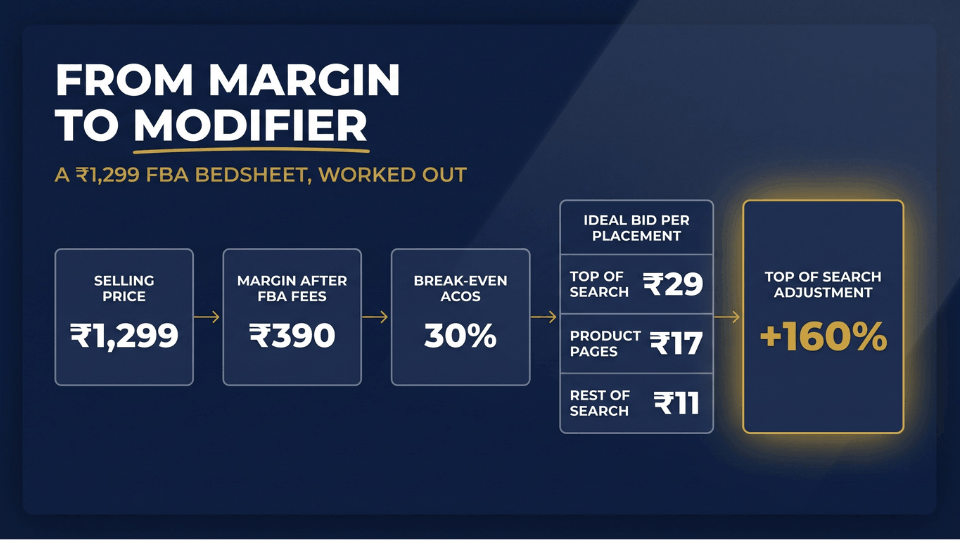
Nandini Rathore from Jaipur sells a ₹1,299 block-print bedsheet through FBA. After fees and product cost (illustrative figures), she keeps about ₹390 per sale, a break-even ACOS of 30%. She targets 22%:
- Top of Search converted at 10%, so revenue per click was ₹130, and her ideal bid was ₹29 (₹130 × 22%).
- Product Pages converted at 6%, so revenue per click was ₹78, and her ideal bid was ₹17.
- Rest of Search converted at 4%, so revenue per click was ₹52, and her ideal bid was ₹11.
- With a base bid of ₹11, she needed roughly a 160% Top of Search adjustment and a 55% Product Pages adjustment.
She started at 120% to stay cautious and moved up over three weeks. Her ACOS dropped from 37% to 24%.
How Top of Search Bid Adjustments Work With Dynamic Bidding
The Order of Operations
Amazon applies your placement adjustment first, then your bidding strategy works on that adjusted figure. Most budget surprises start here.
How “Up and Down” Plus a High Modifier Can Blow Your Budget
Say your base bid is ₹10 and your Top of Search adjustment is 300%. Your adjusted bid becomes ₹40. With “dynamic bids – up and down,” Amazon can raise Top of Search bids by up to another 100%, taking a single click to ₹80. On a ₹500 daily budget, that’s six clicks before your campaign runs dry.
Which Bidding Strategy Fits Each Placement Plan
When testing modifiers, the “down only” bid strategy is safer because Amazon can only reduce your bid. Save “up and down” for proven hero keywords, and use fixed bids for clean, controlled tests.
If you want to see how placement fits into a complete setup, our step-by-step guide to scaling Amazon PPC shows how to organise campaigns so every setting works together.
A Top of Search Bid Adjustment Plan for Indian FBA Sellers
New Launches (0 to 30 Reviews): Go Slow
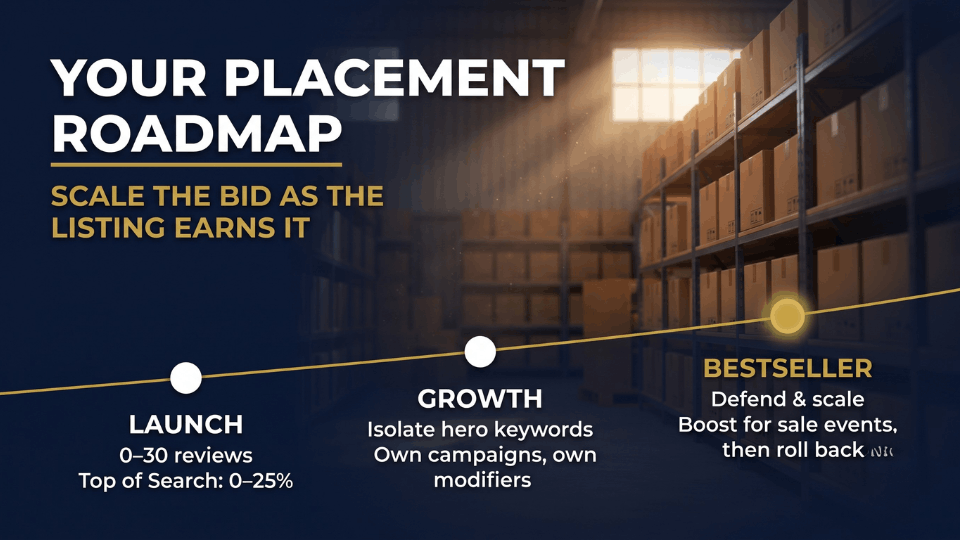
New listings rarely win the conversion battle at the top against established competitors. Start with a 0% to 25% modifier and focus on collecting placement data.
Growing Listings: Isolate Your Hero Keywords
Placement adjustments apply to the whole campaign, not individual keywords. Move your two or three best-converting keywords into their own campaigns so you can push them hard without overpaying on weaker terms.
Established FBA Bestsellers: Defend and Scale
Protect Top of Search on your branded and main keywords. Farah Siddiqui from Hyderabad raised her skincare campaign modifier from 80% to 150% for the Great Indian Festival, then brought it back down a week later. Her event sales grew 41% without a lasting jump in ACOS.
How Often to Adjust
Review weekly, change modifiers by 10 to 25 points at a time, and change one setting at once.
Placement Bid Mistakes That Inflate Your ACOS
Setting 900% on a Brand-New Listing
This means paying top rupee for clicks your listing can’t yet convert. Build reviews and conversion data first.
Changing Base Bids and Modifiers on the Same Day
If you change both together, you’ll never know which one caused the result.
Pushing Ads When FBA Stock Is Running Low
Heavy Top of Search spend speeds up sell-through. Last winter, Gurpreet Singh from Ludhiana stocked out of thermal wear mid-season, and his organic rank took two months to recover. Check inventory and inbound shipments before scaling.
Using Modifiers on Mixed-Keyword Campaigns
A single campaign-wide modifier inflates spend on weak keywords sitting next to strong ones. Separate them first.
FAQ
What is a top of search bid adjustment on Amazon?
It’s a percentage increase, from 0% to 900%, added to your base bid when your Sponsored Products ad competes for the first row of page one. It lets you bid harder where your product converts best without raising bids everywhere else.
Do placement bid adjustments guarantee my ad shows at top of search?
No. A higher adjustment makes you more competitive, but the auction and your listing’s relevance still decide who wins. If your image, price, or reviews are weaker than competitors’, even a large modifier won’t win much share. Fix the listing first.
How do placement adjustments work with dynamic bidding?
Amazon applies the placement adjustment first, then your bidding strategy works on the adjusted bid. With “up and down” bidding, Amazon can raise Top of Search bids by up to another 100%. That’s why high modifiers combined with aggressive bidding can drain your daily budget quickly.
How do I find which placement converts best for my product?
Open your campaign’s placement view in Campaign Manager or download the Placement report. Compare conversion rate, CPC, ACOS, and revenue per click, and wait for 50 to 100 clicks per placement before deciding.
Should new sellers use a high top of search bid adjustment?
Usually not. New listings with few reviews struggle to convert against established competitors at the top of search. Start between 0% and 25%, collect placement data for a few weeks, and increase gradually once your conversion rate justifies it.
Is Top of Search worth it for products under ₹500?
Often not. Low-priced products have thin margins after FBA fees and GST, so the premium can wipe out profit. Run the revenue per click calculation first; if the ideal bid is below the going CPC, focus elsewhere.
Does using FBA help my ads win Top of Search?
FBA doesn’t directly change the ad auction. However, the Prime badge can lift click-through and conversion rates, making it easier to win competitive placements profitably over time.
How often should I change my placement bid adjustments?
Review weekly and change modifiers by 10 to 25 points at a time. Check more often during major sale events like Prime Day or the Great Indian Festival, when competition and CPCs shift quickly.
Conclusion
Most Indian sellers spend months fine-tuning bids, keywords, and schedules while leaving their biggest ACOS lever untouched. Placement decides where your money actually lands, and a well-calculated top of search bid adjustment can turn a leaking campaign into a profitable one.
Start with your placement report. Work out your break-even ACOS after FBA fees, calculate what each click is worth, and adjust in small, patient steps. Let the numbers tell you whether Top of Search deserves your budget, not your instincts.
If you want guidance on building PPC campaigns that grow your FBA business profitably, join our 3-Day Amazon Business Training. You’ll learn the systems that successful Indian sellers use to scale with confidence. Your ad budget, and your bottom line, will thank you.
