
Six months ago, Shanthi Shekar from Chennai was spending ₹35,000 every month on Amazon PPC and watching her margins shrink with every click. Her handmade candle brand had solid reviews and listings that converted well – the problem was getting eyeballs without bleeding money on ads. Then she stumbled on two tools she had been ignoring since registering her brand – Amazon Posts and Brand Story. Within eight weeks of using both consistently, her listing impressions climbed by 28 per cent and her ad spend dropped by nearly a third without spending a single extra rupee. If you are a brand-registered seller in India who has never touched these tools, this guide will show you exactly how to change that and why the free traffic sitting inside your Seller Central dashboard might be the most underused advantage you have.
Why Indian Sellers Need Free Traffic Tools Beyond PPC
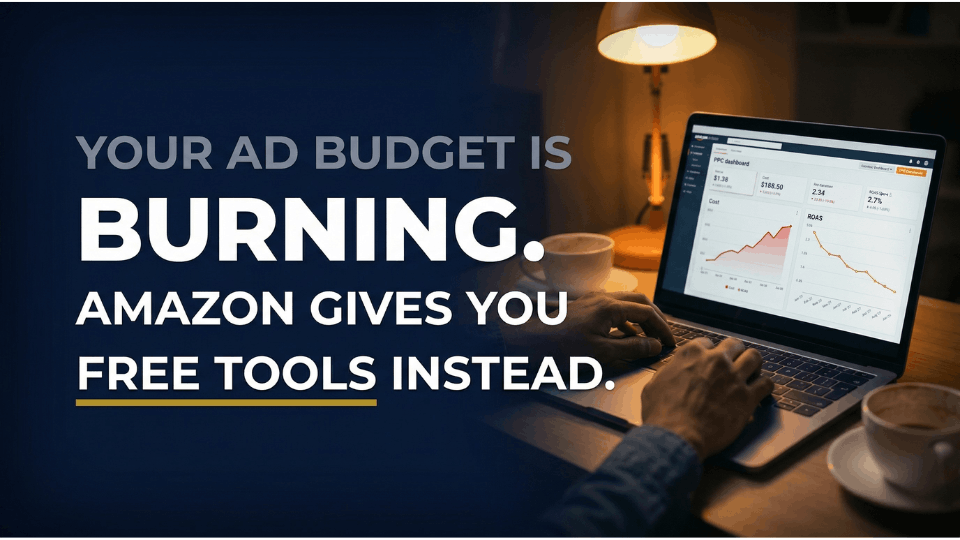
The Rising Cost of Amazon PPC in India
Every Indian seller running Sponsored Products has felt it the cost per click keeps climbing. Categories like beauty, electronics, and home décor have become bidding wars where even long-tail keywords now cost ₹15 to ₹25 per click. Vikram Nair from Kochi launched a kitchen accessories brand last year and quickly discovered that his ₹40,000 monthly ad budget was generating clicks but barely covering his advertising cost of sales. The maths simply stopped working once competitors entered the same keyword space.
How Free Marketing Tools Amazon Sellers Have Access To Can Change the Game
Here is what most sellers miss. The moment you enrol in Brand Registry, Amazon unlocks a suite of zero-cost marketing tools Amazon Posts, Brand Story, A+ Content, and your Brand Storefront. These are not gimmicks. Amazon Posts functions like a social media feed built directly into the marketplace, and the Brand Story carousel gives you prime real estate on every product detail page you own. Yet the majority of Indian sellers never set them up. That gap between what is available and what is used is where your advantage lives. And yes, Amazon Posts is completely free no cost per click, no impression fees.
The Brand Registry Prerequisite
Both Amazon Posts and Brand Story require one thing first Brand Registry enrolment. You will need an active trademark registered with the Indian Trademark Office (or the USPTO if you are selling on Amazon.com). If you have not checked your eligibility yet, our guide on Amazon Brand Registry in India walks you through the full setup process and common mistakes to avoid. Everything in this guide builds on that foundation.
What Are Amazon Posts and How Do They Work?
Amazon Posts Explained — Your Brand’s Social Feed Inside Amazon
Think of Amazon Posts as your brand’s Instagram feed, except it lives right inside the Amazon shopping app. Each post includes your brand logo, a lifestyle image or video, a short caption, a category tag, and a clickable link to your product detail page. Amazon launched Posts in 2019 to give brand-registered sellers a way to tell their story visually without spending on advertising. Shoppers scroll through your feed, discover products, and click through to buy all on mobile, which matters because most Indian Amazon shoppers browse on their phones.
Where Amazon Posts Appear on the Platform
Your posts do not just sit in one place. Amazon’s algorithm distributes them across several high-visibility locations – the product detail page carousel, your brand feed, category-based feeds, the related posts section on competitor listings, the Inspire tab, and even the top of relevant search results. You cannot choose exactly where a post appears, but the more you publish and the more engagement your posts receive, the wider Amazon spreads them. This is organic reach in the truest sense.
Amazon Posts Eligibility and Availability for Indian Sellers
Here is the honest picture. Amazon Posts is currently confirmed for the US marketplace. If you are an Indian seller using Amazon Global Selling to list products on Amazon.com, you can use Posts for those US listings. For sellers operating only on Amazon.in, the Brand Story feature within A+ Content is your closest equivalent and arguably more powerful for conversion. Whether you sell domestically or globally, there is a zero-cost branding tool waiting for you.
Amazon Posts Best Practices That Drive Free Traffic
Create Lifestyle Content That Stops the Scroll
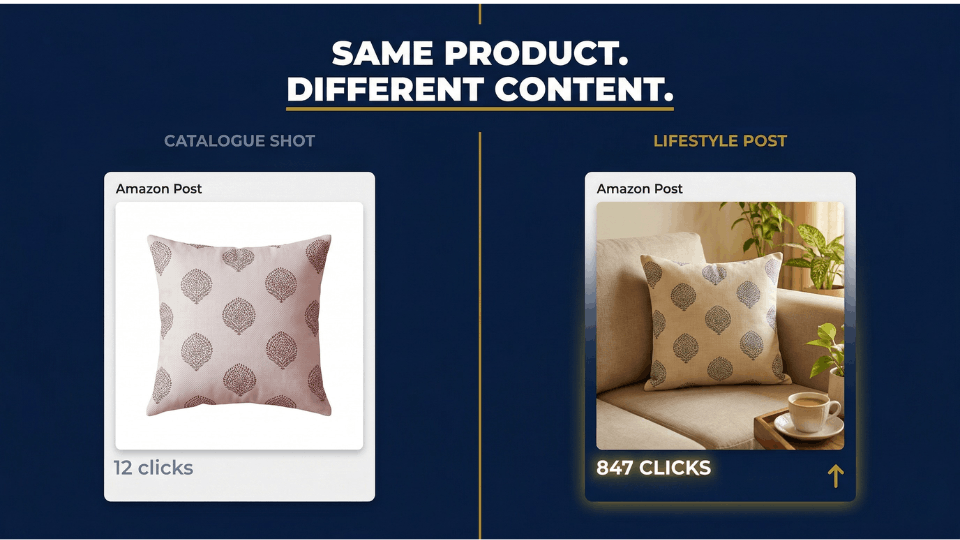
The single biggest mistake sellers make with Amazon Posts is uploading the same white-background product images from their listing. Posts are designed to feel like social media, not a catalogue. Anita Deshmukh from Surat sells handwoven cushion covers and saw her post engagement double when she switched to styled living room settings. Show your product being used in real Indian homes and offices that is what stops a shopper mid-scroll.
Write Short, Benefit-Driven Captions
Less is more with captions. Data consistently shows that shorter captions even four or five words generate the highest engagement. Focus each caption on a single benefit. “Monsoon-proof. Always dry.” beats a three-sentence paragraph about fabric technology. Include relevant keywords naturally, but your caption is a hook, not a product description.
Post Consistently and Tag Multiple Products
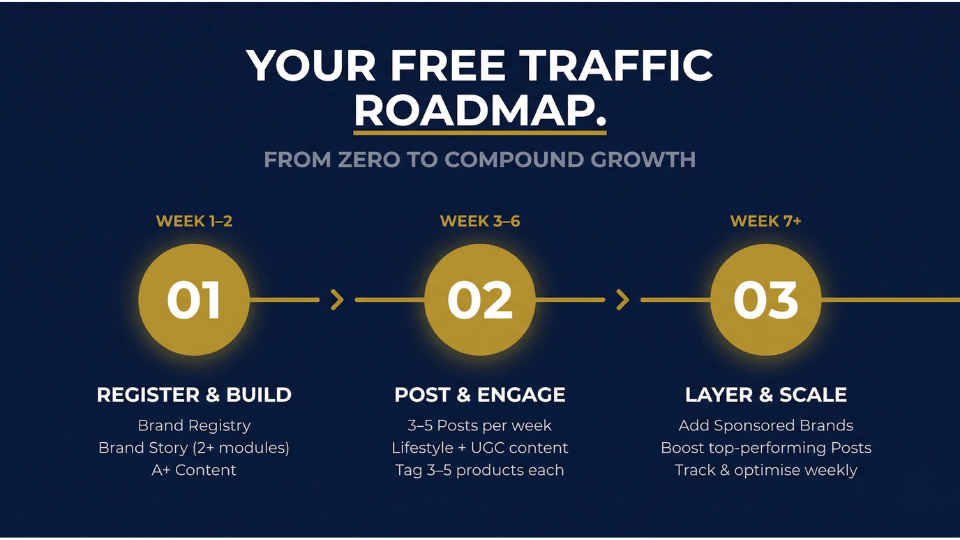
Consistency matters more than volume. Aim for three to five posts per week, and ensure you always have at least ten posts live on your profile. Here is a detail many sellers overlook – tagging three to five products per post has been shown to increase clicks by 37 per cent compared to tagging just one or two. Each tagged product becomes a clickable gateway to a different listing, multiplying the free traffic from a single piece of content.
Use UGC and Micro-Influencer Content
If your customers are already posting photos of your products on Instagram or WhatsApp groups, ask their permission and repurpose that content for Amazon Posts. User-generated content builds authentic social proof inside the marketplace. You can also collaborate with micro-influencers, offer a product sample in exchange for lifestyle photos. Siddharth Rao from Hyderabad sells eco-friendly lunch boxes and built his entire Posts library from five micro-influencer collaborations, each receiving one product. Total cost: five units. Total return: months of free traffic.
What Is the Amazon Brand Story and Why It Matters
Amazon Brand Story vs Regular A+ Content — Key Differences
Many sellers confuse Brand Story with standard A+ Content, but they occupy different real estate. A+ Content replaces your product description with rich visuals and comparison charts it is product-specific. The Amazon A+ Content Brand Story sits in a separate section labelled “From the brand,” just below the bullet points and above A+ Content. It uses a scrollable carousel format with up to 19 modules, and it rolls out across every ASIN you apply it to. Brand Story is available on Amazon.in for brand-registered sellers, making it the most accessible free traffic tool for domestic Indian sellers.
How the Amazon A+ Content Brand Story Builds Trust and Drives Sales
Research shows that 87 per cent of shoppers are willing to pay more for products from a brand they trust, and customers who feel an emotional connection have a 306 per cent higher lifetime value. Brand Story is where you build that connection. Deepali Shiva from Pune sells organic skincare and added a Brand Story carousel featuring her sourcing journey from Kerala farms. Within three months, her repeat purchase rate climbed by 18 per cent. Brand Story did not just tell her story it made people trust her enough to come back.
The 4 Brand Story Modules You Should Use
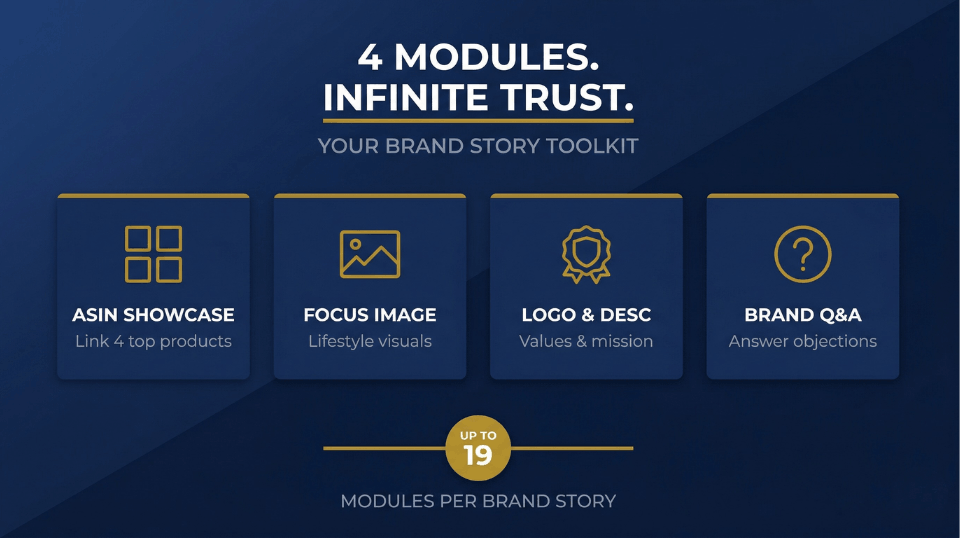
Brand Story offers four module types. The Brand ASIN and Store Showcase gives you a four-grid layout linking directly to top products perfect for cross-selling. The Brand Focus Image displays large lifestyle visuals carrying your brand’s aesthetic. The Brand Logo and Description module shares your values and mission concisely. The Brand Q&A module addresses common objections before shoppers even ask. Together, these create a mini-storefront experience on the detail page, keeping customers engaged with your brand.
If you want to go deeper into building a brand that stands out on Amazon from Brand Registry setup to listing optimisation to traffic strategy the 3-Day Amazon Business Training walks you through the entire process step by step.
Step-by-Step — How to Drive Free Traffic to Amazon Listing Using Brand Story
Setting Up Your Brand Story in Seller Central
Getting started takes less than fifteen minutes. Log in to Seller Central and navigate to Advertising, then A+ Content Manager. Select Brand Story as your content type. You will first set up the Brand Carousel Background — this is the anchor image that stays fixed while shoppers scroll through your modules. Upload a desktop version at 1646 by 625 pixels and a mobile version at 463 by 625 pixels. Add your headline and body text, then start adding modules. Once you are satisfied, apply the Brand Story to your ASINs and submit for review.
Designing Brand Story Content That Converts
Design consistency is everything. Use the same colours, typography, and visual language across your Brand Story that you use on your packaging and social media. Add your brand store ID to the module, this creates a “See All” link that drives traffic directly to your Amazon Storefront. Srivas Raju from Bengaluru sells resistance bands and used his Brand Story to highlight three product tiers in a comparison-style layout. Shoppers who landed on his mid-range product page could instantly see the premium option and 12 per cent of them upgraded.
Link Products Strategically for Cross-Selling
Here is a detail that separates smart sellers from everyone else. The Brand ASIN and Store Showcase module lets you link four ASINs. Combine that with the Standard Comparison Chart in your regular A+ Content, which supports six ASINs, and you can link up to ten products from a single listing page. That is ten pathways for a shopper to stay inside your brand ecosystem instead of clicking to a competitor every link is a chance to convert.
Amazon Posts Free Traffic vs Paid Ads — What the Numbers Say
Amazon’s Own Data on Posts Performance
The numbers speak clearly. According to Amazon’s data from Q1 2025, sellers who actively used Amazon Posts saw a 3.1 per cent increase in overall sales, a 36 per cent higher add-to-cart rate, and roughly a 17 per cent higher average order value. These are not marginal gains, they are meaningful lifts that came with zero ad spend. For a seller doing ₹5,00,000 in monthly revenue, a 3.1 per cent sales lift translates to over ₹15,000 in additional monthly income without spending a rupee on advertising.
When to Combine Posts and Brand Story with PPC
Posts and Brand Story are not replacements for PPC they are force multipliers. Posts and Brand Story work at the top of the funnel, building awareness and familiarity. PPC captures high-intent shoppers actively searching for your category. The strongest sellers layer all three. Allocate your full ad budget to Sponsored Products and Sponsored Brands for direct conversions, while running Posts and Brand Story alongside at zero additional cost. When shoppers see your brand in Posts, encounter your Sponsored Brand ad, and then land on a listing with a polished Brand Story, the cumulative conversion effect is far greater than any single channel alone.
The 3-Day Amazon Business Training covers exactly how to build this kind of layered traffic strategy combining organic brand tools with paid campaigns for maximum impact on the Indian marketplace.
Common Mistakes Indian Sellers Make with Amazon Posts and Brand Story
Using Product-Only Images Instead of Lifestyle Content
This keeps coming up because it is the most common error. Amazon Posts exists to showcase your product in context, not to replicate your listing gallery. A white-background product shot in a Posts feed gets scrolled past instantly. The fix is simple photograph your product in a real setting. If you sell kitchen organisers, photograph them in an actual Indian kitchen with spices and utensils nearby. Relatable context drives clicks.
Ignoring Brand Story Because “My Brand Is Small”
Small brands benefit from Brand Story more than established ones. When a shopper lands on a listing from a brand they have never heard of, Brand Story is the section that answers the unspoken question “Can I trust this company?” Vidya David from Lucknow launched a single-product hair oil brand and assumed Brand Story was only for multi-product catalogues. She added just two modules a Logo and Description plus a Brand Focus Image showing the sourcing process and saw her conversion rate improve by 9 per cent within six weeks. Size does not matter. Credibility does.
Not Tracking Performance Metrics
Publishing posts without checking what works is like running PPC without looking at your campaign reports. Monitor impressions, click-through rate, follow clicks, and product clicks. Use the data to double down on content styles that resonate. Rotate images, test seasonal messaging around Diwali or back-to-school periods, and treat Posts as a data-driven channel rather than a creative afterthought.
Frequently Asked Questions
What are Amazon Posts and how do they work?
Amazon Posts is a free, social-media-style feed for brand-registered sellers. You upload lifestyle images, write short captions, and tag products. Posts appear on mobile across product detail pages, brand feeds, and category feeds. Shoppers click through directly to your product page, giving you free traffic without ad spend.
Are Amazon Posts free for sellers?
Yes, Amazon Posts is completely free with no cost per click or impression fee. The only requirement is Brand Registry enrolment with an active trademark. It remains one of the most cost-effective marketing tools on the platform.
How do I create a Brand Story on Amazon?
In Seller Central, go to Advertising, then A+ Content Manager. Select Brand Story, choose your modules — ASIN Showcase, Focus Image, Logo and Description, or Q&A, upload images and copy, apply to your ASINs, and submit. You need Brand Registry and an active trademark.
Do Amazon Posts help increase sales?
Amazon’s Q1 2025 data shows sellers using Posts experienced a 3.1 per cent sales increase, 36 per cent higher add-to-cart rate, and roughly 17 per cent higher average order value. These gains come with zero advertising cost, making Posts a high-return tool for consistent sellers.
What is the difference between Amazon Posts and A+ Content?
A+ Content enhances your product description with rich visuals and comparison charts on the detail page. Amazon Posts is a separate social feed for lifestyle images and captions. Brand Story is a scrollable carousel in the “From the brand” section above A+ Content. Each serves a distinct purpose in your brand toolkit.
Can Indian sellers use Amazon Posts on Amazon.in?
Amazon Posts is currently available on the US marketplace. Indian sellers on Amazon Global Selling can use Posts for US listings. For Amazon.in sellers, Brand Story within A+ Content serves a similar purpose building brand awareness and driving free on-platform traffic.
How often should I post on Amazon Posts?
Aim for three to five posts per week with at least ten posts live at all times. Consistency signals to Amazon’s algorithm that your brand is active, improving placement. Quality matters more than quantity, one strong lifestyle post outperforms five rushed product shots.
Does Brand Story help unlock Premium A+ Content?
Yes. A published Brand Story is one prerequisite for gaining free access to Premium A+ Content, which offers interactive hotspots, auto-play videos, and enhanced comparison charts. This makes Brand Story doubly valuable — it builds brand equity now and unlocks richer tools for the future.
Conclusion
Amazon Posts and Brand Story are two of the most powerful free traffic tools available to brand-registered sellers — and most Indian sellers barely use them. You do not need a bigger ad budget to get more eyeballs. You need to use the tools Amazon has already given you. Start with Brand Story on your Amazon.in listings today, even if it is just two modules. If you sell on Amazon.com through Global Selling, add Posts to your weekly content calendar. Layer these organic tools on top of PPC and watch the compound effect on traffic, trust, and conversions. If you are ready to build a complete Amazon traffic strategy, the 3-Day Amazon Business Training gives you the roadmap to make it happen. Your customers, and your margins, will thank you.
