
Last November, Rohan Manohar from Nagercoil launched his first Sponsored Products campaign with ₹2,000 per day. He picked broad keywords, accepted every bid Amazon suggested, and waited for sales to roll in. Fourteen days later, he had spent ₹28,000, collected three orders, and his ACoS sat at 187%. His Amazon PPC budget was gone before he understood what it was supposed to do.
Most new sellers treat their first month of advertising like a lottery ticket rather than a structured experiment. They throw money at the platform, panic when results look ugly, and start changing everything at once. The algorithm never gets clean data, the seller never gets clarity, and the budget simply vanishes.
This post gives you a day-by-day plan for your first 30 days of Amazon PPC. A specific framework for how much to spend, what bids to set, when to adjust, and what to leave alone.
Why Your Amazon PPC Budget Strategy Fails in the First Month
The Expensive Mistake of Guessing Your Bids
The fastest way to waste your Amazon PPC budget is accepting Amazon's suggested bids at face value. Those suggestions lean high because Amazon profits from every click regardless of whether you make a sale. Abisha Stalin from Madurai launched a lunch box at ₹749 and accepted a suggested bid of ₹18. With ₹1,000 daily budget, her ads ran out before noon each day. After 10 days she had 550 clicks, nine orders, and a 112% ACoS.
What Amazon's Algorithm Is Actually Doing in Week One
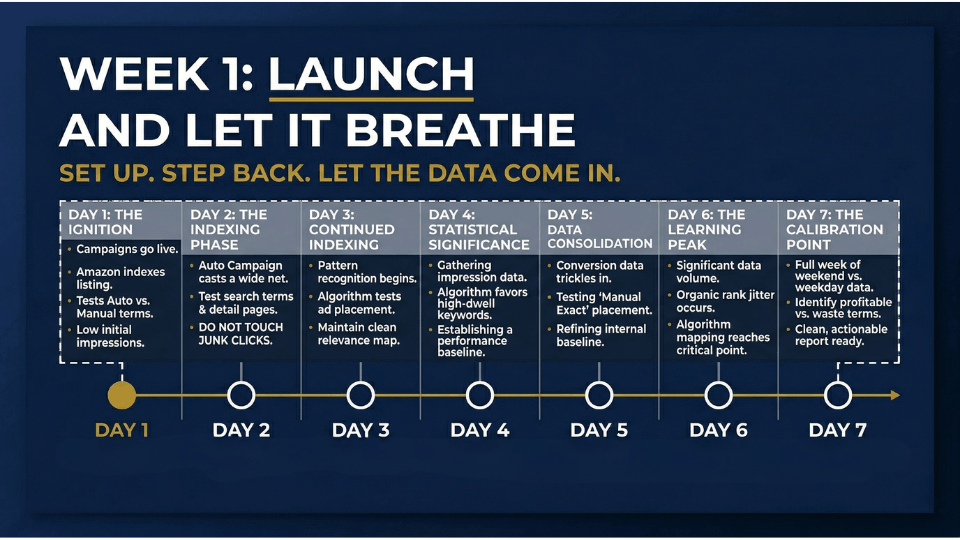
When you launch a new campaign, Amazon's algorithm enters a learning phase. The system tests placements, matches ads to search queries, and collects conversion signals. This takes a minimum of seven days, and the attribution window means some sales from early clicks will not register for up to 14 days. Acting on day-three data is like judging a film by its opening credits.
The Data-First Mindset That Changes Everything
Your first 30 days are not a profit period. They are a paid research sprint. Every rupee should buy useful information: which keywords convert, which search terms waste money, what your actual cost per acquisition looks like. When you approach your budget as a research investment, you stop panicking and start learning.

How Much to Spend on Amazon PPC as a New Seller
Calculating Your Break-Even ACoS Before You Spend a Rupee
You need one number before setting any budget: your break-even ACoS. If you sell a product for ₹999 and total costs add up to ₹650, your profit margin is roughly 35%. That means your break-even ACoS is 35%. Spend less than that on ads per sale and you are profitable. Spend more and you are subsidising Amazon's bottom line. If you are still working out your margins, our guide on understanding Amazon fees breaks down every cost you need to account for.
Setting a Realistic Daily Budget for Indian Sellers
You need at least 20 to 30 clicks per day for meaningful data within two weeks. If your average CPC sits around ₹15 to ₹25, that means roughly ₹500 to ₹750 daily as a starting floor. Suresh Iyer from Coimbatore started at ₹300 per day for kitchen accessories. After two weeks he had fewer than 150 clicks across 40 keywords, too thin for any decisions. When he moved to ₹800 per day focused on 12 relevant keywords, he collected actionable data in a single week.
The 2.5% Rule for Your Starting Bid
Your target CPC should not exceed 2.5% of your product's selling price. For a ₹1,000 product, that is ₹25 maximum. For ₹ 500, your ceiling is ₹12.50. This rule keeps you from overbidding while generating enough impressions for useful data. For a deeper look at how to set the right selling price in the first place, check out our guide on deciding your product's selling price.
Your Amazon PPC Bid Strategy for Days 1–7
Launch Day: Setting Up Auto and Manual Campaigns Together
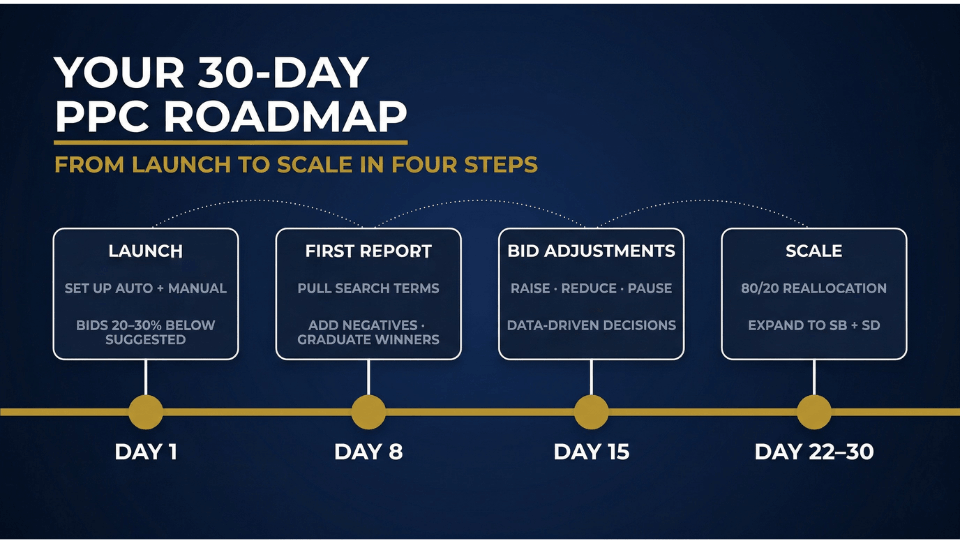
Your day-one structure needs two campaigns in parallel. First, an automatic campaign for keyword discovery where Amazon matches ads to queries based on listing content. Second, a manual exact match campaign with five to ten researched keywords for controlled data. Set both to “dynamic bids, down only” so Amazon can lower bids on weak clicks but cannot raise them. If you want a detailed walkthrough of the ideal launch campaign structure, our article on the only 3 PPC campaigns you need at launch covers the full setup.
What Your Starting Bids Should Look Like
Start 20 to 30% below Amazon's suggested bid. If Amazon suggests ₹20, set ₹14 to ₹16. Meena Krishnan from Chennai accepted suggested bids on all 15 keywords. Her ₹800 daily budget was gone before noon, missing the evening shopping window entirely. Dropping bids to ₹14 let her ads run all day and improved her ACoS by 31% within a week.
The One Rule for Week One: Don't Touch Anything
After launching, do not adjust bids, pause keywords, or change budgets for seven full days. Amazon's attribution window credits sales to clicks that happened days earlier. Reacting on day two means acting on incomplete data. Set your campaigns and come back on day eight.
Optimising Your Amazon PPC Daily Budget in Days 8–14
Reading Your First Search Term Report
On day eight, pull your search term report from Campaign Manager. Navigate to your automatic campaign, select the last seven days, and download the report. You are looking for two things: search terms that generated at least one order (your winners) and search terms that accumulated spend with zero conversions (your leaks). Sort by spend descending to spot the biggest drains first. This is where real Amazon PPC strategy for beginners starts, because the data tells you exactly what real shoppers typed before finding your product.
Adding Your First Negative Keywords
Any search term with 15 or more clicks and zero conversions deserves scrutiny. If it is irrelevant, add it as a negative exact match. Abishek Verma from Bangalore was selling premium yoga mats but his auto campaign matched terms like “cheap exercise mat.” By negating 12 irrelevant terms he saved roughly ₹4,200 per week and redirected budget toward converting keywords.
Graduating Winners into Manual Exact Campaigns
Take converting search terms from your auto campaign and add them as exact match keywords in your manual campaign at a slightly higher bid. Then negate those terms in the auto campaign to stop competing against yourself. This “graduate and negate” workflow turns auto into pure discovery and manual into a precision profit machine.
The Amazon PPC First 30 Days Bid Adjustment Framework
When to Raise Bids (And by How Much)
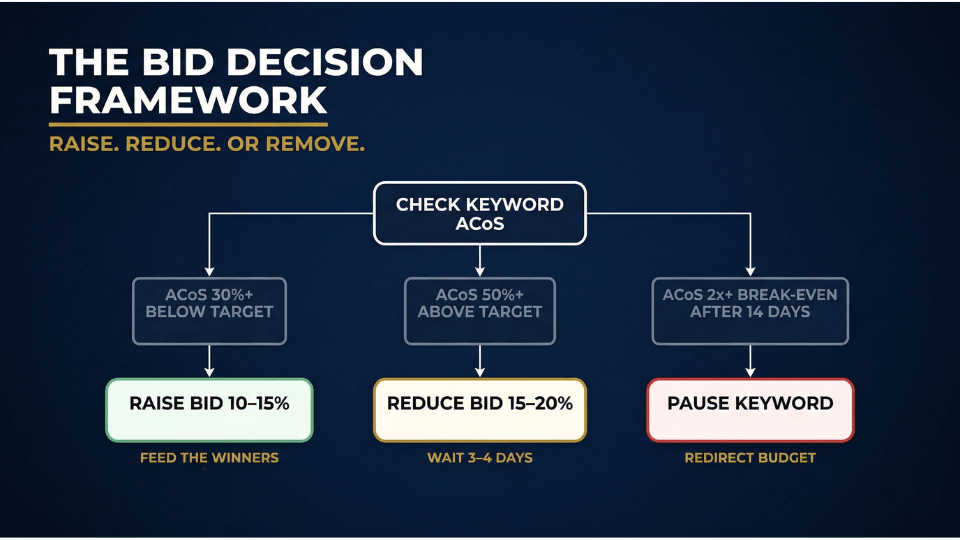
With two weeks of data, you can make informed adjustments. If a keyword converts at an ACoS 30% or more below your break-even, raise the bid by 10 to 15%. If a relevant keyword gets few impressions despite a reasonable bid, bump it by 15 to 20%. Your Amazon PPC bidding strategy here is about feeding winners, not exploring new territory.
When to Lower Bids (Without Killing Momentum)
If a keyword exceeds your target ACoS by 50% but still generates sales, reduce the bid by 15 to 20% and wait three to four days. Kavita Joshi from Indore had eight keywords above 60% ACoS after 14 days. She reduced bids by ₹3 to ₹4 every four days. Six keywords settled into a profitable 25 to 32% range. The two that never recovered were paused with confidence. For a closer look at the most expensive PPC errors sellers make, our breakdown of Amazon PPC mistakes that cost the most is worth a read.
The Kill Switch: When to Pause a Keyword Entirely
Pause a keyword when it meets all three conditions: it has run for at least 14 days with sufficient clicks, its ACoS exceeds twice your break-even target, and you have already attempted bid reductions without improvement. At that point, continuing to spend on it is not optimism. It is stubbornness. Redirect the budget to your proven winners and move on without guilt.
What a Good ACoS Target Looks Like for New Products
Launch Phase ACoS vs. Long-Term ACoS
A 35 to 50% ACoS during your first 30 to 60 days is acceptable if organic sales are climbing alongside ad spend. You are not paying for immediate profit. You are paying for sales velocity that pushes your product up in organic rankings. As your listing gains reviews and conversion history, your ACoS will naturally compress. Most sellers who optimise consistently bring ACoS to 20 to 30% by month three, and below 20% once the product matures.
How to Track TACoS Alongside ACoS
TACoS (total advertising cost of sales) measures ad spend against total revenue, not just ad-driven revenue. Shenin Mathew from Jaipur had a 38% ACoS after 30 days, which looked worrying alone. But his TACoS dropped from 22% to 14% because organic sales were climbing. His ads were buying rank, not just orders. That perspective kept him from killing campaigns that were quietly building his business. To understand the broader metrics that matter, our article on key metrics to monitor in Seller Central walks you through the full picture.
Days 22–30: Building Your Amazon Advertising Budget for Scale
The 80/20 Budget Reallocation
By day 22, a small handful of keywords drive most conversions. Shift 60 to 70% of your Amazon advertising budget toward these proven performers. Reduce discovery campaigns to 20 to 30% of total spend. Your auto campaign still uncovers new terms, but it no longer deserves the majority of your money.
Expanding to Sponsored Brands and Sponsored Display
If your Sponsored Products are stable, consider allocating 15 to 20% toward Sponsored Brands campaigns. These build brand awareness and drive traffic to your Amazon storefront, which supports long-term growth. Reserve another 5 to 10% for Sponsored Display retargeting, which reaches shoppers who viewed your product but did not buy. Only expand into these ad types once your core Sponsored Products budget generates consistent, predictable results.
Setting Your Month 2 Amazon PPC Budget
Use month-one data to plan month two. If campaigns are profitable, increase budget on top keywords by 15 to 20%. If still above break-even but TACoS trends downward, hold steady. Ahmed Kabir from Kannur doubled down on five keywords converting below 22% ACoS, cut eight underperformers, and launched Sponsored Brands at Rs 400 per day. His ad spend rose 18% but revenue jumped 41%. Month one gave her the data to spend smarter.
FAQ
How much budget should I start with for Amazon PPC?
For most categories on Amazon India, ₹500 to ₹1,500 per day gives you enough clicks for useful data within two weeks. Start at a level generating 20 to 30 clicks daily, then scale based on performance.
How long does it take for Amazon PPC to work?
You will see clicks within hours. Meaningful trends take two to four weeks because Amazon's algorithm needs time to test placements and its attribution window delays sales reporting by up to 14 days. Plan for a 30-day learning period before judging profitability.
What is a good ACoS for a new Amazon product?
During launch, 35 to 50% ACoS is typical and acceptable if organic sales grow alongside paid. Target 20 to 30% by month three. For mature products, aim for 15 to 20%.
Should I use automatic or manual campaigns first?
Use both from day one. Auto campaigns discover search terms shoppers use. Manual exact campaigns give controlled data on researched keywords. Auto discovers, manual converts, and you migrate winners between them.
How do I set my Amazon PPC bids for the first time?
Start 20 to 30% below Amazon's suggested bid and use the 2.5% rule: your max CPC should not exceed 2.5% of your product's selling price. Adjust after seven to fourteen days based on conversion data.
Can I run Amazon PPC with a ₹500 per day budget?
Yes, but focus on a narrow set of exact match keywords rather than spreading thin. At ₹500 per day you might get 20 to 30 clicks. Concentrate on keywords where conversion potential is highest, then expand once you find winners.
How often should I optimise my Amazon PPC campaigns?
Review search term reports and adjust bids weekly. Daily changes introduce noise. A weekly cadence reveals patterns while catching problems early. Schedule a deeper audit every two weeks covering budget allocation and campaign structure.
What is the difference between ACoS and TACoS?
ACoS measures ad spend as a percentage of ad-generated revenue. TACoS measures ad spend against total revenue including organic sales. A stable ACoS with declining TACoS means your ads are fuelling organic growth beyond direct ad sales.
Conclusion
Your first 30 days are not about profit. They are about building the machine that generates profit. Every rupee spent with a plan teaches you which keywords matter, what bids work, and where your customers are hiding in the search results.
Launch with discipline in week one, extract insights in week two, refine bids in week three, and reallocate for growth in week four. By day 30 you will own something most sellers never get: a campaign built on data instead of guesswork.
If you want expert guidance on building a profitable Amazon business beyond PPC, the 3-Day Amazon Business Training programme walks you through the complete blueprint from product selection to scaling with ads. It is the fastest way to skip the expensive trial-and-error phase and start with a plan that works.
