

On the second night of this year’s Great Indian Festival, the last brass diya set belonging to Lakshmi Narayanan from Madurai left the fulfilment centre at 1:40 am. She found out at 7:15 am, when her phone showed zero orders since midnight. Her restock took eleven days to arrive, and her listing spent nine of them off page one.
Stock runs out, competitors cut prices and hijackers jump onto listings while you sleep. An AI agent for Amazon sellers is how you stop finding out over breakfast.
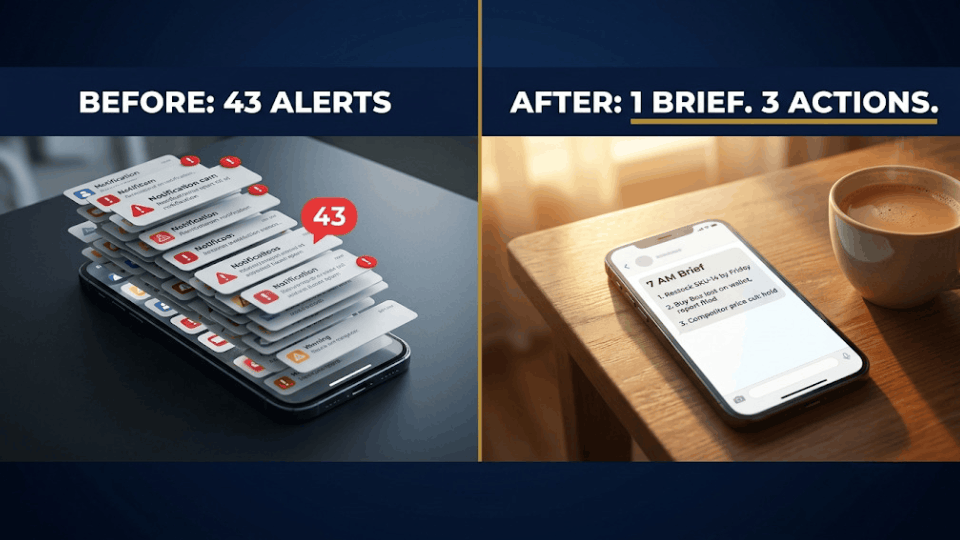
This guide shows you how to build one. Your agent checks three things through the night (low FBA stock, price changes and a lost Buy Box), decides which ones matter, and sends you one short message at 7 am. You won’t write any code, and every tool here works for Amazon.in sellers.
What Happens to Your Listings While You Sleep
The three overnight leaks that cost the most
Most overnight damage comes from three places. The first is an FBA stockout: once units hit zero, your ads stop serving and organic rank slides, and it rarely climbs back as fast as it fell. The second is a price change, from a competitor undercutting you at midnight or your own price shifting through a pricing rule or typo. The third is the Buy Box, now called the Featured Offer. If another seller wins it on your listing, shoppers buy from them instead.
Why your morning Seller Central check is too late
Seller Central shows you what happened, not when. By the time you log in at 9 am, a problem that started at 2 am is seven hours old, and Amazon won’t push you a notification when an item goes out of stock.
Salman Qureshi from Bhopal learnt this the expensive way. A hijacker listed a copy of his leather wallet at ₹40 below his price just before midnight and held the Buy Box until Salman noticed at lunch. Those twelve hours cost him roughly ₹11,000 in sales, plus a one-star review from a buyer who received the fake.

What Is an AI Agent for Amazon Sellers?
An AI agent for Amazon sellers is a small automated assistant that checks your account data on a schedule, compares it with your rules, and tells you what to do when something breaks one. It recommends; you decide.
Listing monitoring tools vs. an AI agent
Traditional Amazon listing monitoring tools alert you to every change, down to a ₹2 price wobble. Nikhil Joshi from Indore ran three of them for his kitchen storage brand, got forty emails a day and muted them all, which is how he missed a stockout on his best seller. An agent ignores what doesn’t break your rules, ranks the rest by money at risk and writes one brief.
The three parts: eyes, brain and voice
The eyes collect data: your stock, your price and who holds the Buy Box. The brain is an AI step that reads it against your rulebook. The voice is the message on your phone.
Why not just use Amazon Seller Assistant?
Amazon Seller Assistant is free in India, works in English and Hinglish, and is excellent for daytime questions. Its always-on workflows, which keep watching while you’re logged out, are limited to Amazon’s US stores for now. Until they reach Amazon.in, building your own agent is how you get overnight coverage. Our guide to AI tools for Amazon sellers in India makes a good companion read.
Your No-Code AI Agent Toolkit for Amazon.in
Can you really build this without coding?
Yes. You’ll build the agent in Make.com, a drag-and-drop tool where each step is a box connected to the next, and you’ll write your rules in plain English. Skip Zapier for this one, because its Amazon Seller Central connector only supports the US marketplace.
The five tools you need (most are free)
Here’s the full stack. Three of the five tools cost nothing:
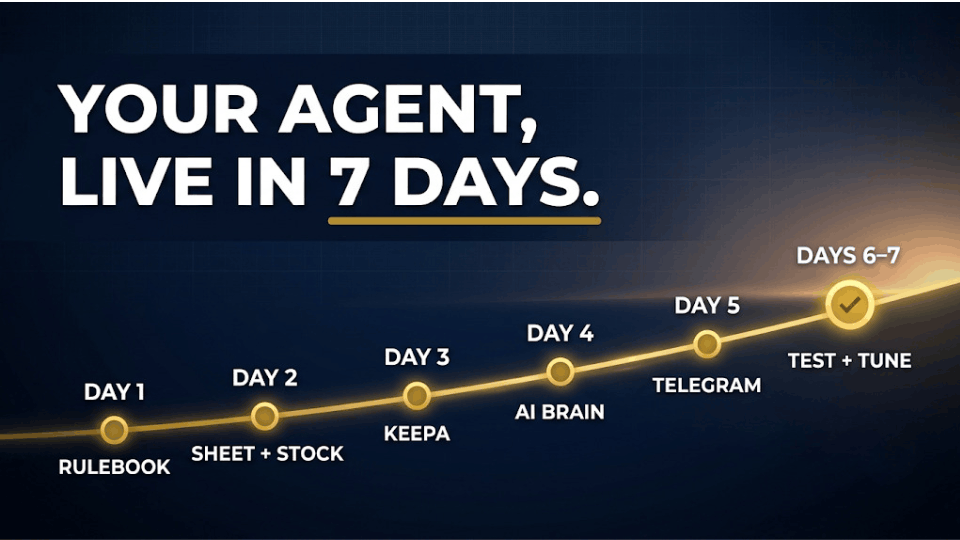
- Google Sheets is the memory, with tabs for your ASINs and rules, your stock and a log of every check.
- Keepa is the eyes for price and Buy Box. It covers Amazon.in, and its API feeds Make fresh data per ASIN.
- Make.com is the scheduler. The free plan suits testing; overnight checks need the Core plan.
- A ChatGPT or Claude module inside Make is the brain.
- A Telegram bot is the voice, free and ready in five minutes.
Your FBA stock count lives in Seller Central, so it needs its own feed. Use a tool that syncs FBA stock from Seller Central daily, or, when you’re starting out, paste the FBA inventory report into the Stock tab each evening. It takes two minutes.
Write your rulebook before you build
First, decide what “something’s wrong” means for your store: say, any SKU below 21 days of cover, any price move above 5%, or a Buy Box seller who isn’t you. Ananya Das from Kolkata, who sells handloom cotton sarees, wrote hers on a Sunday morning and had her agent running by evening.
To skip that step, grab our Agent Rulebook template in Google Sheets, with the rules tab, stock tab and days-of-cover formula ready to go. Download the Agent Rulebook template
Watch #1: Amazon Low Stock Alerts Before FBA Runs Dry
Does Amazon tell you when stock is low?
Partly. Seller Central lets you set Replenishment Alerts product by product inside Manage FBA Inventory, but you maintain each one yourself, and none tells you what to do next or which SKU comes first. That’s the gap your agent fills.
Days of cover beats units left
Fifty units sounds safe until you’re selling twelve a day. Days of cover fixes that: divide units available by your average daily sales over the last 14 days, then compare the result with your full lead time, meaning supplier days plus the days Amazon takes to receive a shipment. In festive weeks, use your highest recent daily sales, because demand can double in a weekend.
What a useful low stock alert says
A good alert shows the SKU, units left, days of cover, units already inbound and the date you must create your next shipment by. Joseph Mathew from Thrissur, who sells cold-pressed coconut oil, got that alert at 19 days of cover, ten days before Diwali. He created his shipment the same morning and stayed in stock through the festival while two competitors ran out.
Watch #2: Price Changes Worth Waking Up For
Which price moves deserve an alert?
Your agent should flag two kinds of price change. The first is any change to your own price, whether from an Automate Pricing rule, a team member’s typo or a listing that lost its price. The second is a competitor on your top five ASINs dropping more than 5 to 10%. A useful Amazon price change alert ignores anything smaller.
Matching a price cut without starting a war
When a competitor cuts deep, don’t match automatically. Your agent should hand you context instead: the competitor’s price history from Keepa and your break-even price after fees and GST. When a rival undercut Harleen Kaur from Jalandhar by 18% at midnight during a sale, her agent noted that the same seller had run three 48-hour flash cuts that quarter. She held her price on her yoga mats, added a 5% coupon and kept her margin, and the rival’s price bounced back two days later.
Watch #3: Amazon Buy Box Alerts and Hijackers
How the agent spots a lost Buy Box
On each run, Keepa returns the seller ID holding the Buy Box, and your agent compares it with yours (Seller Central shows it as your Merchant Token under Account Info). If they differ, or nobody holds the Buy Box at all, that’s an Amazon Buy Box alert worth sending.
Why did you lose the Buy Box on your own listing?
Owning the brand doesn’t guarantee the Buy Box. The usual causes are a hijacker with a lower price, your own stock running out, a price well above what the item recently sold for (which can make Amazon suppress the Buy Box), or a rival offer with faster delivery. Naming the likely cause saves you the first hour of guesswork.
Your first-hour hijacker response
For a hijacker, take screenshots of the offer, place a test buy if you suspect a counterfeit, and file a report through Brand Registry’s Report a Violation tool. Venkatesh Gowda from Mysuru, who sells sandalwood incense, got his alert at 2:14 am, reported by 9 am and had the Buy Box back within two days. Before the agent, the same problem cost him a week.
Want the exact wording we use for the agent’s instructions and morning brief? The copy-paste prompt and Telegram message format are in one short document. Get the agent prompt pack

Give Your Agent a Brain: The 7 AM Morning Brief
The prompt that turns data into decisions
The AI module in Make receives your sheet rows and rulebook on every run. Keep its instructions short: flag only what breaks a rule, explain why in one line, suggest one action, and stay silent when nothing’s wrong. Ask for English or Hinglish, whichever you read faster at 7 am.
Ranking alerts by rupees at risk
Tell the agent to sort issues by money at risk: average daily sales multiplied by the days the problem could last. A stockout on a best seller doing ₹8,000 a day outranks a lost Buy Box on a product doing ₹600. Ritika Saxena from Noida now reads her brief over chai in about four minutes, where her morning round of Seller Central used to take forty.
Recommend-only: why it never touches your prices
Keep your agent in recommend-only mode: it never changes a price or creates a shipment. AI still misreads data now and then, and one wrong automatic price change during a sale can cost more than the agent saves in a year. Amazon’s own workflows can likewise be set to wait for your approval before acting.
Go Live With Your AI Agent for Amazon Sellers
How often should you monitor Amazon listings?
Match each check to how fast the data changes. Stock data refreshes daily, so one nightly check is plenty. Price and the Buy Box can flip within minutes, so check them every two to four hours overnight. More frequent checks burn Make credits and Keepa tokens without catching much more.
Your first week: test, tune and trust
Run your AI agent for Amazon sellers alongside your usual manual checks for seven days before you rely on it, then adjust the thresholds. Bhavesh Patel from Surat, who sells printed dupattas, got fourteen alerts a day at first. Raising his price threshold from 2% to 7% and his stock alert from 30 to 21 days of cover brought that down to two, and both were worth acting on.
When to upgrade to a paid alert tool
This setup comfortably covers a few dozen ASINs. Past a hundred, or across several marketplaces, a paid monitoring tool earns its fee, and your agent can stay on as the brain that turns its alerts into your brief.
Frequently Asked Questions
What is an AI agent for Amazon sellers?
It’s an automated assistant that checks your Amazon data on a schedule, compares it with your rules and tells you what needs attention. Unlike a basic alert tool, it filters out noise, ranks problems by money at risk and suggests a next step, all without any code.
How do I get an alert when I lose the Buy Box on Amazon?
Use a data source that reports the current Buy Box seller, such as Keepa, and compare that seller ID with yours on every check. In this setup, Make runs the comparison every few hours and messages you on Telegram when the Buy Box seller isn’t you or the Buy Box disappears.
Does Amazon tell you when your stock is low?
Only if you set it up yourself. Seller Central offers Replenishment Alerts per product in Manage FBA Inventory, but nothing ranks them by urgency overnight. An agent that calculates days of cover and gives you a ship-by date is far more useful during festive peaks.
Can I automate my Amazon store without coding?
Yes, for monitoring and alerts. Make.com connects Google Sheets, Keepa, an AI model and Telegram with drag-and-drop steps. Just check that every tool supports Amazon.in, because some, like Zapier’s Seller Central connector, only cover the US marketplace.
Why did I lose the Buy Box on my own private-label listing?
Usually it’s a hijacker with a lower price, your own FBA stock running out, a price well above recent prices that makes Amazon suppress the Buy Box, or a rival offer with faster delivery. Brand Registry helps you remove hijackers, but stock and pricing fixes are yours.
How much does this agent cost to run each month?
Roughly ₹6,000 to ₹7,000 a month: Keepa’s entry API plan at €49 (about ₹5,000), Make’s Core plan at around $9 to $11, and a few hundred rupees of AI usage. Google Sheets and Telegram are free. Keepa Pro’s small API allowance lets you test first.
Can I get the alerts on WhatsApp instead of Telegram?
Yes, with more setup. WhatsApp alerts need the WhatsApp Business API through Meta or an approved provider, with pre-approved templates and per-message charges. Telegram bots are free and connect to Make in minutes, so start there.
Is it safe to let the agent change my prices automatically?
We don’t recommend it. AI occasionally misreads data, and one wrong price during a sale can wipe out a week of profit or get your listing blocked for a pricing error. Keep the agent recommend-only and make the final call yourself.
Conclusion
You can’t watch your store around the clock, and you shouldn’t have to. An AI agent for Amazon sellers that checks stock, price and the Buy Box while you sleep turns your mornings from damage control into a four-minute read, and for most sellers it costs less than one bad night during a sale. Start tonight with low stock, then add price and the Buy Box over the week.
The agent watches your systems, but it can’t build them for you. In our 3-Day Amazon Business Training, we walk you through the inventory planning, listing protection and pricing decisions behind every alert, so when your phone buzzes at 7 am, you already know what to do. Join the next 3-Day Amazon Business Training.
