

Six months ago, Vikram Patel from Indore was spending ₹35,000 a month on Amazon PPC and couldn't figure out why his ACoS kept climbing. His keywords looked right. His bids seemed reasonable. But his campaigns were bleeding money on search terms he'd never heard of. Then he downloaded his Amazon search term report for the first time and stared at 2,000 rows of data he didn't know how to read. Most Indian sellers either ignore this report entirely or glance at it without knowing what to look for. That ends today. By the time you finish this article, you'll know how to download, read, and act on every column — turning raw data into lower ACoS and more profitable campaigns.
What Is the Amazon Search Term Report (And Why Should You Care)?
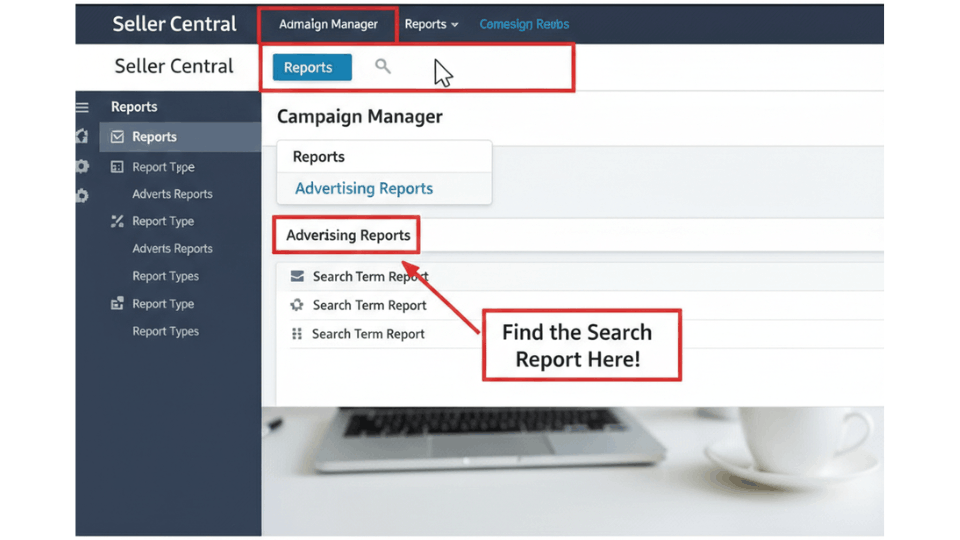
Where to Find the Search Term Report in Seller Central
The Amazon search term report download process is straightforward. Log into Seller Central, go to Advertising, then click on Measurement and Reporting. Under Sponsored Ads Reports, select Sponsored Products as the campaign type, choose Search Term as the report type, set your date range to the last 30-60 days, and click Run Report. The file downloads as an Excel spreadsheet. One critical detail that catches sellers off guard — Amazon only stores 65 days of data. Ravi Mehta from Surat learned this the hard way when he tried pulling a quarterly report and discovered two months of keyword data had vanished forever. Set a monthly calendar reminder or configure recurring downloads to avoid the same mistake.
Search Term vs. Keyword — The Difference Every Seller Must Know
This distinction trips up more sellers than any other concept in Amazon PPC. A keyword is what you, the seller, bid on inside your campaign. A search term is what the shopper actually types into Amazon's search bar. They're connected through match types — broad, phrase, and exact — which determine how loosely your keyword triggers for a shopper's query. Priya Joshi from Jaipur bids on “cotton bedsheets” as a broad match keyword. Her report reveals shoppers found her through “soft cotton bedsheet for summer double bed.” That search term is more specific, more revealing, and far more useful for optimisation than the keyword alone.
Which Ad Types Generate a Search Term Report?
You can pull search term reports for Sponsored Products, Sponsored Brands, and Sponsored Brand Video campaigns. Sponsored Display does not generate this report. For most Indian sellers running primarily SP campaigns, the Sponsored Products search term report will be your main source of insights.
Breaking Down Every Column in the Amazon Search Term Report
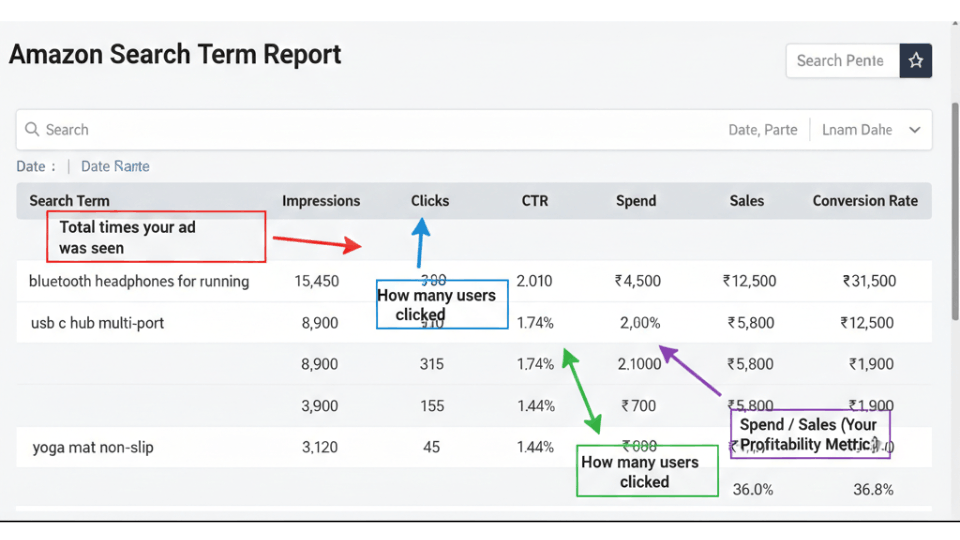
Campaign, Ad Group, and Targeting Columns
The first several columns identify your campaign structure — campaign name, ad group name, targeting keyword, and match type. These tell you exactly which part of your account triggered an impression. This is where clean naming conventions pay off. Anil Verma from Ahmedabad restructured his campaigns to one SKU per ad group and immediately could trace every search term back to a specific product. Without that structure, the report becomes a jumble of data you can't act on.
The Customer Search Term Column — Your Goldmine
This column shows the actual query shoppers typed before clicking your ad. In auto campaigns and broad match campaigns, the customer search term often differs significantly from your targeting keyword. Sometimes you'll see ASINs appear here instead of words — that means your ad was triggered through product targeting, not keyword targeting. Pay special attention to these entries because they reveal which competitor products Amazon associates with yours.
Performance Metrics — Impressions, Clicks, CTR, CPC, Spend, Sales, ACoS, and Orders
After the structural columns, the real data begins. Impressions tell you how often your ad appeared. Clicks show engagement. CTR (click-through rate) signals relevance — a low CTR means your listing isn't compelling for that query. Then comes the money data: CPC (cost per click), total spend, total sales, orders, and your Amazon search term report ACoS. Deepa Krishnan from Chennai discovered a search term with 200 clicks and zero orders. Her CTR was strong, meaning shoppers were interested — but her listing wasn't converting for that query. She revised her bullet points and saw her first orders within a week. If you want to understand these key Seller Central metrics in depth, our dedicated guide breaks each one down.
How to Analyze Your Amazon Search Term Report Step by Step
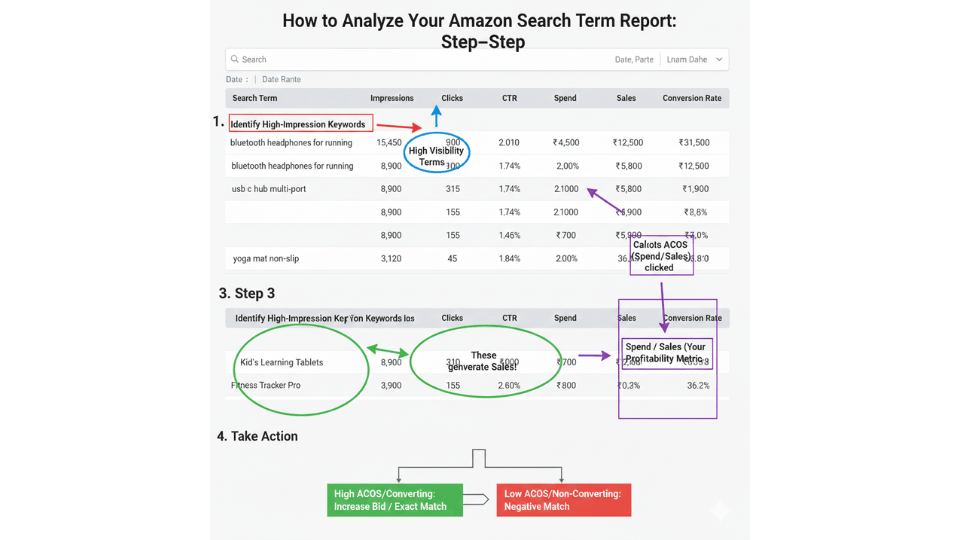
Setting Up Your Spreadsheet for Analysis
You don't need expensive tools to analyze your Amazon search term report — Excel or Google Sheets will do the job. Once you've downloaded the file, freeze the header row, enable filters on all columns, and add two calculated columns: conversion rate (orders divided by clicks) and ACoS if it's not already present. This simple setup turns a wall of raw data into something you can interrogate in minutes.
Filtering for High-Performing Search Terms (Your Winners)
Start by filtering for search terms with two or more orders and ACoS below your target. These are your proven converters — the terms shoppers actually use to find and buy your product. The 80/20 principle hits hard here. In many Amazon PPC campaigns, 10% of search terms drive 90% of sales. Karthik Rao from Bengaluru filtered his 60-day report and found that just three search terms were responsible for 70% of his campaign revenue. Those three terms became the foundation of his entire manual campaign strategy.
Spotting Budget-Draining Search Terms (Your Losers)
Now flip the filter. Look for search terms with seven or more clicks and zero orders. These are eating your budget without delivering results. Also flag any term with ACoS significantly above your target threshold. Meena Sundaram from Coimbatore ran this filter and discovered she was spending ₹4,000 a month on a single irrelevant search term — shoppers looking for a product category she didn't even sell in. One negative keyword addition fixed the leak overnight.
Identifying Long-Tail Opportunities Most Sellers Miss
Don't ignore search terms with just one or two orders if the ACoS is strong. Long-tail keywords — those specific, multi-word queries — often convert better and cost less because fewer sellers compete for them. Sort by conversion rate descending to surface these hidden gems. Over time, a dozen low-volume high-converting terms can collectively outperform a single expensive broad keyword.
If you want a structured system for finding these converting keywords and building campaigns around them, our guide on scaling your Amazon PPC profitably can help you move from spreadsheet analysis to campaign execution.
From Data to Action — 3 Ways to Use Your Search Term Insights
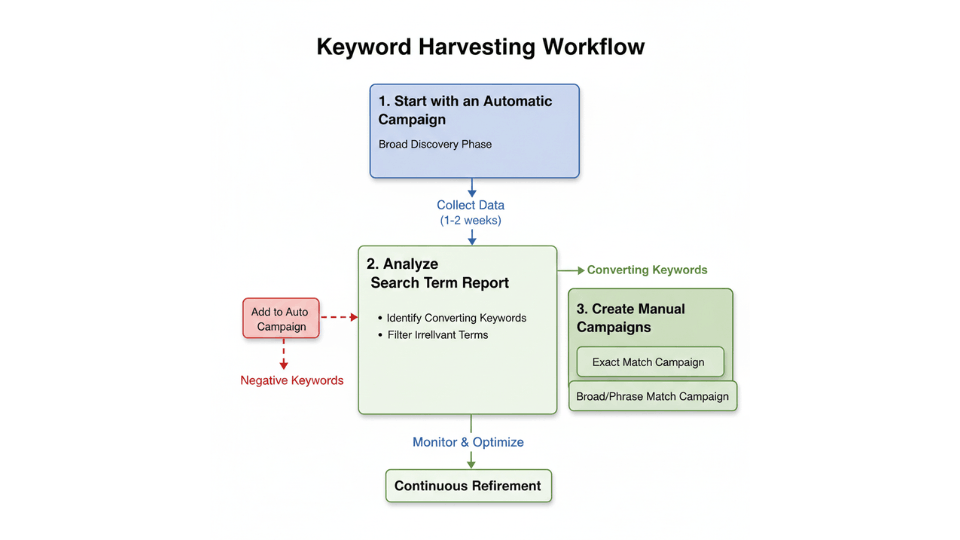
Keyword Harvesting — Moving Winners Into Manual Campaigns
Amazon keyword harvesting is the process of taking proven search terms from auto or broad match campaigns and promoting them into manual exact match campaigns. The workflow: identify a high-converting search term, confirm it isn't already an exact match keyword in another campaign, then add it to a manual campaign with a bid based on the CPC data from your report. This gives you precise bidding control over terms you know convert. Think of auto campaigns as your discovery net and manual campaigns as your precision rifle.
Negative Keyword Strategy — Blocking the Budget Wasters
Finding Amazon negative keywords from search terms is equally important. Take every irrelevant or non-converting term you flagged earlier and add it as a negative keyword. You have two options: negative exact (blocks only that specific term) or negative phrase (blocks any query containing that phrase). Suresh Nair from Pune sells premium chef knives but kept showing for “cheap knife set.” Adding that as a negative phrase saved him roughly ₹8,000 per month — money he redirected into his best-performing keywords. Avoiding costly PPC mistakes like these is what separates profitable sellers from the rest.
Optimising Your Product Listing with Search Term Data
Your search term report doesn't just improve PPC — it feeds your organic strategy too. Take your highest-converting search terms and weave them into your product title, bullet points, description, and backend search terms. Amazon's algorithm indexes these fields for organic ranking, so including terms proven to convert through paid ads boosts your organic visibility for them as well. Keep backend keywords within Amazon's approximately 250-byte limit and avoid repeating words already in your title or bullets.
The Amazon Brand Analytics Search Terms Report — A Bonus Weapon
What Is Search Frequency Rank and How to Read It
If you're brand registered, Amazon Brand Analytics gives you access to a separate search terms report with powerful data. The key metric is search frequency rank — a relative ranking of how often a term is searched. A rank of 5 means it's searched more than a rank of 6, but Amazon doesn't disclose exact volumes. The weekly report contains around 500,000 search terms. Use this to identify which queries have the highest demand in your category without spending a rupee on ads.
Using Click Share and Conversion Share to Spy on Competitors
For each search term, the Amazon Brand Analytics search terms report shows the top three most-clicked ASINs along with their click share and conversion share percentages. This is competitive intelligence served on a platter. If a competitor holds 40% click share on your target keyword, study their listing to understand why. Neha Gupta from Delhi discovered a competitor capturing three times her click share. She invested in better product photography and a sharper title, and the gap narrowed significantly within a month.
For a deeper understanding of how Brand Analytics fits into your overall strategy, explore our article on using Amazon Brand Analytics to outsmart your competition.
Common Mistakes Indian Sellers Make When Reading This Report
Analysing Too Short a Time Period
A seven-day Amazon PPC search term report rarely has enough data to draw conclusions, especially if your daily budget is modest. Aim for 30-60 days of data before making major keyword decisions. Short timeframes amplify anomalies — one lucky sale or one bad day can skew your entire analysis.
Ignoring “Other SKU Sales” in the Data
Your ad for Product A might drive a sale for Product B — especially with multi-packs or size variations. The report separates advertised SKU sales from other SKU sales. If you only evaluate advertised SKU performance, you'll undervalue search terms that are actually profitable across your catalogue.
Not Downloading Reports Before the 65-Day Expiry
This bears repeating because so many sellers lose valuable data. Amazon's advertising reports from Seller Central only go back 65 days. Once that window closes, the data is gone permanently. Treat your monthly download like a backup — because that's exactly what it is.
FAQ
What is the Amazon search term report and how do I download it?
The Amazon search term report is a downloadable Excel file from the Advertising section of Seller Central. It shows the actual queries shoppers typed before clicking your ads, along with performance data like impressions, clicks, orders, and ACoS. Navigate to Measurement and Reporting, select Sponsored Ads Reports, choose Search Term as the report type, and run.
What is the difference between a search term and a keyword on Amazon?
A keyword is what you bid on as a seller — it's your targeting input. A search term is what shoppers actually type into Amazon's search bar. Your keyword triggers ads based on match type settings, but the customer search term reveals the real language buyers use. Understanding this gap is essential for effective campaign optimisation.
How do I find negative keywords from my Amazon search term report?
Filter your report for search terms with seven or more clicks and zero orders. These high-click, no-conversion terms are draining your budget. Add them as negative exact or negative phrase keywords in your campaign settings. Also flag terms with ACoS far above your target — they're candidates for negation too.
How often should I analyze my Amazon search term report?
For active or high-spend campaigns, review weekly. For stable campaigns with consistent performance, bi-weekly or monthly works. The key is consistency — search behaviour shifts over time, and regular analysis lets you catch emerging trends and stop wasteful spend before it compounds.
How do I use the search term report to improve my Amazon PPC campaigns?
Three core actions: harvest high-converting search terms into exact match manual campaigns, negate irrelevant or non-converting terms to stop budget waste, and incorporate proven search terms into your product listing to boost organic ranking alongside paid performance.
Can I access the search term report without running PPC campaigns?
No. The advertising search term report requires active PPC campaigns because it tracks shopper queries that triggered your ads. However, if you're brand registered, you can access the Brand Analytics search terms report, which shows popular search terms and top-clicked ASINs without needing to run any ads.
Does the Amazon search term report work for Amazon India (Amazon.in)?
Yes. The search term report is available on Amazon.in through Seller Central, just as it is on other marketplaces. The download process, columns, and metrics are identical. Indian sellers can analyse their Amazon.in campaign data using the same methods described here.
What is search frequency rank in Amazon Brand Analytics?
Search frequency rank is a relative metric in the Brand Analytics search terms report that indicates how often a term is searched compared to other terms. A lower number means higher search volume. Amazon doesn't disclose exact search counts — only the relative ranking. It's available exclusively to brand-registered sellers.
Conclusion
The Amazon search term report is the single most underused free tool in every seller's advertising console. It tells you what shoppers type, which queries convert, and where your budget leaks. Reading it properly is the difference between guessing which keywords deserve your money and knowing with certainty. Indian sellers who master this report compete with bigger budgets by being smarter with data. Download your report today, set up the filters we covered, and start making decisions backed by real shopper behaviour. If you want hands-on guidance building profitable PPC campaigns, the AmanCentral 3-Day Amazon Business Training walks you through search term analysis and every essential Amazon selling skill.
