

Kavitha Raman from Madurai had done everything the tutorials told her to do. Her pre-seasoned cast-iron kadai sat in an Amazon fulfilment centre with a Prime badge, her title read “Cast Iron Kadai for Cooking”, and her ads covered every English phrase she could think of. Yet for three straight months, a competitor with fewer reviews and a blurrier main image kept outselling her.
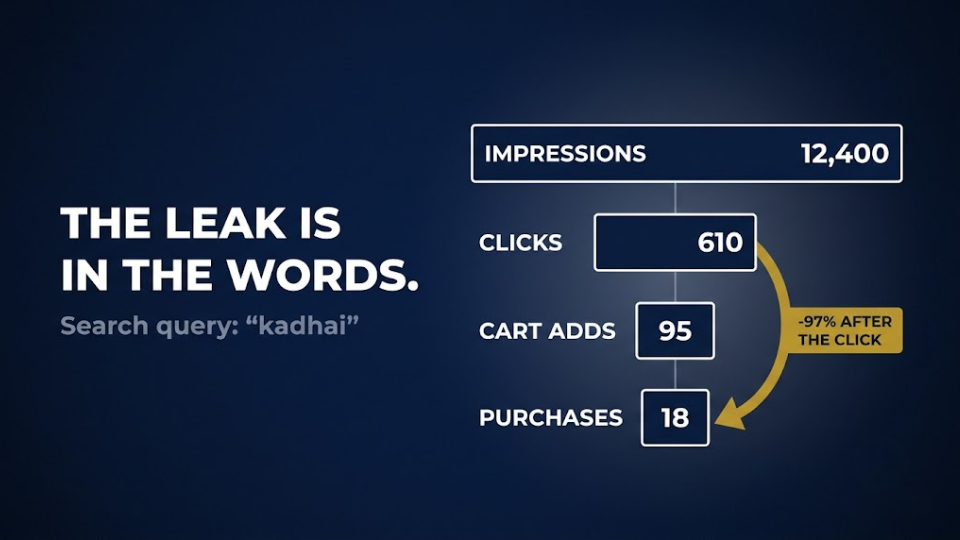
The answer was hiding in the Amazon India search terms her customers actually typed. When she finally opened her Search Query Performance dashboard, she saw shoppers searching for “kadhai”, “karahi” and “loha kadai”. Her listing used none of those words, so to Amazon her product simply wasn’t the closest match.
This is the gap most keyword advice misses. It assumes Indian shoppers search in neat English, when many of them type in transliterated Hindi, regional words and phonetic spellings. In this guide, you’ll learn how to find those Hinglish keywords in your own data, and exactly where each one belongs: your title, your backend or your ads.
Why Amazon India Search Terms Break the English Rules
The “Gijar” Lesson Every Indian Seller Should Know
A few winters ago, water heater brand Racold noticed something odd about how people searched for geysers on Amazon. Many shoppers, especially in smaller towns, typed the word the way they said it: “gijar” or “geezar”. The brand built campaigns around 526 misspelled keywords, reached more than 3.5 million additional searches in a quarter and earned a 16X return on ad spend. Then it added those words to every product listing so the gains would last.
Demand that never shows up in an English keyword tool is still demand, and someone will capture it.
Why US Keyword Guides Leave You Blind
Most keyword guides are written for Amazon.com shoppers who type tidy English. Flipkart’s own researchers have reported that a significant share of their search queries are code-mixed Hinglish, with examples like “sasta atta”. Amazon sees the same behaviour, which is why it now offers shopping in Hindi and several regional languages.
Arjun Mehta from Jaipur learned this the slow way. His FBA brass pooja brand ranked well for “brass diya”, but his search term report showed “pital diya” bringing in more orders at a lower cost per click. He’d spent six months of ad budget before noticing.

Hinglish Keywords, Regional Terms and Misspellings
Hinglish keywords fall into three types, and each is placed differently, so sort them before you act.
Transliterated Hindi: One Word, Five Spellings
When a shopper writes a Hindi word in English letters, there’s no official spelling to follow. Achar becomes achaar or aachar, lehenga becomes lehnga or lahenga, and dupatta becomes duppata. None of these are mistakes, and each spelling has its own group of shoppers.
Regional Language Keywords Amazon Shoppers Use
Regional terms are different words altogether. A shopper in Chennai types “mixie” where a buyer in Delhi types “mixer grinder”. Words like “idli cooker” and “veshti” are everyday vocabulary in one state and almost unknown in another. If your FBA stock ships to pin codes across India, your listing needs to speak to more than one region.
Amazon Misspelled Keywords: Phonetic, Not Careless
Phonetic misspellings come from how a word sounds, often through voice typing, which is the “gijar” pattern. Unlike random typos, they repeat across thousands of shoppers, so they’re worth tracking. Fathima Nazeer from Kozhikode found that “dabba set” and “steel dabba” converted at nearly twice the rate of “storage container” for her kitchen storage range. She’d never have guessed it without the data.
How to Mine Search Query Performance on Amazon
Your best source of Amazon India search terms is Amazon’s own data, and the richest version of it sits in one dashboard.
Where to Find It and Who Gets Access
In Seller Central, go to Brands > Brand Analytics > Search Query Performance. It’s only available to sellers enrolled in Amazon Brand Registry in India. The dashboard shows the top 1,000 search queries tied to your brand or products, with impressions, clicks, cart adds and purchases for each one, tracked week by week.
Filtering the Report for Hinglish Queries
Download a quarter’s worth of data in brand view and sort it by search query volume. Then scan the list for anything a spell-checker would underline, because that’s where transliterated words, regional terms and phonetic spellings hide. Tag each one by type, then compare your impression share with your purchase share, as our Search Query Performance report guide explains. If you show up often but rarely convert, the shopper may be looking for a word your listing never uses.
Rohit Deshmukh from Nagpur ran this exercise on his FBA cotton bedsheet brand. He found 11 Hinglish queries in his top 100, including “chadar” and “jaipuri bedsheet double bed”. Four of them appeared nowhere in his listing or his ads.
To make this routine easier, download our Hinglish Keyword Tracker sheet, with columns for each query, its type, volume, purchase share and placement decision.
No Brand Registry? Use Search Suggestions and Ads Data
Without Brand Registry, you can still find most Amazon India search terms using two free sources.
The Vowel-Swap Trick in Amazon Search Suggestions
Amazon search suggestions are built from what real shoppers type, which makes them a free source of Hinglish variants. Open the Amazon.in app, type a root word and note every suggestion that appears. Then swap the vowels and letter pairs a shopper might use: kadai, kadhai, karahi, kadaai. Each spelling brings up its own list. Suggestions don’t show search volume, so treat them as discovery rather than proof.
Your PPC Search Term Report Is the Backup SQP
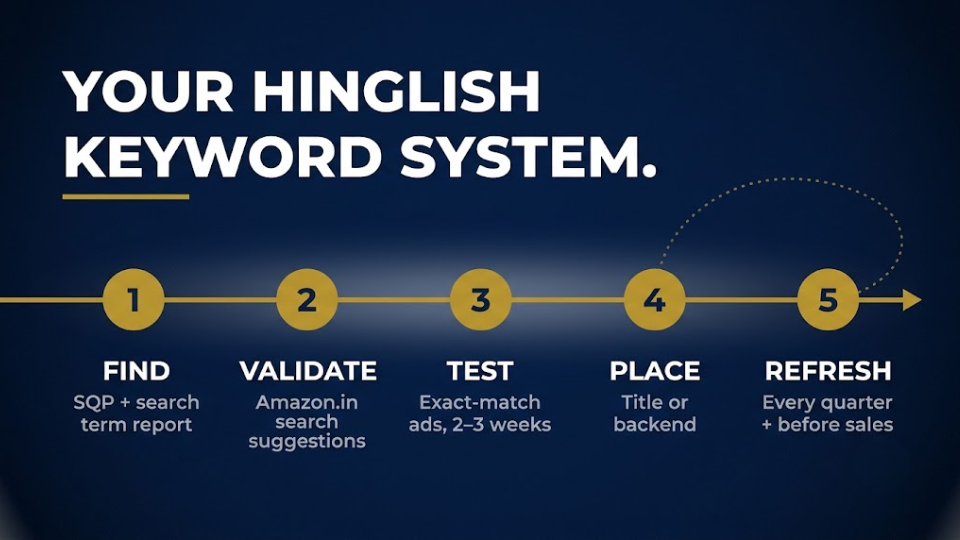
Your Sponsored Products search term report shows the exact queries shoppers typed before they clicked your ad. Run an automatic campaign and a broad-match campaign on your core keywords for two to three weeks. Then pull every non-English query that earned clicks or orders.
Sneha Iyer from Coimbatore, a first-time FBA seller without Brand Registry, built a list of 40 variants for her copper water bottles this way, including “tamba bottle” and “copper sombu”. It cost a few thousand rupees in ad spend and surfaced terms no keyword tool had shown her.
Title or Backend: Where Each Hinglish Keyword Goes
Finding the words is half the job; placing them well is the other half.
The Title Test: Would Your Best Buyer Recognise It?
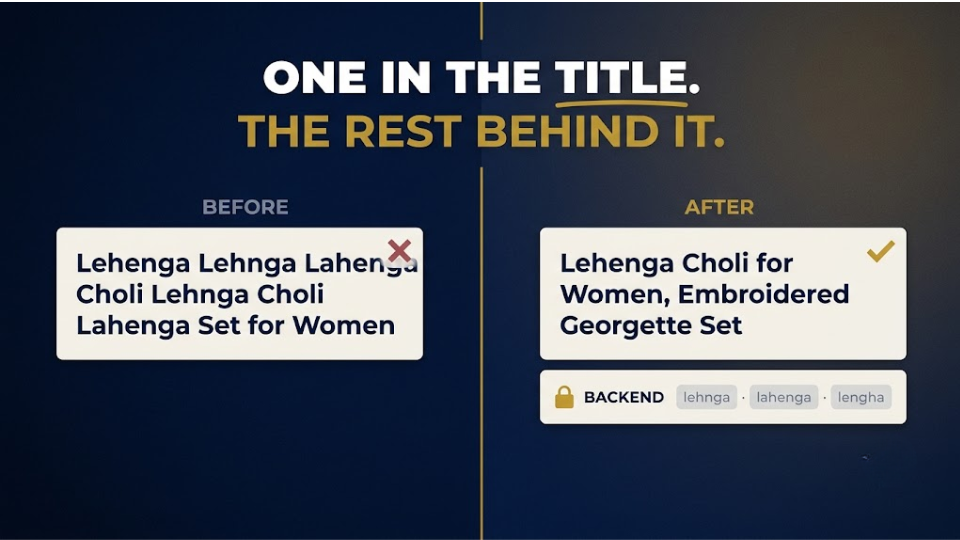
Your title is read by people first, so only the variant with the most purchases earns a spot there. If “lehenga choli” outsells “lehnga choli” five to one, the first goes in your title and the second goes to the backend. Never stack three spellings of one word in a title, because it looks like spam and hurts your click-through rate.
Can You Use Hindi Keywords in an Amazon Listing?
Yes, as long as they’re relevant to the product. The safest home for most Hindi keywords in an Amazon listing is the backend search terms field, plus one natural mention in a bullet where it reads well. “Perfect for making achaar at home” works in a bullet. “Achar achaar aachar pickle jar” does not.
Devanagari or Roman Script?
Most Hinglish is typed in Roman letters, so start there. Add Devanagari only if your data shows real queries in Hindi script. Pooja Agarwal from Lucknow moved “lehenga choli” into her title and put three alternative spellings in her backend. Over the next six weeks, sessions on her FBA ethnic wear range rose by 18%.
Amazon Backend Search Terms: The Rules for India
Most of your Hinglish keywords will live in the backend, so learn its rules.
The 250-Byte Limit and Why Devanagari Eats It
Amazon limits the search terms field to under 250 bytes, and bytes aren’t the same as characters. An English letter takes one byte, but a Devanagari character usually takes three, so Hindi phrases fill the field fast. Go over the limit and Amazon may ignore the whole field for that ASIN. Imran Shaikh from Surat found his backend had crept to 290 bytes after he added Hindi words. Trimming it to 230 bytes got his listing showing again for terms it had silently dropped.
Spelling Variants Yes, Misspellings With Care
Amazon India’s own guidance is to use spelling variations but skip common misspellings, because its search system already corrects those. Transliterations like achar and achaar are spelling variations, so they belong in your backend. Phonetic misspellings like “gijar” are different, because Amazon may correct some and miss others. Test those in ads first, and move them to the backend only if your data shows Amazon isn’t connecting them to your product.
To save time, grab our backend search terms template, which has a byte counter and starter Hinglish variants for kitchen, fashion, home and pooja products.
Test Hinglish Keywords in Ads Before You Commit
Ads let you test a keyword with real shoppers before you change your listing for good.
Exact-Match Campaigns for Phonetic Variants
Create one exact-match campaign for your Hinglish variants with a modest daily budget, and give each term two to three weeks before you judge it. FBA works in your favour here. The Prime badge and fast delivery reassure first-time online shoppers in smaller towns, where much of this search behaviour comes from, so these clicks get a fair chance to convert.
Promoting Winners to Your Listing
Once a term proves itself, move it up the ladder: from ads into your backend, and the strongest one into your title. Test festive terms like “rakhi gift” and “diwali gift hamper” at least a month before big sale events.
Manpreet Kaur from Ludhiana tested five spellings of “phulkari dupatta” ahead of the Great Indian Festival and kept two. By the end of the sale, her cost per order on those two terms was about 30% lower than on her English keywords.
Build a Hinglish Keyword Bank for Amazon India Search Terms
Doing this once helps one listing. Turning it into a system helps every product you launch.
A Starter Bank by Category
Start with a shared sheet of root words for your category, then expand each one using search suggestions and your own reports. These examples are a starting point to validate, not a list to copy:
- Kitchen sellers can begin with kadai, kadhai, tawa, dabba, mixie and idli cooker.
- Fashion sellers can begin with lehenga, lehnga, dupatta, kurti and salwar suit.
- Home sellers can begin with chadar, jhadu, pocha and jaipuri bedsheet.
- Pooja sellers can begin with pital diya, pooja thali and agarbatti stand.
Validate every word in the Amazon.in search bar first; your own data always outranks a generic list.
Where This Fits in Amazon Keyword Research for India
Hinglish shouldn’t be a one-off project. Make it part of your regular Amazon keyword research India routine: refresh the bank every quarter, and again a month before the Great Indian Festival. Give one team member ownership of the sheet so it grows with every new listing. Deepak Nair from Kochi did exactly that, and his team now adds Hinglish variants to every new FBA launch in week one instead of month six.
Frequently Asked Questions
Can I use Hindi or Hinglish keywords in my Amazon India listing?
Yes, as long as they describe your product accurately. Put the strongest variant in your title only if it’s what most buyers search for, and keep the other spellings in your backend search terms. Avoid stuffing several spellings of the same word into visible copy.
Should I add misspellings to Amazon backend search terms?
Amazon India’s guidance is to include spelling variations but not common misspellings, since its search corrects those automatically. Transliterations such as achar and achaar count as variations. Phonetic misspellings like “gijar” are less predictable, so test them in exact-match ads first and add them to your backend only if the data supports it.
How do I find what customers actually search for on Amazon India?
Brand-registered sellers should start with the Search Query Performance dashboard in Brand Analytics. Everyone can use Amazon.in search suggestions and their Sponsored Products search term report. Together, they reveal the Hinglish and regional Amazon India search terms that English keyword tools miss.
What is the Search Query Performance dashboard, and who can access it?
It’s a Brand Analytics report showing the top 1,000 search queries linked to your brand or products, with impressions, clicks, cart adds and purchases for each. Only sellers enrolled in Amazon Brand Registry can access it. You’ll find it in Seller Central under Brands > Brand Analytics > Search Query Performance.
What is the byte limit for Amazon backend search terms?
The search terms field must stay under 250 bytes. English letters use one byte each, while Devanagari characters usually use three, so Hindi script fills the field quickly. If you go over the limit, Amazon may ignore the field entirely, so check the byte count after every edit.
Will Hinglish words in my title put off English-speaking buyers?
Not if you choose carefully. Words like kadai, lehenga and dupatta are familiar to most Indian shoppers, whatever language they search in. Problems start when a title repeats several spellings or uses a word only one region understands. Keep the title clean and let the backend carry the variants.
Does Amazon automatically match Hinglish searches to English listings?
Sometimes, but you shouldn’t count on it. Amazon’s search handles common misspellings and offers shopping in several Indian languages, yet transliterated words with many spellings can still slip through. Check your own query data to see whether you’re appearing for them.
How often should I update my Hinglish keywords?
Review them every quarter, and again about a month before major sale events like the Great Indian Festival. New products, seasonal gifting terms and shifting search habits all change which words matter.
Conclusion
Indian shoppers aren’t searching wrong. They’re searching in the language they think in, and most listings simply haven’t caught up. Once you start reading Amazon India search terms the way your customers write them, you’ll spot demand your competitors are leaving on the table.
Kavitha, by the way, put “kadhai” in her title and three variants in her backend. Within two months, her kadai had overtaken the competitor that frustrated her all season.
If you want to build listings, keywords and FBA operations the right way from day one, join our 3-Day Amazon Business Training. We’ll walk through the whole process together, step by step. Your customers are already telling you what they want. Now you’ll know how to listen.
