
Kavya Nair spent four straight weekends redoing her pressure cooker listing on Amazon India. New title, sharper bullets, a full A+ module with lifestyle shots, even a fresh set of professional images. Sales moved a little, but not the way she expected. What actually broke the plateau was something she’d been ignoring since launch — three unanswered customer questions sitting quietly at the bottom of her product page, one of them asking whether the cooker’s gasket was sold separately for replacement. She answered it in under two minutes. Conversions on that ASIN rose within the week. This is the story of the one part of your listing that costs nothing to fix and that almost nobody bothers to touch: the Amazon customer questions and answers section.
What Is the Amazon Customer Questions and Answers Section (And Why Sellers Skip It)
The Amazon customer questions and answers section is a feature that lives on every product detail page, usually below the reviews block, where shoppers can post a question and get a response from the seller, the brand, or even a previous buyer. It works less like a comment thread and more like a live objection-handling desk sitting right where a hesitant buyer is deciding whether to click “Add to Cart” or bounce to a competitor’s listing. Anyone browsing the page can ask a question, and technically anyone — not just verified owners — can answer it, which is why sellers who show up consistently as the responder tend to build outsized trust.
Where the Q&A Block Sits on the Product Page
On both desktop and mobile, the Q&A module sits between the review section and the “Products related to this item” carousel. It’s easy to miss during a routine listing audit because it doesn’t show up in the same dashboards sellers check for reviews or return rates, so it tends to get glanced at once during launch and then forgotten.
Who Can Ask a Question — And Who Can Answer It
Amazon labels this section “Customer Questions & Answers” and nudges shoppers to ask “the owners,” but that label is misleading — anyone can answer, and the seller’s response carries a visible badge that marks it as an official, trusted source. That badge is the entire reason this section is worth your time.
Why This Free Real Estate Gets Ignored While Reviews and A+ Get All the Budget
Most sellers pour their energy into reviews, bullets, A+ Content, and product photography because those are the levers agencies pitch and courses teach. Q&A gets skipped because it feels like customer support, not marketing — but the questions sitting there unanswered are often the exact objections costing you the sale.

Why the Amazon Q&A Section Quietly Drives Conversions
Star ratings tell you a buyer was happy or unhappy after purchase. The amazon q&a section tells you what they were unsure about before they bought — and that distinction matters more than most sellers realize. A five-star review says “this worked for me.” A pending question says “I’m not sure this will work for me,” which is the exact moment a sale is won or lost.
Answering those questions well does two things at once: it removes the specific doubt in front of that one shopper, and it leaves a permanent, searchable answer for every future visitor who has the same doubt but never bothers to type it out. Buyers trust a direct answer from a seller far more than they trust marketing copy, because it reads as a real response to a real concern rather than a pitch.
Rohan Ghosh, who sells home fitness equipment out of Kolkata, noticed his resistance band sets had a healthy click-through rate but a conversion rate that lagged behind similar products in his category. Digging into the Q&A section, he found four questions asking almost the same thing — whether the bands worked for someone over 90 kilograms. He’d never mentioned weight capacity anywhere on the listing. Within three weeks of answering that question clearly and adding the detail to his second bullet point, his conversion rate climbed 14%, without touching his ad spend.
Once you notice a pattern like this, don’t stop at answering the live question — go back and tighten your bullet points to close the gap for good, so future buyers never have to ask at all.
How the Q&A Section Affects Amazon SEO and Rankings
Yes, the Q&A section affects your Amazon SEO — and it does so in a way most keyword tools completely miss. Amazon’s search algorithm doesn’t just scan your title and bullets; it evaluates the full depth of information on your detail page, and customer-generated text in the Q&A block is part of that depth. Amazon’s algorithm treats Q&A as a ranking signal, alongside quantity, quality, and frequency of interactions on that section.
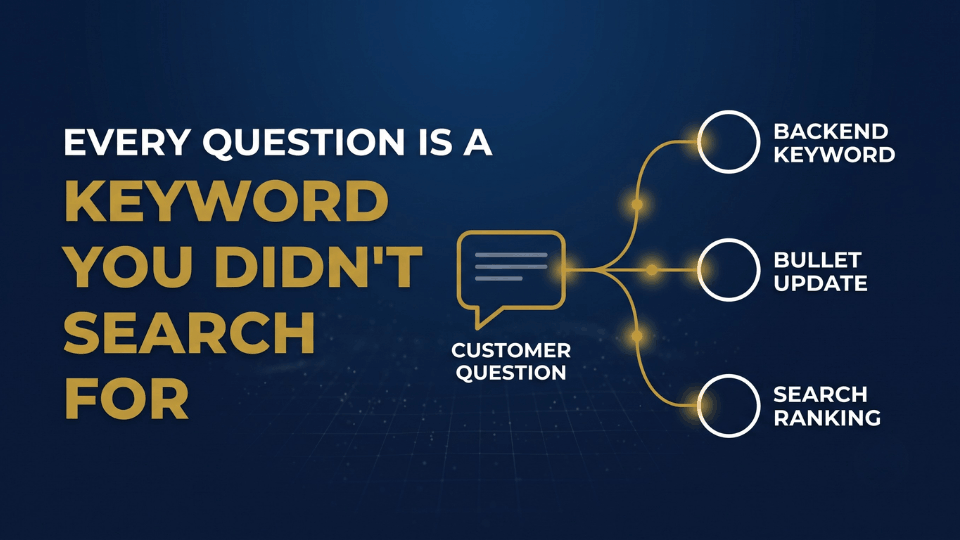
The real advantage isn’t keyword stuffing your own answers — it’s that customers write their questions in the exact conversational language they’d use in search, phrases your keyword research tool never surfaces. A shopper won’t type “yoga mat” into a Q&A box; they’ll ask whether it works for hot yoga on a hardwood floor. That phrase, sitting live on your page, becomes indexable content connecting your listing to a long-tail search you never targeted on purpose.
If you’re a newer seller without much Q&A history of your own yet, the fastest workaround is to reverse-engineer a competitor’s listing and study the questions piling up there instead — the objections are usually identical across similar products in the same category.
Treat every unanswered question as a missed opportunity to plug a keyword gap you didn’t know existed. Cross-referencing what you find against your Search Query Performance Report is often the fastest way to confirm whether a phrase buyers keep asking about is also a phrase they’re searching for.
How Amazon’s Rufus AI Reads Your Q&A Section
Rufus, Amazon’s AI shopping assistant, has changed what “optimizing” a listing means. Instead of shoppers typing narrow keywords into the search bar, they now ask Rufus conversational questions like “what’s a good gift for a five-year-old who loves dinosaurs,” and Rufus reads across your titles, bullets, reviews, A+ Content, and Q&A to decide whether your product deserves the recommendation.
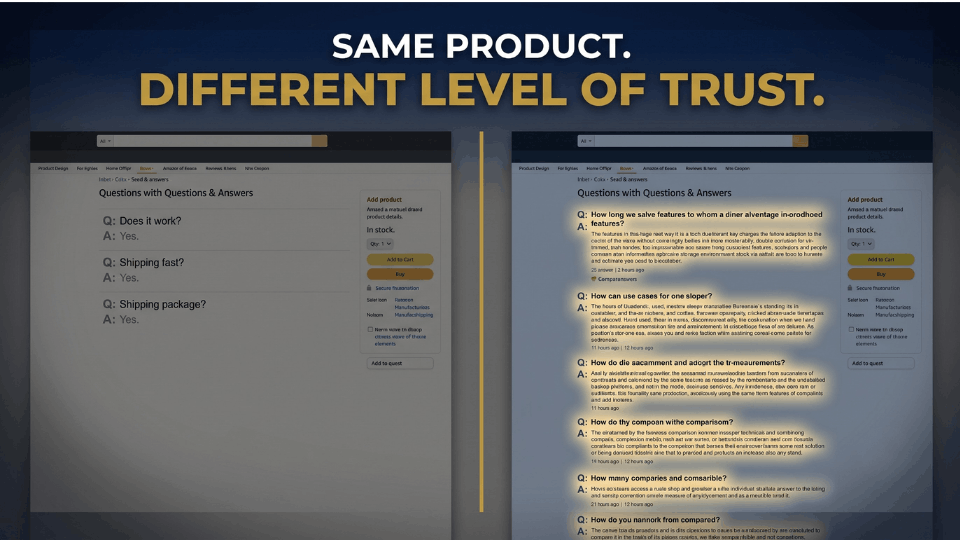
This is where a thin amazon q&a section becomes a real liability. A product with twenty well-answered questions covering different use cases and objections gives Rufus twenty separate chances to match a shopper’s intent; a product with three generic, one-word answers gives it almost nothing to work with. Rufus isn’t matching exact keywords anymore — it’s reading the collective meaning of everything on your page, and Q&A is one of the richest, most human sources of that meaning, because it’s written in the customer’s own words rather than a copywriter’s.
What Rufus Pulls From Q&A to Answer Shopper Questions
Specific, honest answers — the ones that mention exact dimensions, compatibility details, and real use cases — perform far better in generative search than vague reassurances. If your competitor’s Q&A openly discusses limitations and yours doesn’t, Rufus has more reason to trust and surface theirs.
Thin or Generic Q&A = Invisible in Generative Search Results
A listing with an empty or stale Q&A section isn’t neutral in Rufus’s eyes — it’s genuinely harder to recommend, because there’s less evidence the product solves the shopper’s actual problem.
How to Answer Customer Questions on Amazon Without Sounding Robotic
Knowing how to answer customer questions on Amazon well is a skill most sellers never develop, mostly because nobody trains for it the way they train for ad copy. The mechanics are simple — Amazon gives you up to 30 days to respond, though answering within a day is far better for the sale sitting on the fence — but the tone is where most sellers lose the moment.
A flat “yes” answers the literal question and wastes the opportunity underneath it. Compare “Yes” to “Yes — this fits all standard 2-litre pressure cookers sold in India, including Prestige and Hawkins models, and comes with a spare gasket in the box.” The second version answers the question, removes a second unasked doubt, and reads like a human who actually knows the product. That’s the difference between Q&A as customer support and Q&A as a selling tool.
Not every question deserves the same effort. You’ll occasionally get irrelevant or trolling questions that have nothing to do with the product, and Amazon doesn’t require you to engage with those:
- Skip questions that are clearly off-topic, rude, or unrelated to the product’s function.
- Personalize genuine questions where it makes sense — a name or a direct acknowledgment of the specific concern goes further than a generic template.
- Never answer with information you’re not certain about; an inaccurate answer does more damage to your account health than a delayed one, in much the same way mishandling a customer complaint does.
- Update your listing copy once you notice the same question repeating, so future buyers never have to ask it at all.
Once you build this into a weekly habit rather than a reactive scramble, it stops feeling like extra work and starts feeling like free ad copy testing — you’re literally watching which objections your real buyers care about most.
How to Seed Your Own Amazon Q&A Inside Amazon’s Rules
Waiting for questions to appear organically is slow, and by the time enough buyers have asked the same thing, you’ve already lost sales to sellers whose listings answered it upfront. Learning how to seed amazon q&a proactively — the right way — closes that gap without breaking Amazon’s policies.
The safest source of real questions is data you already have. Pull recurring themes from your customer support inbox, return reasons, and any pre-sale chat messages you’ve fielded. If a return tag keeps saying “size smaller than expected,” that’s a question worth answering before it’s even asked, either directly in the Q&A section or folded into your bullets. Running internal workshops with your team — asking everyone who’s ever fielded a customer call to list the five questions they hear most — is another reliable way to surface real objections without inventing anything.
Amazon strictly prohibits fabricating questions, incentivizing customers to post planted ones, or manufacturing a Q&A section that doesn’t reflect genuine buyer concerns. The line is simple: you can proactively answer real objections your customers actually have, sourced from real support tickets and real conversations, but you cannot manufacture the appearance of demand. Sellers who cross that line risk account-level policy action, which is a steep price for something that was supposed to be free.
Deepak Chauhan, who runs an electronics accessories brand out of Ahmedabad, built a habit of reviewing his top five ASINs’ support tickets every Sunday evening and turning the three most common concerns into direct, detailed Q&A answers each week. Six months in, his listings carry noticeably deeper Q&A sections than his competitors’, and he credits it as a quiet, compounding advantage he never has to pay ad spend for.
Building an Amazon Listing FAQ Section That Works With A+ Content
Q&A and A+ Content solve overlapping but different problems, and confusing the two means duplicating effort in one place while leaving gaps in the other. An amazon listing faq section built into your A+ Content module is structured, permanent, and fully under your control — you decide exactly what appears and in what order. The Q&A section, by contrast, is dynamic, customer-driven, and visible earlier on the page, which makes it better for catching real-time objections you didn’t anticipate.
The two work best as a loop rather than a substitute for each other. Recurring Q&A questions are your evidence for what belongs in the A+ FAQ module, and the A+ FAQ module reduces how many repetitive questions show up in Q&A in the first place. Once you notice the same three or four questions surfacing across a product family, that’s your signal to formalize them into a structured FAQ block — this is exactly the kind of detail work covered in our guide on using A+ Content to boost sales and build trust.
A Weekly Q&A Audit Routine for Indian Amazon Sellers
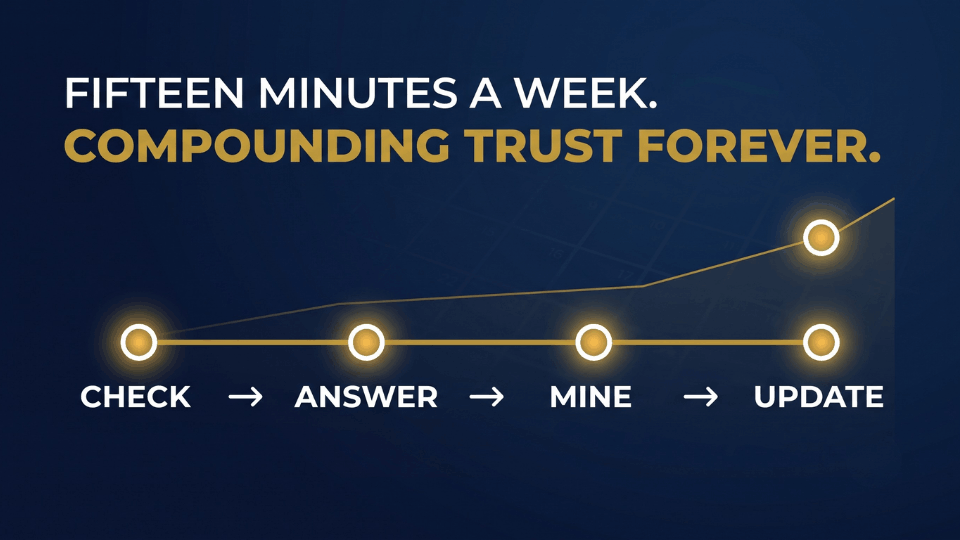
Amazon q&a optimization doesn’t need a dashboard or a subscription tool — it needs fifteen minutes a week, treated with the same seriousness as checking your PPC spend. Set a fixed time, pull up your top-selling ASINs, and read through anything new in the Q&A section along with a quick scan of one or two close competitors.
For sellers managing a catalog beyond a handful of ASINs, tracking repeat questions across products becomes the harder part — a simple spreadsheet noting the ASIN, the question, and whether it’s been folded into your bullets yet keeps this from slipping through the cracks as your catalog grows. The sellers who treat this as a standing weekly habit, rather than a one-time listing task, are the ones who end up with Q&A sections rich enough to matter to Rufus and buyers alike.
Frequently Asked Questions
What is Amazon’s Customer Questions and Answers section and where does it appear?
It’s a feature on every Amazon product page, usually sitting just below the reviews section, where shoppers can post questions and get answers from sellers, brands, or previous buyers. Seller responses carry a visible badge marking them as an official, trusted source, which is why sellers who respond consistently build stronger buyer confidence than those who leave the section untouched.
How do you answer customer questions on Amazon as a seller?
Respond as quickly as possible, ideally within a day, and go beyond a one-word answer by adding the specific detail — dimensions, compatibility, or use case — that removes a second unasked doubt. Skip questions that are irrelevant or trolling, and never answer with information you’re not fully certain about.
Does the Q&A section actually affect Amazon SEO and search ranking?
Yes. Amazon’s algorithm evaluates the full depth of your product page, including Q&A text, and treats the quantity, quality, and frequency of interactions there as part of its ranking signals. Customer questions also surface conversational keyword phrases that standard keyword tools typically miss.
How does Amazon’s Rufus AI use Q&A content to recommend products?
Rufus reads across your entire listing, including Q&A, to match shopper intent in natural-language searches rather than exact keywords. A rich, specific Q&A section gives it more evidence your product solves a real problem; a thin one makes your listing harder to surface in generative search results.
Can sellers proactively seed their own Q&A, and what are the compliance limits?
Yes, as long as the questions reflect real buyer concerns sourced from genuine customer support tickets, return reasons, or team knowledge. Amazon strictly prohibits fabricating fake questions or incentivizing customers to post planted ones, and violating this can trigger account-level policy action.
Can an Indian seller delete or hide an irrelevant customer question?
Sellers have limited backend control over Q&A content, but Amazon allows you to skip answering questions that are clearly off-topic, rude, or unrelated to the product, rather than requiring a response to every single post.
Does a weak Q&A section hurt Buy Box eligibility or account health?
Q&A isn’t a direct Buy Box or account health metric the way order defect rate is, but a thin or neglected section indirectly hurts conversion rate and search visibility, both of which Amazon’s ranking system does weigh heavily.
Conclusion
Reviews take months to accumulate, A+ Content takes a design budget, and product photography takes a studio session — the customer questions and answers section takes neither, and it’s sitting on every one of your listings right now, mostly untouched. Treat it as the objection-handling desk it actually is: answer with real detail instead of one-word replies, mine your own support tickets for questions worth answering before they’re asked, and give it fifteen honest minutes every week. If you want a structured, guided path through this along with the rest of your listing strategy, our 3-Day Amazon Business Training walks Indian sellers through exactly this kind of high-leverage, low-cost fix. Your customers — and your bottom line — will thank you.
