

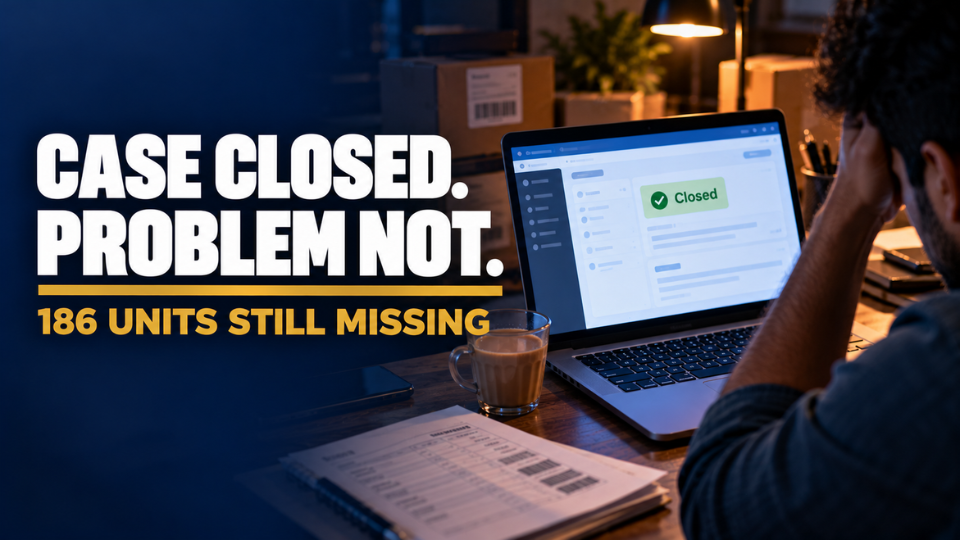
Harish Kumar from Madurai sent 420 steel lunch boxes into an Amazon fulfilment centre last March. The shipment showed only 234 units received. He opened a case with the shipment ID, attached his invoice and the courier’s proof of delivery, and waited. Six weeks later, that case had been closed as “answered” three times, each time with a polite note thanking him for his patience. Not one of the 186 missing units had been found or reimbursed.
If that sounds familiar, you’re not alone, and you’re not powerless. Amazon Seller Support escalation is not about shouting louder or opening ten new cases. It’s a process with clear levels, and most FBA sellers in India never get past the first one because nobody showed them the rest.
In this guide, you’ll learn why cases stall, how to build a case that gets read the first time, and the exact ladder to climb when Seller Support goes quiet: reopening inside the case, phone and Account Health routes, the Seller Forums, and the last-resort executive email. You’ll also get the wording that works at each step.
Amazon Seller Support Not Responding? Here’s Why
How Amazon’s Tiered Support Actually Works
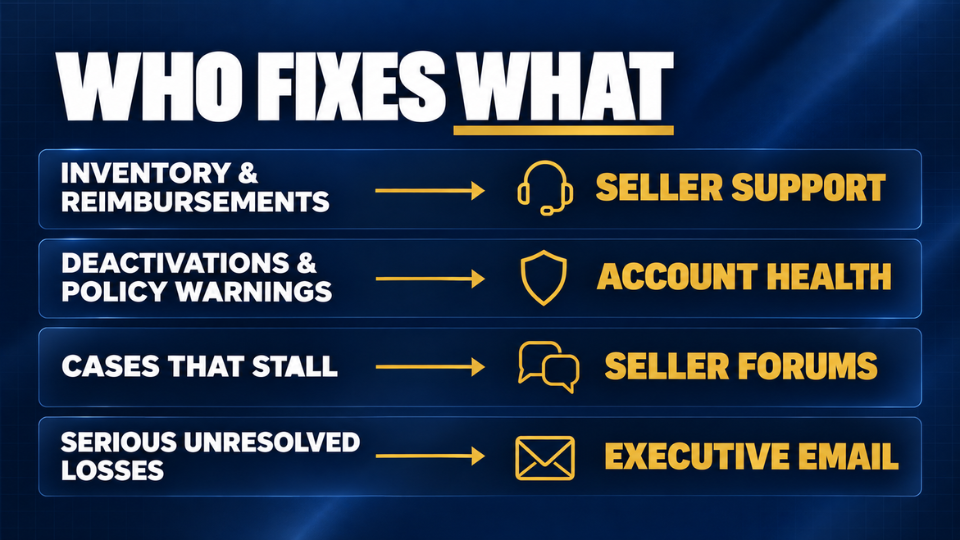
When Amazon Seller Support is not responding in any useful way, it usually isn’t personal. Your case first lands with a frontline associate who works largely from scripted responses. The people who can actually fix FBA problems sit in specialist teams behind them, covering areas like inventory investigations, catalog and Account Health. If the frontline associate can’t solve your issue or route it correctly, your case simply loops.
Why “Answered” and “Transferred” Cases Quietly Die
A case marked “answered” is treated as finished, even when the answer was a template that ignored your question. A case marked “transferred” leaves your case log and joins another team’s queue, often with no further update. Sellers on the Amazon forums describe transferred cases that stayed unresolved for over a year. In both situations, nobody is looking at your problem until you give them a reason to.
What a Stuck Case Really Costs FBA Sellers
For FBA sellers, lost inbound units are money already spent on manufacturing and freight, and a blocked listing leaves stock in the fulfilment centre collecting storage fees instead of orders. Pooja Bhatt from Ahmedabad saw her cotton kurta listing suppressed over a size-chart error just before Diwali. Her case bounced between teams for 23 days, and she estimates the delay cost her ₹1.8 lakh in sales. Most of these delays, though, start with something you control: the case itself.
Before You Escalate, Build a Case That Gets Read
What Evidence Should Every FBA Case Include?
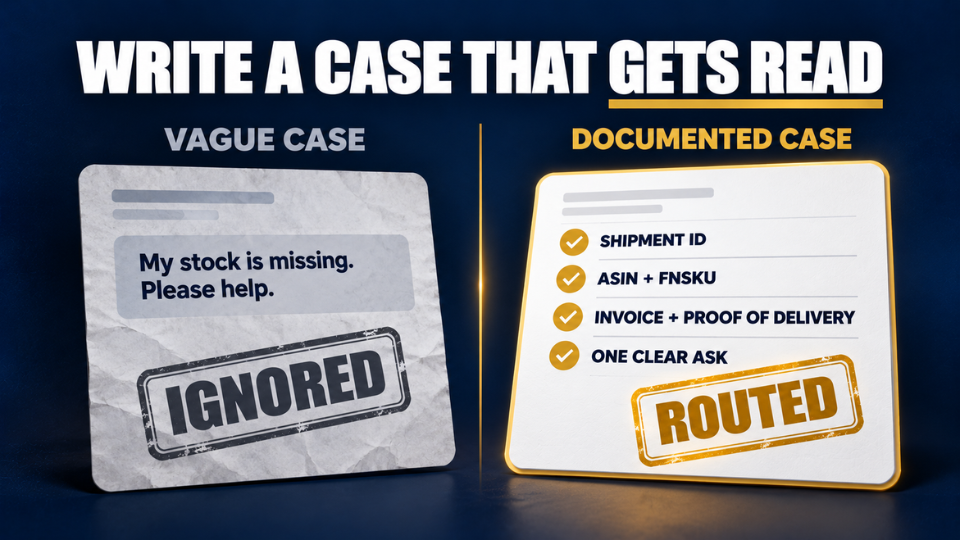
Associates spend only minutes on each case, so yours must make the problem obvious at a glance. Before you submit, check it includes these five things:
- A one-line summary of the problem and the outcome you want, such as “186 units missing from shipment FBA15XXXXX; please investigate and reimburse.”
- Every relevant ID, including the shipment ID, ASIN, FNSKU, order ID or removal order ID.
- Proof such as invoices, packing lists, box labels and the carrier’s proof of delivery.
- Dates showing when the problem started and what you have already tried.
- Earlier case IDs on the same issue, so nobody starts from zero.
With all five, the associate has nothing to guess and can route it correctly.
One Issue, One Case: Stop Opening Duplicates
Opening a fresh case every day feels proactive, but it backfires. Each new case can start at the back of the queue, and splits your history across associates who never see the full picture. Keep one case per issue and reply inside it.
How to Contact Amazon Seller Support the Right Way
In Seller Central, go to Help, then Get Support, and describe your issue so the right contact options appear. Choose the topic that matches your problem, because the topic decides which team sees it first. Imran Sheikh from Lucknow filed inventory issues under a general category and waited weeks. Once he picked the FBA inventory topic and put his shipment ID in the first line, a specialist replied in two days.
Amazon Seller Support Escalation Starts Inside the Case
How to Reopen an Amazon Seller Central Case
When a case is closed without a fix, don’t open a new one. Go to your Case Log, open the closed case and reply, which reopens it with the full history attached. State clearly that the issue is not resolved, then restate the one outcome you need. That paper trail is what every later escalation depends on.
How to Escalate an Amazon Seller Support Case
Most sellers never ask for escalation directly, and that is the missed step. Request that the case be escalated to a manager or specialist team, backed by facts: days open, times closed and what it is costing you. A line like “This is my third reply in 21 days; please escalate to the team that handles inventory investigations for manual review” works far better than an angry paragraph. This is where real Amazon Seller Support escalation begins.
Amazon Case Closed Without Resolution? Do This
If the case is closed without resolution again, quote the previous associate’s own promise back, such as “On 12 August you confirmed this would be reviewed within 48 hours.” Anjali Deshpande from Nagpur did exactly this after a removal order of 60 units vanished in transit. Her third reopen, with a dated timeline of every reply, finally reached a specialist, and she was reimbursed within ten days.
Want every case this tight from day one? Our Seller Support Case Checklist [LINK] covers the IDs, evidence and wording each case needs.
Get a Human on the Line: Phone and Account Health
Is There an Amazon Seller Support Phone Number in India?
The honest answer is that Amazon works mainly on a callback model. Instead of dialling a fixed Amazon Seller Support phone number in India, you request a call through the contact options in Seller Central, and an associate calls the number registered on your account. Numbers shared on third-party websites are often outdated, so stick to the route inside Seller Central. A call helps most when your issue needs explaining, because you can ask the associate to stay on the line until the right team is looped in.
When to Use Amazon Account Health Support
Amazon Account Health Support is a separate team that handles policy violations, listing deactivations, suspension risks and appeals. Don’t use it for routine inventory questions, but do use it when a problem threatens your account or your ability to sell an ASIN. You’ll find the option on your Account Health dashboard, and if a Call Me Now option appears there, use it for urgent issues so a specialist calls you.
Gurpreet Singh from Ludhiana spent two weeks emailing Seller Support about a deactivated ASIN for his gym gloves. One Account Health call revealed that Amazon needed a single compliance document, and his listing was live again within four days.
Use the Seller Forums to Get Moderator Eyes on It
How to Write a Forum Post Moderators Act On
When cases stall, the Seller Forums are an underrated Amazon Seller Support escalation route. Amazon moderators regularly read threads and ask sellers to share case IDs so they can review the issue and send it to the right team. Post on the India forums inside Seller Central with a clear title, your case IDs in the first line, a three-sentence summary and what you have already tried. Share nothing beyond case IDs, and keep the tone factual, because a calm post is far easier for a moderator to act on.
What Moderators Can and Can’t Do for You
Moderators can review your case history, push it to a specialist team and follow up on your behalf. They cannot overturn policy decisions or promise a reimbursement. Joseph Mathew from Thrissur posted three stalled case IDs about 92 customer returns that never made it back into his sellable FBA stock. A moderator replied within two days, linked the cases together and assigned a specialist, and the reimbursement arrived the following week.
If the forums don’t move your case within a week or two, it’s time for the final rung.
Last-Resort Amazon Seller Support Escalation Routes
Does Emailing jeff@amazon.com Still Work for Sellers?
The jeff@amazon.com address doesn’t reach Jeff Bezos personally. Emails sent there are routed to an executive seller relations team that handles issues frontline support couldn’t fix. Sellers report replies within a few days to a couple of weeks, and the team expects you to have tried normal channels first. Use this level of Amazon Seller Support escalation only with a clear case history, a strong claim and a serious issue, such as a large inventory loss or a listing block support has failed to fix.
How to Write an Executive Escalation Email
Keep it to one page, with your case IDs and issue in the subject line. Then cover four things briefly: what happened, a dated timeline of every case and reply, the business impact in rupees, and the specific outcome you want. Attach the same evidence you used in your cases. Nitin Joshi from Dehradun used this exact structure after three months of chasing 140 lost units of brass diyas, and an executive relations specialist called him within nine days.
When to Call in Outside Help
When the money at stake is large, an experienced agency or e-commerce lawyer can help frame the case. They still work through your Seller Central account, so be wary of anyone promising guaranteed results.
Grab our escalation swipe file [LINK] for ready-to-edit wording for the reopen reply, forum post and executive email.
Stop the Next Stuck Case Before It Starts
Keep a Simple Case Log With Escalation Dates
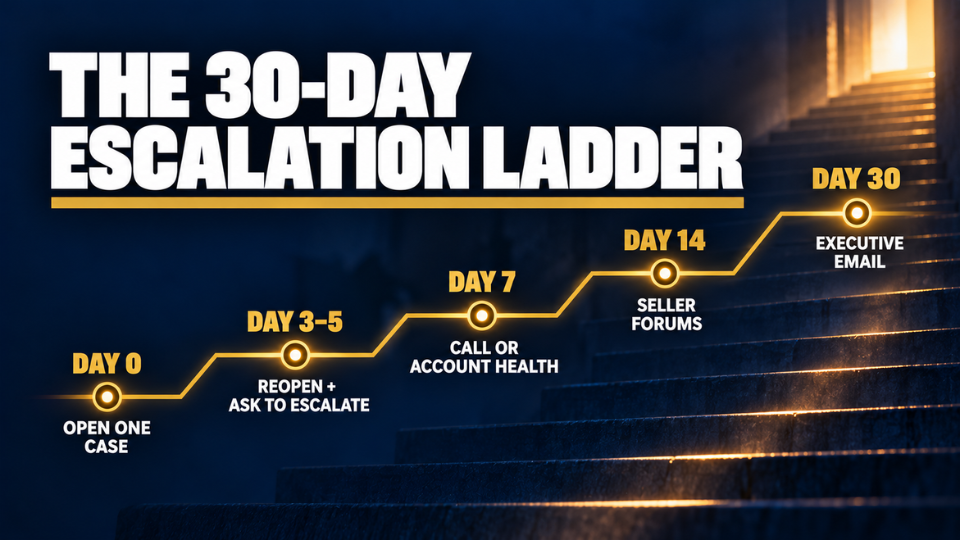
The sellers who get cases fixed fastest track them like a project. Keep a shared sheet with the case ID, date opened, issue, team, status and next follow-up date, then use a simple ladder to decide when to move up:
- Day 0: open one well-documented case.
- Day 3–5: if there’s no meaningful reply, reopen it and ask for escalation.
- Day 7: request a call, or contact Account Health for account-level issues.
- Day 14: post your case IDs on the Seller Forums.
- Day 30: send the executive escalation email.
Treat this as a default, not a rule. Urgent account health issues deserve a call on day one.
Check Account Health Every Week
Many long fights start as small warnings nobody noticed. A ten-minute weekly check of your Account Health dashboard and FBA inventory reports catches listing issues and missing units while they’re still easy to fix.
Know Which Team Owns Which Problem
Inbound discrepancies, lost or damaged inventory, listing blocks and policy warnings all go to different teams. Sneha Rao from Mysuru wrote a one-page routing guide for her two-person team, and their open cases dropped from 14 to 3 within a month because each one reached the right team the first time.
Frequently Asked Questions
How do I escalate a case with Amazon Seller Support?
Amazon Seller Support escalation starts inside the case. Reopen it from your Case Log, state that the issue is unresolved and ask for escalation to a manager, citing how long it has been open. If that fails, request a call, contact Account Health, post your case IDs on the Seller Forums, and keep the executive email as a last resort.
Is there an Amazon Seller Support phone number in India?
Amazon mainly uses a callback system for sellers. Instead of dialling a fixed number, you request a call through Help in Seller Central, and an associate calls the phone number registered on your account. Numbers posted on third-party websites are often outdated, so the Seller Central route is the reliable one.
What should I do if Amazon closes my case without resolving it?
Reopen the same case instead of starting a new one, so the history stays attached. Say clearly that the problem is not fixed, restate the outcome you need and quote any earlier promises with dates. If it closes again, ask for escalation to a manager and move up the ladder.
Does emailing jeff@amazon.com still work for sellers?
Yes, as a last resort. Emails go to an executive relations team, not Jeff Bezos himself, and replies can take a few days to a couple of weeks. It works best for serious, well-documented issues where normal channels have clearly failed.
Why is Amazon Seller Support not responding to my case?
Usually the case was closed as answered, transferred to another queue or sent to the wrong team. Vague cases and duplicate tickets make it worse. Check your Case Log, reopen the right case with clear evidence and IDs, and ask for escalation if nothing has moved in three to five working days.
How long should I wait before escalating an Amazon case?
For routine FBA issues, give a case three to five working days. If you get no meaningful reply, reopen it and request escalation. Anything threatening your account or a top-selling ASIN deserves a call or Account Health contact the same day.
Can escalating too often hurt my seller account?
Escalating politely with evidence won’t hurt you. Dozens of duplicate cases or abusive messages are what slow everything down. Keep one case per issue, stay factual and climb the ladder in order.
Can an agency escalate Amazon cases on my behalf?
An agency or account manager can draft and manage cases for you, but they still work through your own Seller Central account. Be cautious of anyone promising guaranteed reimbursements or reinstatements.
Conclusion
A case that goes nowhere feels like a wall, but it’s really a ladder you haven’t climbed yet. Most FBA sellers stop at the first rung because they assume Seller Support is the end of the road. Now you know the full path: build a case that gets read, reopen it with facts, get a human on the phone, put your case IDs in front of moderators, and save the executive email for the fights that truly matter. Treat Amazon Seller Support escalation as a system, and you’ll spend less time chasing Amazon and more time growing.
If you want to build an Amazon business that runs on systems like this, from inventory and listings to account health, join our 3-Day Amazon Business Training. Your next stuck case will be shorter, and your business stronger for it.
