
The Repricing Trap That Quietly Eats Your Profit
Nikhil Menon from Kochi flipped on automated pricing for his kitchenware catalogue and felt like a genius for about three weeks. His Buy Box win rate climbed. Orders ticked up. Then he opened his month-end numbers and something didn’t add up — a product he priced at ₹499 was quietly closing sales at ₹461, again and again, and his profit for the month was thinner than the month before he automated anything.
That is the trap, and it catches thousands of Indian sellers. When you set automated Amazon repricing rules without a floor, the damage doesn’t show up as a cost you can spot. It hides inside your revenue, spread across hundreds of orders as a slightly lower average selling price. You never see a line that says “margin surrendered” — you just feel poorer at month-end and can’t explain why.
The fix isn’t to switch automation off — no human can watch competitor prices 24/7. The real problem is unbounded automation, a repricer told to win at any cost that will happily chase a competitor down to near-zero. This guide shows you how to keep the speed while keeping your margin intact.

What Amazon’s Automate Pricing Tool Actually Does
Before you set a single rule, know what you’re switching on. Amazon Automate Pricing is a free, rule-based engine inside Seller Central that adjusts the price of selected SKUs the moment a trigger fires — a competitor drops their price, the Buy Box shifts, or your sales slow down.
How Amazon Automate Pricing works
You pick a rule, attach it to specific SKUs, and set your price boundaries. From then on, the tool watches the market and reprices within your limits, usually within about fifteen minutes. It only touches SKUs you enrol, and you can stop it anytime. Sana Qureshi from Hyderabad enrolled just twelve fast-moving SKUs at first, wanting to see the behaviour before trusting it with her whole catalogue.
Is it free? What you actually need
Yes — it’s included with the Professional selling plan at no extra charge, and you need an active offer on the products you want to reprice. But free doesn’t mean smart. The tool does exactly what you tell it, so a lazily configured rule costs you far more in lost margin than any paid tool would in subscription fees.
Automate Pricing vs. manual repricing
Manual repricing fails for a simple reason: you can’t refresh listings all day. By the time you spot a competitor undercutting you, you’ve lost Buy Box hours. Automation reacts instantly — but it obeys only the logic you gave it, which is why the next few sections matter.
How to Set Up Automated Pricing on Amazon, Step by Step
Getting started is quick. The trouble is never the setup — it’s the settings, which we’ll fix in a moment. Deepak Rao from Mangalore had his first rule live in under ten minutes; it was the floor he set an hour later that actually saved his margin.
Here’s the path to switch it on:
- In Seller Central, open the Pricing menu and select Automate Pricing, then click Get Started.
- Choose a predefined rule or build a custom one, depending on how much control you want.
- Attach the rule to your SKUs — one at a time through the interface, or in bulk using the Automate Pricing file upload.
Once those three steps are done, price changes begin flowing within roughly fifteen minutes.
Picking a predefined rule vs. building a custom one
Predefined rules are fine for a first test. Custom rules earn their keep once you want to compete only against certain sellers, or price differently by product. If you’re unsure, start predefined, watch the results, then graduate to custom.
Applying rules to SKUs
Be warned: adding SKUs one by one is tedious, and the search field wants your exact SKU, not a partial match. For anything beyond a small catalogue, the file upload option saves real hours — an afternoon of clicking versus a five-minute spreadsheet.
The Amazon Repricing Rules You Can Choose From
The rule you pick decides whether automation protects you or bleeds you. Every option can be pointed at your margin or against it. Fatima Sheikh from Ahmedabad learned this the hard way when a sales-based rule quietly cut her prices on stock that was selling perfectly well.
Competitive Buy Box rule
This prices your SKU below, at, or above the current Featured Offer. When you’re the only seller in the Buy Box, repricing stops — so it works best on shared listings where several sellers compete on the same product. This is the core of most Amazon Buy Box repricing setups.
Competitive Lowest Price & External Price rules
These match or cap your price against the lowest offer on Amazon, or against prices on other websites. Useful, but risky: they can drag your price down to chase a competitor who isn’t even a realistic threat.
Sales-based rules — the one to handle with care
This rule drops your price when units sell below a target you set. Treat it cautiously — it serves Amazon’s agenda of faster sell-through, which isn’t always yours. Plenty of healthy inventory simply isn’t meant to move in thirty days, and cutting its price is margin donated for no reason.
Want to find your true break-even before you touch any rule? Our breakdown of Amazon’s selling fees covers every cost that eats into a sale, so your floor reflects reality instead of a guess.
Setting a Minimum Price That Protects Your Margin
This is the section that saves your business, so slow down here. Everything above is machinery; the minimum price is the safety net that keeps it from hurting you. Get this right and unbounded chasing becomes impossible by design.
How to set a minimum price for repricing
When you attach a rule to a SKU, you’ll see fields for a minimum and an optional maximum price. The minimum is non-negotiable — the hard floor your repricer can never sink below, however aggressive a competitor gets. Skip it, and you’ve handed a stranger permission to set your prices.
The floor formula
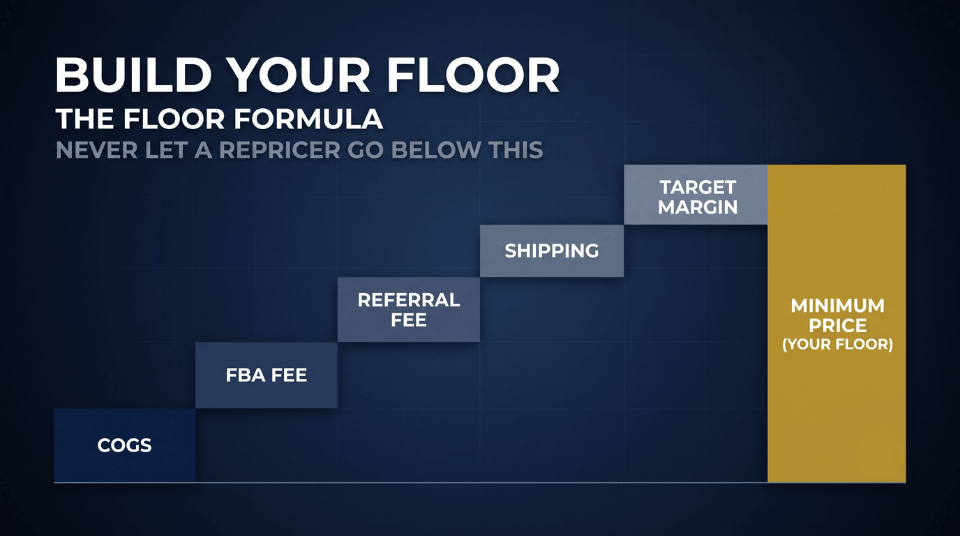
Your floor isn’t a number you feel out at midnight. Build it from real costs: COGS + FBA fee + referral fee + shipping + target margin = floor. Arjun Nair from Thiruvananthapuram rebuilt his floors this way and found three SKUs he’d been unknowingly selling at a loss for months. Don’t round, and don’t guess.
Why a static floor still bleeds you
A floor you set once drifts out of date. Amazon’s fees change, and units aging in a warehouse rack up long-term storage fees a fresh unit never carried. Review your floors monthly, and always after a fee update, so yesterday’s safe price isn’t today’s quiet loss.
Setting a ceiling to catch competitor stockouts
Your maximum price is the upside most sellers forget. When rivals run out of stock, the highest remaining offer often wins the Buy Box by default. A ceiling around 15–20% above your target price captures that windfall instead of leaving it on the table.
Avoiding the Race to the Bottom
Every seller fears the price war, and automation is what drags them into one. But the race to the bottom is a choice, not an inevitability — and the sellers who avoid it usually make more, not less.
Does automated repricing hurt your profit?
It can, and it’s honest to say so. A rule set to always undercut will surrender margin you never needed to give, matching a competitor’s panic-drop cent for cent. But that’s the rule’s fault, not automation’s. A repricer with a real floor and a sensible strategy protects profit rather than eroding it.
Hold your floor and let them sell out
Here’s the mindset shift. When a seller crashes their price below your floor, you don’t follow — you hold. Ritika Bansal from Jaipur watched a rival undercut her on a phone accessory, refused to chase, and within a day that seller was out of stock — and the Buy Box came back to her at a price that actually paid.
Price isn’t everything anymore
This matters more than ever after Amazon’s late-2025 Buy Box change. Price reportedly dropped to around a quarter of the algorithm’s weighting, while delivery speed rose to match it. Strong seller metrics and fast delivery can now win you the Buy Box above the cheapest offer — so racing to the floor on price alone is a worse plan than ever.

Amazon’s Free Tool vs. a Third-Party Repricer
At some point you’ll wonder whether the free tool is enough or you should pay for something smarter. The honest answer: it depends on your catalogue and competition. A solid Amazon repricing strategy starts free and upgrades only when the maths justifies it.
Where Automate Pricing falls short
The free tool has real limits. You can’t control how often it reprices, it struggles to target FBM and FBA competitors cleanly, and managing SKUs at scale is painful. For a small catalogue with light competition, none of that may bother you.
What paid repricers add
Third-party tools bring net-margin floors that account for every fee automatically, separate logic for FBA versus FBM listings, rules that tighten as inventory ages, and algorithmic strategies that anticipate competitor moves. Harpreet Singh from Ludhiana switched once his catalogue crossed a few hundred SKUs and manual floor-setting became a job in itself.
When it’s worth upgrading
The deciding factors are simple: catalogue size, how crowded your listings are, and how thin your margins run. Managing thousands of SKUs against aggressive competition, a paid repricer usually pays for itself. If you’re not, Amazon’s tool plus a disciplined floor carries you a long way.
Building a Repricing Strategy You Actually Monitor
Setup is a moment; strategy is a habit. The sellers who win with automation watch and refine it, rather than flipping a switch and forgetting. Meera Iyer from Chennai built her whole approach around one rule: never scale what you haven’t tested.
The 10-SKU rollout
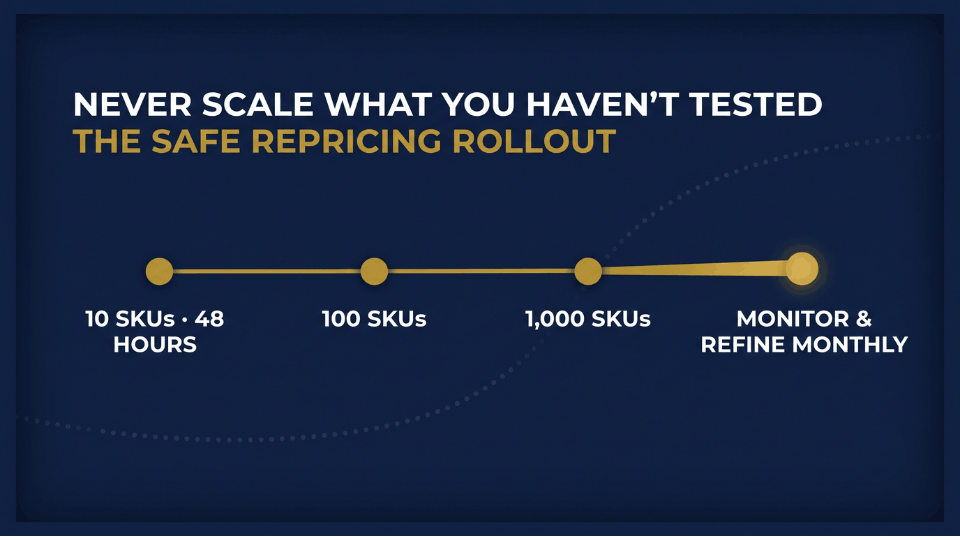
Don’t enrol your whole catalogue on day one. Pick ten SKUs, set your minimum and maximum, and let it run for forty-eight hours. Watch two numbers side by side — Buy Box percentage and net margin. Only when both look healthy do you roll out to the next hundred, then the next thousand. A slow start beats a week of firefighting.
Reading the 30-day price history and business reports
Automate Pricing keeps a detailed thirty-day history. Cross-reference it against your Seller Central business reports and, crucially, look past the Buy Box win rate to the real margin on your P&L statement. A high win rate on low-margin sales is a trap dressed up as a victory.
Time-based and inventory-based adjustments
Smart sellers reprice with the calendar. Hold or lift prices during peak demand — evenings, weekends, the Great Indian Festival rush — instead of reflexively cutting, then loosen the reins to clear aging stock. Pricing that reads demand this way separates a strategy from a setting.
FAQ
How does Amazon’s Automate Pricing tool work?
Automate Pricing is a rule-based tool in Seller Central. You choose a rule, attach it to selected SKUs, and set minimum and maximum prices. When a trigger fires — a competitor’s price change or a Buy Box shift — it reprices within your limits, usually within about fifteen minutes. It only affects SKUs you enrol and can be stopped anytime.
Is Amazon Automate Pricing free?
Yes. It’s included with the Professional selling plan at no extra cost, and you need an active offer on the products you reprice. The catch isn’t the price — it’s the configuration. A rule with no floor can cost you far more in surrendered margin than any paid tool charges in subscription fees.
Does automated repricing hurt your profit margin?
It can if you skip a minimum price. A rule set to always undercut will match competitors down to unprofitable levels. But with a properly calculated floor, automation protects your margin instead of eroding it. The tool isn’t the risk — an unbounded rule is. Set your floor from real costs and the danger disappears.
How do I set a minimum price for repricing on Amazon?
When you attach a rule to a SKU, you’ll see a minimum price field. Fill it using this formula: cost of goods, plus FBA fee, plus referral fee, plus shipping, plus your target margin. That total is the lowest price your repricer can ever reach. Treat it as mandatory on every SKU, never optional.
What’s the difference between Automate Pricing and a third-party repricer?
Amazon’s tool is free but basic — limited timing control, weaker FBA/FBM targeting, tedious SKU management. Paid repricers add net-margin floors, fulfilment-aware pricing, inventory-age rules, and algorithmic strategies. For small catalogues, Amazon’s tool plus a solid floor is enough; larger, more competitive catalogues usually justify upgrading.
How long does it take for automated pricing to update prices?
Once a rule is active and a trigger fires, price changes typically appear within about fifteen minutes. The adjustment itself happens as soon as a marketplace event meets your rule conditions; the short delay is just the time Amazon needs to reflect it on the live listing.
Can I use Automate Pricing for FBM listings?
Automate Pricing works best with FBA offers, and its ability to target merchant-fulfilled competitors cleanly is limited. FBM sellers can still use it, but should watch closely, since FBM listings often need different pricing than FBA to stay competitive under Amazon’s fulfilment dynamics.
Will repricing alone win me the Buy Box in 2026?
No. Since Amazon’s late-2025 update, price carries roughly a quarter of the Buy Box weighting, with delivery speed and seller metrics now equally important. Repricing keeps you competitive, but fast delivery and healthy account metrics matter just as much. Treat pricing as one lever among several, not the whole game.
Conclusion
The tool was never the danger. Nikhil’s ₹499 sliding to ₹461 wasn’t automation failing — it was automation running without a floor. Once you build your minimum from real costs, add a ceiling to catch stockouts, and roll out slowly across ten SKUs before you trust it with a thousand, repricing stops being a threat and becomes exactly what it should be: hours of your week handed back to sourcing, listings, and building your brand.
Set the floor, hold your line when others panic, and let the machine do the watching while you do the growing. If you want to master pricing alongside every other lever that actually moves an Amazon business, come spend three focused days with us in the 3-Day Amazon Business Training and build the full playbook, step by step.
