
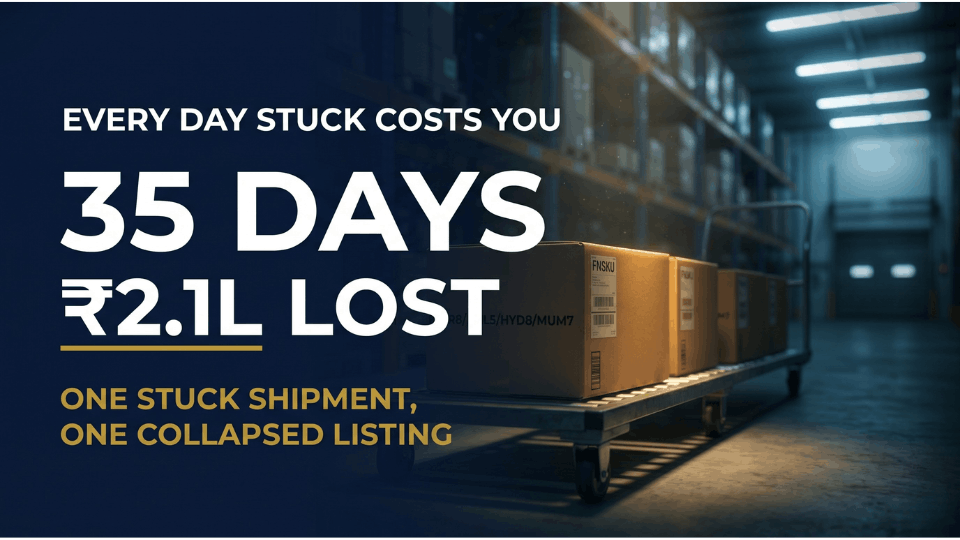
Three weeks ago, Sibi Raj from Bangalore watched his organic baby oil listing slide from page one to page four on Amazon.in. The product was fine. His ads were running. The problem was sitting in a fulfillment centre an hour from home, in a status that read “Receiving” — for the thirty-fifth day straight. By the time those 400 units finally went live, he had lost ₹2.1L in sales and his Buy Box share had collapsed.
Almost every inbound delay traces back to one of seven FBA inbound shipment mistakes, each with a fix you can apply before your next shipment leaves your warehouse. Here are the actual mistakes that delay inventory at Indian fulfillment centres, and the fixes that get stock checked in faster.
Why FBA Inbound Mistakes Hurt More Than You Think
Most sellers think of a stuck shipment as an inconvenience. It’s a slow-motion ranking collapse with cash flow consequences that compound by the day.
The real cost of a delayed FBA shipment
Every day your shipment sits in “Receiving” is a day your listing’s sales velocity drops. Amazon’s algorithm doesn’t care that your inventory is technically inside a warehouse — if the stock isn’t buyable, your conversion data flatlines, your ranking slips, and your PPC spend burns on clicks that can’t convert.
How inbound delays compound across your catalogue
Stuck cash means delayed reorders. Stockouts push your inventory performance score down, which restricts storage limits and forces smaller, more frequent shipments — creating more opportunities for inbound errors. If your ranking is slipping, our guide on handling stockouts without losing momentum covers the recovery playbook. Indian sellers feel this harder because tighter margins and longer transit times to FCs like BLR8, DEL5, HYD8, and MUM7 leave less room to absorb damage.
Mistake #1: Sloppy Box Content and SKU Mismatches
This is the most common reason shipments get flagged for manual reconciliation at Amazon.in fulfillment centres. The shipment shows as “Delivered” on the carrier side, but units never become available — because the moment a warehouse associate finds something that doesn’t match your declared box contents, the shipment gets pulled into the “Problem Solve” queue. That queue can sit two to four weeks while someone manually counts every unit.
Neha Gupta from Jaipur learned this last September. She shipped 800 units across six SKUs to BLR8 ahead of her festive launch. One carton was mis-declared — she’d swapped unit counts of two SKUs while uploading box contents — and the entire shipment paused for 18 days. Her launch came and went with zero stock available.
How to fix it
Use Amazon’s 2D barcode workflow for box contents wherever possible. It’s faster to receive than manual entry, and the scannable label leaves no ambiguity about what’s inside each carton. Triple-check unit counts before sealing, and never mix ASINs in a single carton unless you’ve declared it as a mixed-SKU box. If a shipment is already stuck, opening a case rarely helps — Support will tell you to wait. Gather your supplier invoice, dispatch packing list, and photo log of sealed cartons, and file reconciliation once the status changes to “Closed.”
Mistake #2: Barcode and FNSKU Label Errors
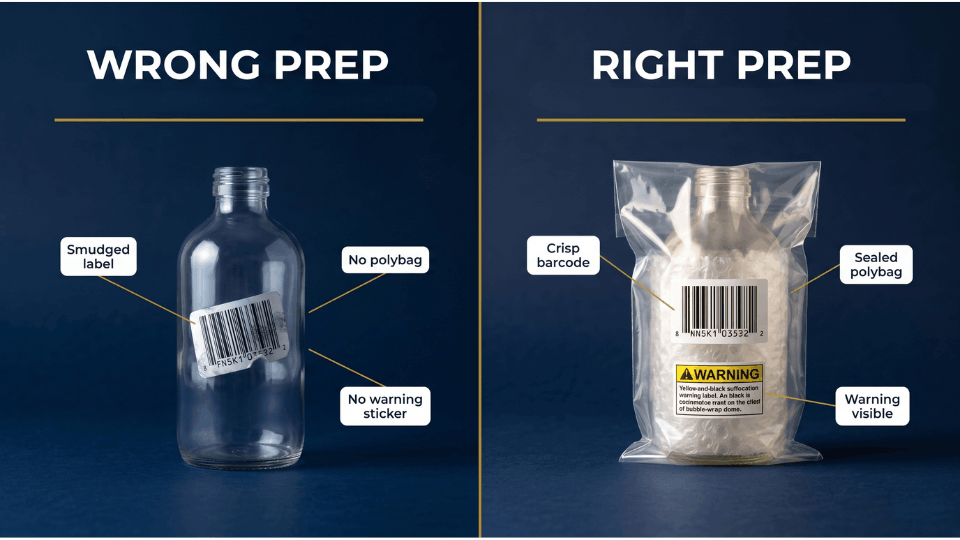
Label errors are the silent killer of inbound shipments. A barcode that’s smudged, off-centre, or printed at the wrong DPI can fail at the receiving dock — and when that happens, the unit gets rejected, reclassified as “unfulfillable,” or charged a manual processing fee. The other label trap is the reused box. If the old FBA label on a returned carton isn’t fully covered, scanners pick it up first and route your inventory to the wrong shipment ID.
Mitel Roy from Kochi shipped 1,200 units of a kids’ apparel SKU to HYD8 last winter. He’d printed FNSKUs on a low-DPI inkjet printer instead of a thermal label printer, and 300 units came back rejected for unreadable labels. Return shipping alone cost him ₹47,000.
Label printing standards that pass every time
Use a thermal label printer at minimum 203 DPI on plain white adhesive labels — never glossy stock. Place the FNSKU on a flat surface, never wrapped around a curve or on top of an existing barcode. If you’re relabelling returns, peel off the old label or cover it with a fresh opaque one. Test-scan with a phone barcode app before sealing. If Amazon flags a label defect, do not click “Resolve” reflexively — that button means you’re admitting fault. Open a case and dispute it if you have evidence the label was correct on your end.
Mistake #3: Ignoring Prep and Packaging Requirements
Amazon’s prep requirements look like fine print until they cost you a shipment. Polybagging, bubble-wrap, suffocation warnings, expiry markings on consumables — every category has rules, and assuming “this doesn’t apply to my product” is how sellers end up with rejected inventory and disposal fees. Amazon.in has tightened prep enforcement over the last year. If your unit shows up at the FC without the required prep, the FC won’t fix it for you — it gets rejected, returned at your expense, or disposed of with no reimbursement.
Kavya Reddy from Hyderabad shipped 600 units of glass scented candles to MUM7 without bubble-wrap, assuming the outer carton would protect them. Forty per cent arrived broken. Amazon refused reimbursement because prep was the seller’s responsibility. She lost roughly ₹1.4L on a single shipment.
Pull prep requirements per ASIN
Prep requirements are listed under “Prep instructions” for every SKU inside Seller Central. Apparel, baby products, jewellery, glass, electronics, and consumables all have category-specific rules — check every ASIN, every time. For sellers shipping under 500 units a month, DIY prep usually makes sense. Once you cross 1,000 units a month, third-party prep centres in Mumbai, Bangalore, and Delhi will polybag, label, and box your inventory for ₹4–₹8 per unit, and they’ll catch prep mistakes before your shipment leaves their facility.
Mistake #4: Picking the Wrong Carrier or Shipping Method
Carrier choice feels purely about cost until you watch a shipment sit on a loading dock for two weeks. Non-partnered carriers don’t have pre-scheduled unloading appointments at Amazon FCs — their trailers join a queue that can stretch for days during peak periods. The other mistake is choosing LTL when SPD would be faster. Small Parcel Delivery generally processes faster at Amazon.in FCs because each box is scanned individually rather than waiting for a whole pallet. For shipments under 15 cartons, SPD almost always beats LTL.
Vikram Sethi from Ludhiana switched from Amazon Transportation Services to a cheaper local freight company to save ₹3,500 on a Diwali shipment. His average inbound time went from 5 days to 22 days, and he lost an estimated ₹38,000 in held-up sales.
When ATS is worth the premium
ATS isn’t always cheapest, but it earns its premium during peak and time-sensitive launches. Dock appointments are pre-scheduled, trailers unload faster, and tracking integration is tighter. For routine replenishment, a reliable third-party carrier with prior FC experience can save 15–25% on freight — but never use one that can’t share real-time tracking or prove prior delivery experience at your destination FC.
Mistake #5: Ignoring Inbound Performance Alerts
Seller Central sends inbound problem notifications every week, and most sellers either ignore them or click “Resolve” without reading the actual problem. Clicking “Resolve” without verification is the worse of the two — that button means you’re admitting fault. You get charged a manual processing fee, your account health takes a hit, and the flag is logged against your inbound performance metrics. Stack enough and Amazon will start restricting which categories you can ship to FBA.
The Inbound Performance Dashboard inside Seller Central shows your defect rate and most common defect types. Open it once and you’ll often find patterns — a specific SKU getting flagged for prep, a specific FC where partial-receive flags keep appearing — that tell you exactly where to fix your process. For how this fits into your wider stock flow, see our guide on bulletproof FBA inventory management.
How to read a defect notification correctly
Read the full notification. Check the shipment ID, affected ASIN, and specific defect type. Compare against your records — photo log, supplier invoice, and dispatch packing list. If the flag is accurate, accept it and fix the process. If not, dispute it. Open a case if you have evidence the flag is wrong, or if the same defect keeps appearing on shipments you know were prepped correctly.
Mistake #6: Sending Everything at Once During Peak Season
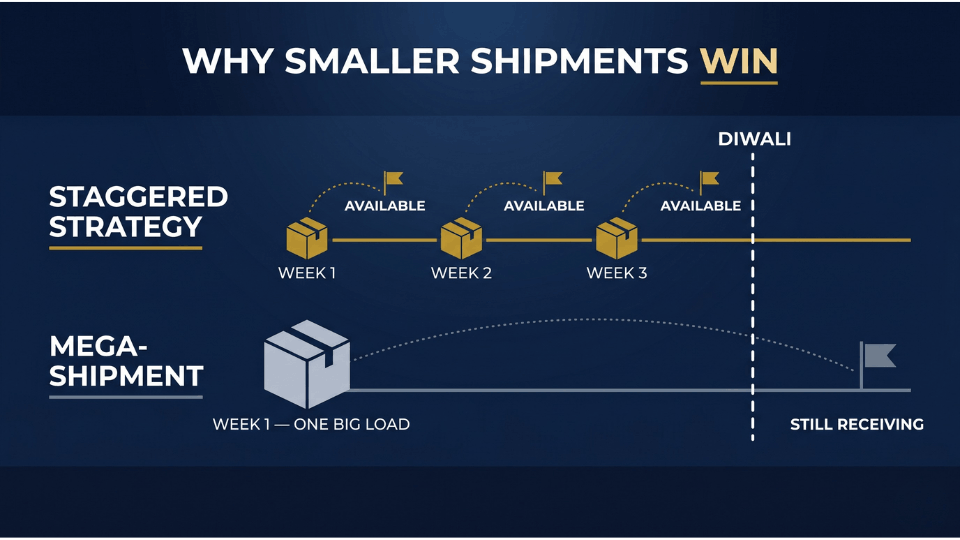
Q4 in India — Diwali, the Great Indian Festival, year-end sales — turns Amazon’s normal 5-day check-in window into 15 to 20 days at most major FCs. Sellers know this. They still wait until October to ship Diwali stock, then wonder why nothing is live in time. Our Great Indian Festival strategy guide covers the full peak-season playbook beyond just inbound.
The fix isn’t to ship earlier in one giant load. It’s to ship smaller batches more frequently. A 1,500-unit shipment is a single point of failure. Three 500-unit shipments staggered across three weeks have three independent check-in clocks — if one gets flagged, the other two flow through and your listing keeps selling. Sneha Iyer from Chennai ran exactly this experiment last Diwali. Instead of one 1,500-unit shipment to BLR8, she sent three 500-unit shipments across three weeks. All three were live before her competitor’s mega-shipment even reached “Receiving” status.
Build a backwards calendar
Work backwards from your peak sales date. If you need stock live by 15 October, plan for 15 to 20 days inbound during peak — meaning your shipment needs to be at the FC by 25 September, dispatched by 20 September, prepped by 15 September. Build the full timeline before placing a supplier reorder. For a deeper framework, see our 30-day reorder plan guide.
Mistake #7: Not Tracking the Shipment After Dispatch
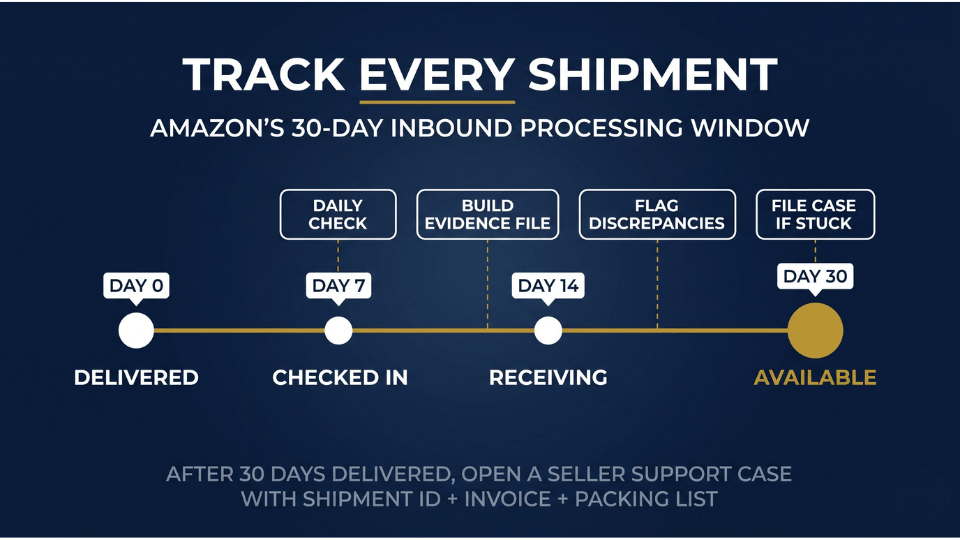
The “shipped and forgotten” mentality is the final mistake, and it turns recoverable problems into unrecoverable losses. The Shipments tab shows status changes, defect flags, and quantity discrepancies in near real time. Sellers who check daily catch problems on day three or four. Sellers who check weekly catch them on day ten — by which point the shipment is often sitting in a problem queue with no one investigating.
Amazon’s policy allows up to 30 days to process an inbound shipment. After 30 days of “Delivered” status with no inventory available, you can open a Seller Support case. Earlier and Support will tell you to wait. Rohan Desai from Ahmedabad caught a 200-unit discrepancy on day 14 of a shipment to DEL5. He had his supplier invoice and dispatch packing list ready, filed reconciliation immediately once the shipment closed, and recovered ₹89,000 — money written off entirely if he’d waited 60 days.
The daily 5-minute check
Open the Shipments tab. Check the status of every active shipment. Look for “problem” flags or partial-receive indicators. Scan unit counts against your dispatched quantity. If anything looks off, screenshot it and start building your evidence file. Successful reconciliation claims have three things in common: a clean supplier invoice, a dispatch packing list, and timestamped photos of sealed cartons before dispatch. For the full audit playbook, our guide on FBA reimbursements and inventory audits walks through what wins claims.
FAQ
Why is my FBA shipment stuck in receiving?
Most stuck shipments trace back to FC backlog (especially during Q4), a discrepancy between what you declared and what arrived, or a label issue that pulled the shipment into manual processing. Check the Shipments tab for defect flags first. If there are none, it’s likely backlog — you’ll need to wait out the 30-day processing window before Amazon investigates.
How long does Amazon take to process an FBA inbound shipment in India?
In normal periods, expect 5 to 10 business days from delivery to fully available stock at most Amazon.in fulfillment centres. During Q4 and around the Great Indian Festival, that window stretches to 15 to 20 days. Plan replenishment around the longer window during peak.
What is an inbound defect in Amazon FBA?
An inbound defect is any issue Amazon flags during receiving — incorrect labels, missing prep, mis-declared box contents, damaged packaging, or quantity discrepancies. Each is logged against your inbound performance metrics. Repeated defects can lead to manual processing fees, restricted shipping privileges, or limits on how much inventory you can send.
What happens if Amazon rejects my FBA shipment?
Rejected shipments are either returned at your expense, disposed of, or held for re-prep at a fee. The outcome depends on the defect type and your removal settings. You’ll get an email explaining the rejection — respond quickly, because if you don’t choose within the window, Amazon defaults to whichever option is set in your account preferences.
How do I fix a delayed FBA shipment in Seller Central?
If the shipment is past 30 days delivered with no inventory available, open a Seller Support case with the shipment ID, carrier tracking, supplier invoice, and dispatch packing list. Under 30 days, monitor daily and gather evidence — opening a case earlier rarely speeds the process.
Can I cancel an FBA inbound shipment after dispatch?
Once dispatched, you can’t cancel cleanly — Amazon will receive whatever arrives. You can mark the shipment “deleted” in Seller Central, but units that arrive will still need to be reconciled or removed. The cleanest move is to let it process, then create a removal order.
Should I use Amazon Transportation Services or my own carrier?
For peak periods and time-sensitive launches, ATS is usually the better call — pre-scheduled dock appointments mean faster check-in. For routine replenishment, a reliable third-party carrier with prior FC experience can save 15–25% on freight. Avoid carriers without an Amazon FC track record entirely.
Conclusion
Every mistake covered here traces back to one habit: treating an inbound shipment as a one-time event instead of a process with checkpoints. Sellers who get this right have built a repeatable system — pre-flight checks before dispatch, daily monitoring after, and a documented evidence file ready for any reconciliation claim. That’s the difference between a seller whose inventory flows in and one whose cash sits stuck at a loading dock every quarter.
If you want to build that system from the ground up — for inbound ops, listings, launches, ads, and scaling, join the 3-Day Amazon Business Training. Build the process once, and every shipment after this becomes a quiet win instead of a fire you’re putting out.