
The Silent Leak: How Amazon Negative Keywords Protect Your Ad Budget
Nobody loses their ad budget to a single disastrous click. They lose it the way you’d lose blood to a thousand tiny paper cuts — a few wasted rupees on one irrelevant search, a few more on the next, none of them alarming on their own, all of them quietly adding up to a number that bleeds you dry. That’s exactly what happened to Devang Mehta from Surat.
Devang Mehta sold premium cotton bedsheets, and for two months he couldn’t understand why his ACoS kept climbing while his sales stayed flat. When he finally downloaded his search term report, the answer was sitting right there: shoppers searching for “cheap single bedsheet” were clicking his ₹1,499 listing, bouncing in seconds, and walking off with his budget. Over sixty days, those clicks had quietly drained nearly ₹18,000 — money that could never convert, spent on people who were never going to buy.
This is the leak almost every seller has and almost nobody watches. Amazon negative keywords are the simplest, highest-return fix in all of PPC, and most sellers either ignore them or treat them as an afterthought. The pattern is brutal: in unaudited accounts, somewhere between 30% and 40% of total ad spend goes to search terms that have never produced a single sale. It’s one of the costliest Amazon PPC mistakes — not because the campaigns are badly built, but because the wrong shoppers keep slipping through.
The good news is that plugging this leak doesn’t take a bigger budget or a fancier tool. It takes a system. This guide gives you five layers, each one sealing a different gap that bleeds money. Run all five and you stop paying for clicks that were never going to become customers.

What Are Negative Keywords on Amazon? (And the Two Match Types)
Think of your regular keywords as the people you invite to a party, and negative keywords as the bouncer at the door. A negative keyword is a search term you exclude so your ad never even enters the auction when a shopper types it. No impression, no click, no charge. While positive keywords pull traffic in, negatives keep the wrong traffic out — and on Amazon, keeping the wrong people out is often worth more than letting more people in.
Negative exact vs negative phrase match
Amazon gives you exactly two negative match types, and the difference matters. Negative exact blocks only that specific query and its close variants — plurals and small misspellings. Negative phrase is broader: it blocks any search that contains your phrase in order, plus everything around it. So “cheap wallet” as negative phrase stops “cheap wallet for men” too, while the same term as negative exact only stops the standalone search. There is no negative broad match type on Amazon, which means negative phrase is the widest net you can cast.
The close-variant catch most sellers miss
Here’s a gotcha that trips up Indian sellers constantly: Amazon automatically includes close variants in your negatives, even though Google Ads doesn’t. Add “refurbish” as a negative and you also block “refurbished” and “refurbishes.” You don’t need to enter every spelling, but you do need to respect that breadth — a single negative catches more than the exact letters you typed.
Negative product targeting
Negatives aren’t only words. You can also exclude specific competitor listings. If your ₹2,000 premium product keeps appearing on a ₹400 budget listing’s page, that’s bad real estate — the price gap means those clicks almost never convert. Negative product targeting lets you block it cleanly.
Layer 1: Mine Your Search Term Report for Proven Losers
Your search term report is the single most valuable file in your advertising account, and most sellers let it gather dust. It shows every actual query that triggered your ads, with the clicks, spend, and orders attached to each one. That’s where your negatives live — not in guesswork, but in proven data. If you’ve never learned to read this report properly, that’s the first skill to fix, because every layer after this one depends on it.
How to find negative keywords from your search term report
The filter recipe is simple. Pull a window of at least 30 days, set Orders to zero, then sort by spend in descending order. The terms at the top are your most expensive losers — queries that took your money and gave nothing back. Manish Agarwal from Indore did exactly this with his kitchenware campaign and found a single term, “plastic dish rack,” had eaten ₹3,200 with zero orders while he sold steel racks only. One negative, leak sealed.
How many clicks before you negate?
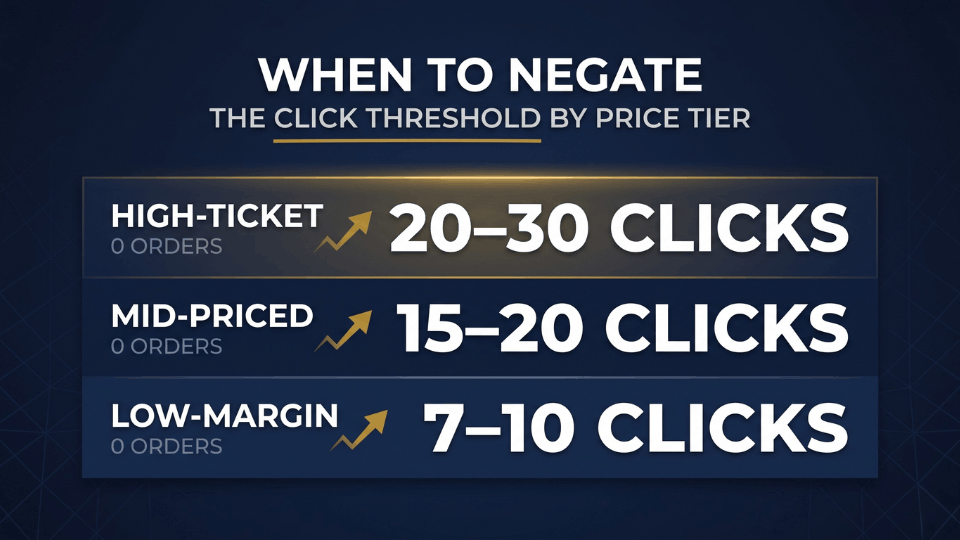
The threshold question is where judgment comes in. Negating after three clicks is premature — you don’t have enough data. The reliable rule scales with your price and margin: roughly 7 to 10 clicks with zero orders for thin-margin products, 15 to 20 for mid-priced items, and 20 to 30 for high-ticket goods that naturally take longer to sell. Beyond clicks, watch two more signals: any term that has spent past your profit margin with no order, and any term whose ACoS sits at two to three times your target even after you’ve cut its bid twice. Those aren’t going to improve.
Layer 2: Block Universal Low-Intent Negatives Before They Cost You
Some negatives you don’t need data to justify. If you sell premium, you already know certain shoppers will never be your customer, and you can block them on day one. These are the universal low-intent terms — words that signal a buyer looking for something you simply don’t offer.
A reliable starter blocklist for Indian premium sellers includes words like “cheap,” “second-hand,” “used,” “wholesale,” “rental,” “combo offer,” and “refurbished” wherever they clash with your positioning. Ananya Rathore from Jaipur sells handcrafted brass home décor, and within her first week she blocked “cheap” and “wholesale” across her account. Her click-through rate climbed almost immediately, because her ad stopped showing to bargain hunters and started reaching people who actually valued craftsmanship.
One caution on placement. These universal negatives are the rare case where campaign-level application makes sense, because they’re irrelevant across every ad group you run. But reserve campaign-level negatives strictly for terms that are universally wrong — everything more specific belongs at the ad group level, where you keep tighter control.
If you’d like a ready-made starting point, our 3-Day Amazon Business Training walks through building a category-specific blocklist you can apply across your whole catalogue — so you’re not blocking terms one at a time from scratch.
Layer 3: Match-Type Discipline (Exact First, Phrase With Care)
Choosing the wrong negative match type is one of the most expensive mistakes in PPC, and it’s entirely avoidable. The discipline is simple: negative exact is your safe default, and negative phrase is the escalation you reach for only with evidence.
Why exact comes first
Negative exact is surgical. It removes one bad query and leaves every neighbouring search untouched. When a term shows up with clicks and no orders, blocking it as negative exact stops the bleeding without risking anything you want to keep. That’s why it should always be your safe default.
When to escalate to phrase
Negative phrase is powerful but blunt. Because it blocks every query containing your phrase, one careless entry can wipe out profitable long-tail traffic you didn’t mean to touch. Faizan Qureshi from Lucknow learned this the hard way — he added “case” as a negative phrase to his phone-accessory campaign and accidentally killed “premium leather case,” one of his best converters. The rule: escalate to negative phrase only after the same irrelevance pattern repeats across multiple report cycles. Until then, stay exact.
Campaign level or ad group level?
The level decision follows the same logic. Ad group-level negatives give you granular, precise control and should be your default. Campaign-level negatives apply to every ad group at once, so save them for terms that are irrelevant everywhere — the universal blocklist from Layer 2.
Layer 4: Cross-Negatives to Stop Campaigns Cannibalizing Each Other
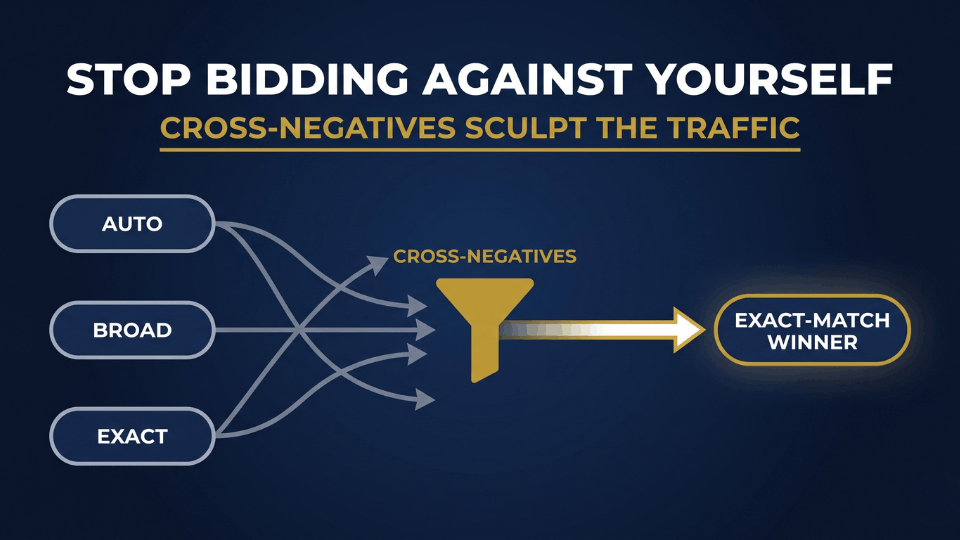
This is the layer most sellers never reach, and it’s where serious money hides. Keyword cannibalization happens when your own campaigns compete against each other — your auto or broad campaign poaches a click that your tuned exact-match campaign was built to win. You end up bidding against yourself, paying more for traffic you already had a better home for.
The fix is cross-negatives. Once a search term proves itself as a converter and you’ve harvested it into a manual exact-match campaign, add that same term as a negative exact in your auto and broad campaigns. This works best when you’ve already set up the auto, broad, and exact campaign structure cleanly from launch. Now the traffic flows to the campaign that handles it best, and your discovery campaigns stop siphoning budget from your winners. Sneha Reddy from Hyderabad runs a private-label yoga-mat brand, and when she layered cross-negatives across her account, her exact campaign’s conversion rate jumped because it finally stopped fighting her own auto campaign for the same shoppers.
There’s a useful benchmark here. Mature, well-run accounts typically carry three to five times more negative keywords than targeted keywords. That ratio isn’t over-restriction — it’s the natural result of consistent report analysis and disciplined cross-negation over time.
Layer 5: A Weekly Audit Cadence That Compounds
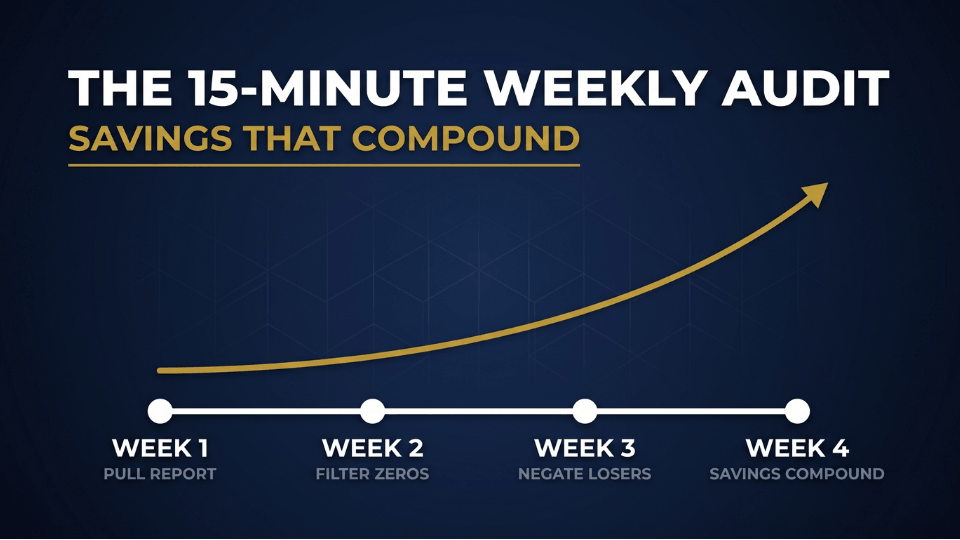
Negative keywords are never a one-and-done job. Shopper behaviour shifts with seasons, festivals, competitor launches, and price changes, so the term that’s harmless today can start bleeding next month. The sellers who win treat this as a routine, not a rescue mission.
The weekly routine takes about fifteen minutes for an active campaign. Pull the latest search term report, filter for zero-order terms above your click threshold, sanity-check them against your product, and add the clear losers as negative exact. Rahul Nair from Kochi blocked one weekly slot for this on his coir-products account, and over a quarter his wasted spend dropped steadily without him ever touching his bids — pairing it with day-parting your bids can compound those savings even further.
Two warnings keep this from backfiring. Don’t over-negate during a new campaign’s learning phase, when Amazon still needs data to figure out what converts. And remember that not every low-converting term is a bad term — a research-style query might be valuable for an awareness campaign even if it has no place in a conversion-focused one. Block surgically, not emotionally.
Once your weekly cadence is running, the next step is structuring your campaigns so negatives and bids work together as one system. That full campaign-architecture playbook is exactly what we build out, account by account, inside the 3-Day Amazon Business Training.
Frequently Asked Questions
What is the difference between negative exact and negative phrase match?
Negative exact blocks only that specific search term and its close variants, like plurals and small misspellings. Negative phrase is broader — it blocks any query that contains your phrase in order, including extra words before or after. Exact is precise and safe; phrase is powerful but risks blocking traffic you want. Always start with exact.
How do I find negative keywords from my Amazon search term report?
Download a report covering at least 30 days, filter for terms with zero orders, then sort by spend from highest to lowest. The expensive zero-sale terms at the top are your candidates. Check each one against your product, and add the clearly irrelevant or non-converting ones as negative exact keywords in the relevant campaign or ad group.
How many clicks before I should add a negative keyword?
It depends on your price and margin. Thin-margin products justify negating after about 7 to 10 clicks with no orders, mid-priced items after 15 to 20, and high-ticket products after 20 to 30, since they sell more slowly. Below that range you don’t have enough data, so resist the urge to negate too early.
Should I add negative keywords at the campaign or ad group level?
Use ad group level as your default, because it gives you precise, surgical control over exactly which searches you block. Reserve campaign level for terms that are irrelevant across every ad group you run — universal words like “cheap,” “free,” or “used.” That structural discipline keeps you from accidentally suppressing traffic that one of your ad groups actually wants.
Do negative keywords lower ACoS, and how often should I review them?
Yes — by cutting clicks that never convert, negatives concentrate your budget on high-intent searches, which directly lowers ACoS and lifts conversion rate. Review weekly for active or high-spend campaigns and bi-weekly or monthly for stable ones. Consistency matters more than frequency, because search behaviour keeps shifting underneath you.
Can negative keywords hurt my campaigns if I add too many?
They can, if you’re careless. Over-negating during a campaign’s learning phase starves Amazon of the data it needs, and an overly broad negative phrase can block profitable searches by accident. Add negatives based on real report data, lean on negative exact, and double-check phrase entries before you apply them.
Do negative keywords block plurals and misspellings automatically?
Yes. For both negative exact and negative phrase, Amazon automatically includes close variants — plurals, singulars, and slight misspellings. You don’t need to enter every variation separately. Just remember this works against you too: a negative catches a wider range of queries than the exact characters you typed, so choose your terms with that breadth in mind.
Is there a negative broad match type on Amazon?
No. Amazon only offers negative exact and negative phrase. Negative phrase is the broadest exclusion available, blocking any query that contains your full phrase in order. If you need to exclude a wide cluster of related searches, negative phrase is your tool — applied carefully, so it doesn’t suppress traffic you’d rather keep.
Conclusion: Five Layers, One Protected Budget
The leak in your ad budget isn’t going to announce itself. It just quietly drains, click after click, until you go looking — or until you build a system that stops it for good. That’s what these five layers are: not five chores, but one defence. Mine your report for proven losers, block the low-intent crowd before they cost you, stay disciplined on match types, cut the cross-negatives that stop your campaigns from fighting each other, and make the weekly audit a habit that compounds.
Start with Layer 1 this week. Pull your search term report, find your most expensive zero-sale term, and block it. Then build outward. If you want the complete campaign architecture for scaling your ads profitably — tying negatives, bids, and structure into one system — come build it with us inside the 3-Day Amazon Business Training. Your ACoS — and your bottom line — will thank you.
