

Last March, Anjali Reddy from Jaipur opened her Seller Central dashboard at 6 in the morning. Her ethnic kurta listings had been stuck on page two for weeks. She sold the same kurta in five colours, each with its own listing, each one quietly sitting at twenty-eight reviews. Her direct competitor, three positions above her, had one consolidated listing showing one hundred and forty reviews. Same product, same price band. The only real difference was the amazon parent child listing structure, and it was costing her roughly two lakh in monthly revenue.
Amazon is about to make that decision even more urgent. On January seventh, the platform announced a major review-sharing policy change rolling out between February twelfth and May thirty-first. Most sellers in India still have not adjusted.
This post is the framework Anjali used. You will get the merge-versus-split rules, the review-pooling math, the policy red zones, and the audit you can run on your own catalog before the May deadline.
What an Amazon Parent-Child Listing Actually Is
An amazon parent child listing groups related product variations under one detail page. Customers pick the size, colour, or flavour from a dropdown. Behind the scenes, this structure controls how reviews stack, how Amazon ranks you, and how much friction sits between a shopper and the buy button.
The three building blocks of an amazon variation listing
Every variation family has three parts. The parent ASIN is a virtual placeholder customers cannot buy — it exists only to bind the children together. The child ASINs are the buyable SKUs with their own price and inventory. The variation theme separates them, like Size or Color. Rohan Mehta, a Surat textile seller, runs one kurta in four sizes and three colours under one parent. Twelve children, one detail page.
Why this structure decides whether you sink or scale
Roughly ninety-five percent of shoppers read reviews before they buy. A listing showing one hundred and forty pooled reviews versus one showing twenty-eight is the difference between page one and page five. Customers never see the parent — they see a clean detail page with a picker and one consolidated review section. The parent is your structural backbone for indexing and reviews, not a product. If you want the bigger picture on how reviews drive sales, our guide on the importance of customer reviews and how to get more breaks down why this matters so much.

The Review-Pooling Math That Changes Everything
This is the section most sellers skim, and it is the most expensive thing to skim. Reviews feed directly into Amazon’s ranking algorithm and your conversion rate. The math is unkind to fragmented catalogs.
Why 140 pooled reviews beats 5×28 reviews
A new SKU with zero reviews converts at roughly thirty to forty percent of category baseline in its first sixty days. Once it crosses twenty-five reviews at 4.3 stars, it climbs to about seventy percent. At one hundred, ninety to ninety-five percent. Beyond two hundred and fifty, the curve flattens.
Run that math on Anjali’s catalog. Five colour variants at twenty-eight reviews each, all below the seventy-percent baseline. Merged into one parent with one hundred and forty pooled reviews, every child SKU instantly converts at ninety percent or higher. Same products, same ad spend, different structure. And no, you do not lose search visibility by merging — Amazon’s A9 algorithm surfaces only the best-selling child in organic search anyway. Merging funnels demand signals into the listing with the strongest shot at page one.
The hidden revenue lift most Indian sellers miss
For a brand doing thirty lakh per month per SKU at seventy-five percent baseline conversion, the lift to ninety percent works out to roughly six to nine lakh per SKU per month. Across five SKUs, that is thirty to forty-five lakh in monthly revenue. Priya Iyer, who sells stainless steel kitchenware out of Bengaluru, merged four colour variants of her hero pan last November. Her conversion climbed from seven to twenty-two percent within eight weeks.
The Feb 2026 Amazon Review Sharing Update
If you have been running variations for years, the ground just shifted. Amazon announced a fundamental change to how reviews share across variation families, and the enforcement window is closing.
What Amazon announced on January 7, 2026
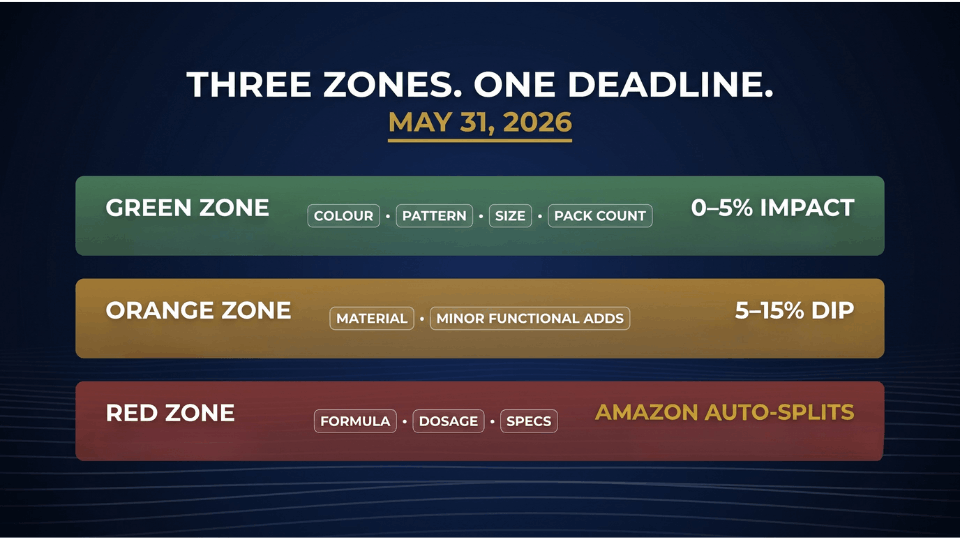
Starting February twelfth, Amazon began restricting review sharing between variations with significant functional differences. Enforcement concludes May thirty-first. Sellers get a thirty-day notice before changes hit, but by the time that email arrives, your strategy window is already closing.
The three risk zones for your parent ASINs
Every parent ASIN now falls into one of three zones. Green Zone covers pure colour, pattern, size, and pack-count differences with identical function — these continue to pool reviews, zero to five percent impact. Orange Zone covers material differences like cotton versus polyester, plus minor functional add-ons — five to fifteen percent conversion dip. Red Zone covers different formulas, dosage strengths, ingredient blends, and performance specs. Amazon splits these automatically.
Why supplement and electronics sellers are most exposed
Two categories are taking the heaviest hit. Supplement sellers regularly group different formulas or dosages under one parent using flavour or scent as the theme. Vikram Joshi, an Ayurvedic seller from Delhi, was running three different formulas as “flavour variations” of his hero product. His pooled count of twenty-four hundred reviews is about to drop to roughly three hundred per child.
When to Merge: The Four Green-Light Scenarios
Merging is the right call more often than sellers realise.
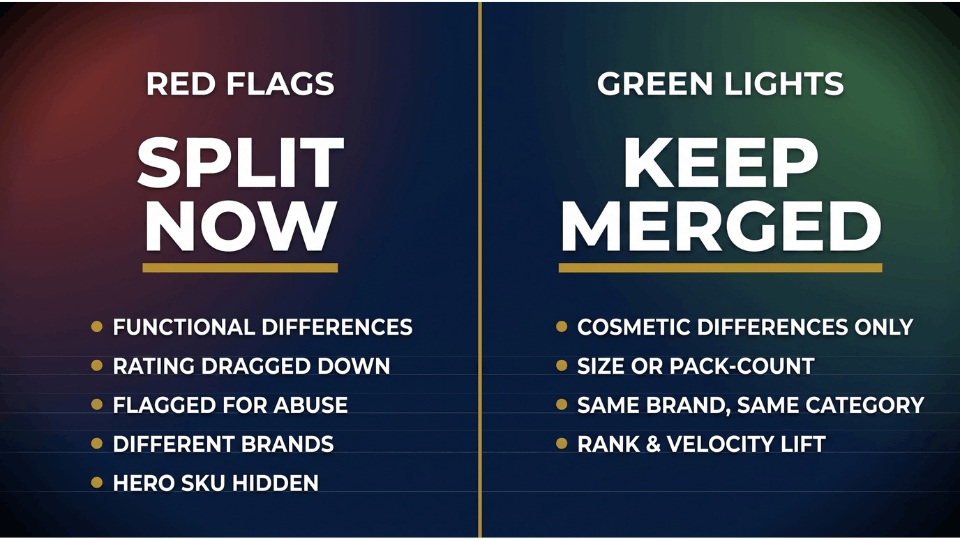
Same product, cosmetic differences only
Colour, pattern, and print variations on identical core products are textbook merge candidates. Same materials, same function, same price. Karthik Subramaniam, who sells phone cases out of Coimbatore, runs six design variations of one case model under a single parent — identical mould, different printed graphics. This is exactly what an amazon variation listing was built for.
Same product, genuine size or pack-count differences
T-shirts in S, M, L, XL. Water bottles in 500ml, 750ml, and 1L. Masala packs in 100g, 250g, and 500g. As long as the core product is functionally identical and only size or pack count changes, merge them.
Same brand, same functional category
This rule is non-negotiable. All children must share the same brand. Mixing branded and unbranded items, or pulling in different brands you sell, is catalog abuse and triggers immediate enforcement. If you are still shaping how your brand shows up on the platform, our guide on how to build a strong brand presence on Amazon is a useful companion read.
When merging restores rank and review velocity
Pairing a low-selling SKU with a high-selling SKU under one parent can lift the laggard — the algorithm reads them as variations of one strong product. If the products are not genuinely related, you have crossed into variation abuse.
Want a one-page version of this framework next to your inventory tab? It sits inside the resource library we maintain for AmanCentral readers — the checklist Anjali used to audit her catalog in two hours.
When to Split: The Five Red Flags You Cannot Ignore
Splitting is harder than merging. Once you split, the review pools cannot be recombined. Make the call deliberately — before Amazon makes it for you.
Functional differences between children
If your children differ in formula, specs, or use case, split them proactively before May thirty-first. Saanvi Nair, a Chennai supplements seller, had whey isolate and a mass gainer grouped under one parent for two years. She split them in March after a risk audit, preserving her ad performance and review history. Sellers who wait for Amazon’s automated split often see suppression flags attached on top.
One child is dragging down the rating
If one child consistently underperforms and pulls down the parent’s overall rating, splitting may be the right call. Be honest about the trade-off — split reviews cannot be recombined later. Knowing how to deal with negative reviews on Amazon first can sometimes save a child SKU before you resort to splitting.
Amazon already flagged you for variation abuse
Amazon variation abuse covers a specific set of patterns: merging unrelated products, using the wrong theme to disguise functional differences, adding a poorly reviewed product as a “variation” of a highly rated one, or hijacking a competitor’s variation family. If you have been flagged, do not wait for the second strike.
Different brands or different functional categories
Pairing items that share no brand identity or core function — the classic example was grouping socks with water bottles for extra stars — is immediate catalog abuse. Split yesterday.
When the parent is masking a hero SKU
If you have two products that are both genuine high converters, parentage hides one from search. Splitting lets both rank independently.
How to Split or Merge Without Losing Your Rankings
Both operations are reversible only in theory. Here is how to execute cleanly.
How to merge two ASINs into one parent-child listing
Follow these steps to consolidate two ASINs into one variation family:
- Confirm both ASINs share the same category, brand, and core functional product.
- Download the inventory file template from Seller Central under Inventory → Add Products via Upload.
- Create a new parent SKU, assign existing ASINs as child SKUs, and set a valid variation theme.
- Upload the flat file; if auto-merge fails, open a Seller Support case.
Expect fifteen to thirty minutes for the merge to reflect. The most common failure is a brand mismatch or invalid variation theme.
How to split a variation family safely
Splitting is where sellers accidentally delete entire listings. Order matters:
- Go to Manage Inventory and locate the parent ASIN.
- Click the small arrow to unfold all child variations — skipping this and selecting the parent directly can delete every child at once.
- Download the category flat file, blank out the parent SKU field for the children you want to detach, and save.
- Upload in Partial Update mode and confirm the detached ASINs appear as standalone listings.
If you are splitting proactively, submit a brief Seller Central case explaining the cleanup. It creates a paper trail.
What never to do (variation abuse triggers)
Three patterns trigger automated enforcement faster than anything else: repeatedly changing parent ASINs to chase review pools, adding new products as children of high-review listings to inherit social proof, and using flavour or scent themes to hide functional differences. Any of these can take you from suspension to permanent termination.
How to Audit Your Variations Before May 31, 2026
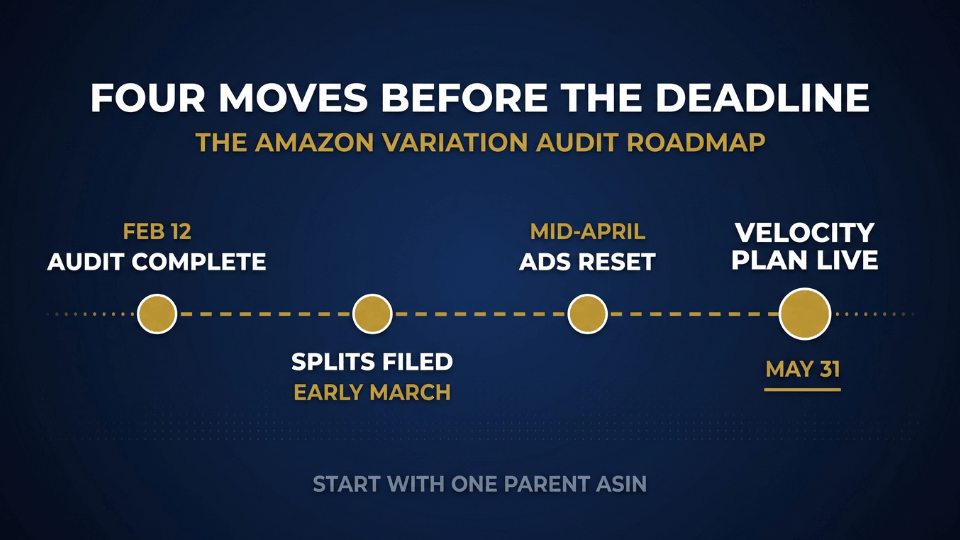
The May thirty-first enforcement deadline is the action-forcing event for every Indian seller running variations. Here is a three-step audit for this week.
Run a variation health check in three steps
Start with a full inventory pull and work parent by parent:
- Export every parent ASIN with more than two children.
- For each parent, compare individual child review counts against the displayed pooled count — the bigger the gap, the higher the risk.
- Classify every variation family into Green, Orange, or Red zone using the criteria above.
This usually takes two to four hours for a catalog of fifty SKUs.
Fix the orange and red zones first
Work the orange zones first — borderline cases where a theme correction or partial split can preserve some review pooling. Tackle red zones second with full splits. Aarushi Bhatt, a Pune cosmetics seller, audited eight parent ASINs in February, found two in the red zone, and split them in early March. She preserved her ad performance through May because she moved first.
When in doubt, get a second pair of eyes
Variation strategy is one of the highest-leverage and hardest-to-reverse decisions in the FBA business. If you are unsure whether a borderline parent should split, do not guess. The 3-Day Amazon Business Training walks through this exact framework live with Indian seller case studies.
FAQ
What is a parent-child relationship on Amazon?
A parent child asin amazon relationship groups related variations under one detail page. The parent ASIN is a non-buyable container; the child ASINs are the buyable SKUs. Children share a variation theme like size or colour and pool reviews, sales velocity, and ranking signals into one listing customers see as one product.
When to split variation amazon listings?
Split when children have significant functional differences — different formulas, specs, or use cases. Split when one child’s poor reviews drag down the parent’s rating, when Amazon has flagged you for amazon variation abuse, or when two genuinely high-converting products are hidden under one parent. Otherwise keep them merged.
Do reviews stay shared after splitting variations on Amazon?
No. Once you split, the review pools separate permanently. Each detached ASIN keeps only the reviews written for it. Split reviews cannot be recombined later, even if you rebuild the parent-child structure. This is why a proper audit matters before you act.
What counts as variation abuse on Amazon?
Variation abuse means manipulating the parent-child structure for unfair advantage — merging unrelated products to share reviews, adding new products as children of high-review parents, using flavour or scent themes to disguise functional differences, or hijacking competitor variation families. Consequences range from listing suppression to permanent account termination.
How to split amazon variations into separate listings?
Go to Manage Inventory, find the parent ASIN, and click the arrow to unfold every child first — selecting the parent without unfolding can delete all children at once. Download the category flat file, blank out the Parent SKU field for the children you want to detach, and upload in Partial Update mode.
Can you undo a variation split and get reviews back?
You can rebuild the parent-child structure, but split reviews cannot be merged back. Amazon treats post-split review recombination as review manipulation and has been actively enforcing against it since 2025. Treat every split as a one-way door.
Do parent and child ASINs need separate keywords?
Yes. Each child needs its own optimised title, bullets, and backend keywords. Parent listings do not appear in customer search, so keywords on the parent alone will not get you indexed. Duplicate core keywords across children and add variation-specific terms — colour, size, material — to capture long-tail searches. Our guide on how to boost your Amazon listing for greater visibility covers this in depth.
How many child ASINs can one parent listing have?
Amazon allows up to two thousand children under a single parent, but that ceiling is theoretical. Variation families with more than fifteen to twenty children overwhelm shoppers and dilute conversion. Keep the picker focused on attributes that matter for the purchase decision.
Conclusion
The variation decision is one of the few catalog moves that is both extremely high-leverage and largely irreversible. Most sellers in India sit at one of two extremes — over-merging products that will get auto-split on May thirty-first, or under-merging colour and size variants that should have been pooled years ago. The middle path is a deliberate, parent-by-parent audit using the green, orange, and red zone framework. Anjali, Priya, Saanvi, and Aarushi all started where you are. They picked one parent ASIN, classified it honestly, and moved.
If you want this audit framework walked through live with real Indian seller case studies, the 3-Day Amazon Business Training is built around exactly this kind of catalog decision. Bring your messiest parent ASIN. Leave with a plan.
