

Pooja Deshmukh from Nagpur spent three weeks preparing her organic spice brand for launch. She paid a photographer ₹14,000, rewrote her bullets four times and built A+ content with recipe cards. Then, the night before going live, she reached the Amazon backend search terms field, typed her brand name, repeated “organic masala powder” from her title and clicked save. It took ninety seconds.
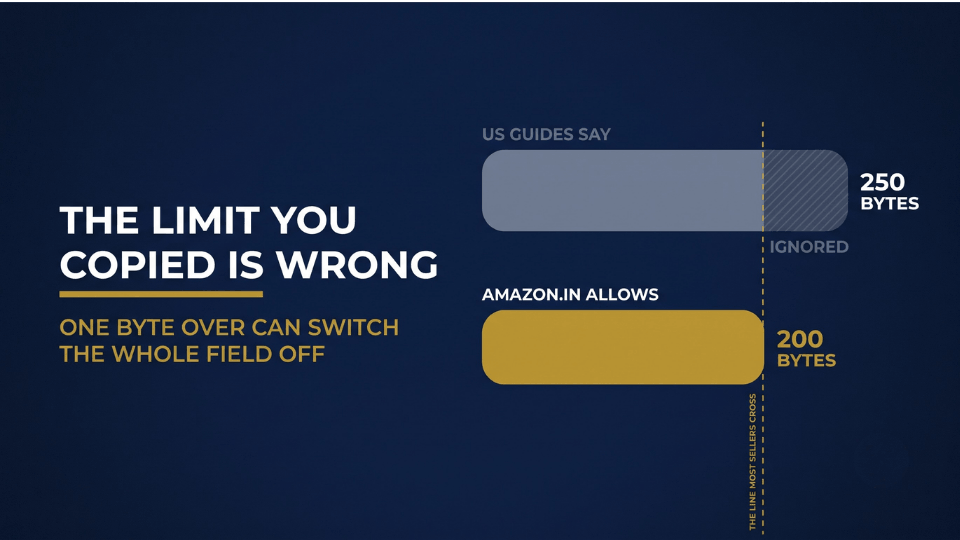
Pooja isn’t careless. She did what most Indian sellers do, because almost nobody explains that this hidden field decides which searches your product can appear in. On Amazon.in you get just 200 bytes of it, not the 250 most guides quote, and crossing that line can make Amazon ignore every word you typed.
This guide covers what the field really does, the mistakes quietly wasting it, and how to fill every byte with words Indian buyers actually type.
What Amazon Backend Search Terms Actually Do
Amazon Hidden Keywords: The Field Your Buyers Never See
Every listing has two layers. Shoppers see the front one: your title, bullets, images and A+ content. The back layer sits inside Seller Central, and its most important field holds your Amazon backend search terms. These Amazon hidden keywords have a single reader, which is Amazon’s search engine. Because nobody sees them, they don’t need to sound good, so they’re the perfect home for synonyms, local names and alternate spellings.
Amazon Backend Keywords or Generic Keywords? Same Box
Blogs and tools call this field Amazon backend keywords or search terms, while Seller Central labels it “Generic Keyword.” When someone mentions the generic keywords Amazon reads behind the scenes, they mean the same single box. There’s nothing else to hunt for.
Getting Indexed Is Not the Same as Ranking
A backend word gets your product indexed, meaning Amazon now considers you eligible for that search. Your rank still depends on sales, conversion and relevance. But if you aren’t indexed, you don’t appear at all, however good your product is.
Nandini Joshi from Indore sold her brass pooja brand steadily through PPC, yet organic orders stayed flat for four months. Her listing wasn’t indexed for “pooja thali set,” the exact phrase buyers typed, because her title said “puja plate.” Three backend words closed the gap, and organic orders from that search started arriving within ten days.

The Amazon Search Terms Byte Limit Is 200 in India, Not 250
Bytes vs Characters: Why the Counter Can Mislead You
Amazon measures this field in bytes, not characters. Plain English letters and numbers cost one byte each, but symbols, curly quotes and Indian scripts can cost three. Worse, sellers on Amazon.in have reported the edit box accepting text well past the limit, showing no error, while their changes never applied. The box accepting your words doesn’t mean Amazon is using them.
Where the 250-Byte Number Comes From
Amazon set different caps by marketplace: under 250 bytes for the US and most others, 500 for Japan and under 200 for India. The popular guides are written for American sellers, so the 250 figure travels everywhere. Indian sellers copy those templates and overshoot the real Amazon search terms byte limit without ever realising it.
One Byte Over: What Happens When You Cross the Line
Go over the limit, and Amazon doesn’t neatly trim the extra words. It can ignore the entire field, with no warning email and no red banner. Treat 190 bytes as your working ceiling and count the spaces too, because that caution costs you almost nothing.
Harpreet Singh from Ludhiana pasted a 245-byte template from a US YouTube tutorial into his thermal wear listings. Through the two busiest winter months, not one backend term was indexed. After trimming to 186 bytes, he started appearing for “winter inner wear for men” within a week, but he estimates the silent error had already cost him around ₹60,000 in sales.
The 75-Character Title Cap Makes Backend Worth More
What Changed on July 27, 2026
From July 27, 2026, Amazon began enforcing a 75-character limit on product titles, spaces included, in every category except media, and the update covers Seller Central India. Titles left over the limit get gradually rewritten by Amazon’s AI. Brand owners get a short window to review those rewrites, but squeezing 180 characters of keywords into a title is finished.
Item Highlights: Useful, But Not a Backend Replacement
Amazon also added Item Highlights, a 125-character field that is searchable and appears with your title. It suits materials, sizes and use cases, but buyers read it, so it must sound natural. Nobody trusts a line reading “tiffin dabba lunch carrier steel box.” The backend is still the only field that doesn’t have to read well.
Where Your Dropped Keywords Should Go Now
Sort the words you cut from old titles into two piles. Buyer-friendly phrases go into Item Highlights and bullets, while synonyms, Hinglish terms and alternate names go into your Amazon backend search terms.
Vikram Rathore from Jodhpur trimmed his sheesham furniture titles from 190 characters to 72, and about twenty keywords fell out. He moved the descriptive ones into Item Highlights and pushed terms like “bookcase rack shelf unit” into the backend. His organic sessions held steady through August, when he had braced for a drop.
Four Mistakes That Waste Amazon Backend Search Terms
Repeating Words Already in Your Title and Bullets
Amazon already indexes every word in your title and bullets. Repeating “cotton kurta for women” in the backend spends 22 bytes for nothing. You also don’t need plurals or capitalised versions, because Amazon handles those itself.
Adding Brand Names: Yours, Competitors’, and “Addidas”
Amazon’s guidelines keep brand names out of this field, including your own, since your brand is already attached to the listing. Competitor brands can put your listing at policy risk. Some Indian guides still promote misspellings like “addidas” as a hack, but it’s the same violation with a typo.
Commas, Filler and Promotional Words
Commas, semicolons and fillers like “a,” “the” and “and” eat bytes. So do claims like “best,” “cheap,” “new arrival” or “sale.” Separate words with single spaces and nothing else.
Leaving It Blank or Pasting an AI Keyword Dump
An empty field wastes your cheapest indexing opportunity. Pasting a 600-character list from an AI tool is worse, because it breaks the byte limit and can switch off the whole field.
Farhan Qureshi from Lucknow sells chikankari kurtas under his own label. His backend held his brand name, three repeats of “kurta” and the word “best.” Cleaning it freed about 70 bytes for terms like “georgette mul eid festive office wear,” and his listing was indexed for 14 new searches within two weeks.
Before you move on, grab our [Amazon Listing Audit Checklist] and run your top five ASINs through these four mistakes. It takes about 20 minutes per listing.
Backend Keywords for Amazon India: How Buyers Search
Hinglish and Everyday Indian Product Names
Indian buyers don’t search the way copywriters write. They type “dabba,” “mixie,” “almirah,” “kadai” and “chappal,” words that rarely fit a polished English title. These are the backend keywords Amazon India shoppers use every day, and in English letters they cost one byte each. Type your product into the amazon.in search bar and note what autocomplete suggests, because those suggestions come from real searches.
Hindi and Tamil Script: The 3-Bytes-a-Letter Trap
In the encoding Amazon counts, every Devanagari or Tamil letter takes three bytes, and vowel signs count separately. The Hindi “टिफिन” uses 15 bytes, while “tiffin” uses six. Start with transliterated terms, and add native script only if bytes remain.
Lakshmi Narayanan from Madurai added four Tamil words to the backend of her steel kitchenware brand and pushed the field past 200 bytes without noticing. Swapping them for “dabba lunch carrier” brought it down to 174 bytes, and her backend terms were indexed within three days.
Indian Spellings and Genuine Misspellings
Indian shoppers switch between British and American spellings, so cover “jewellery” and “jewelry” or “colour” and “color” if your visible copy uses only one. Common slips like “sandles” deserve a place too. Misspell generic words only, never brand names.
How to Write Amazon Backend Search Terms in 200 Bytes
Step 1: Build an Exclusion List
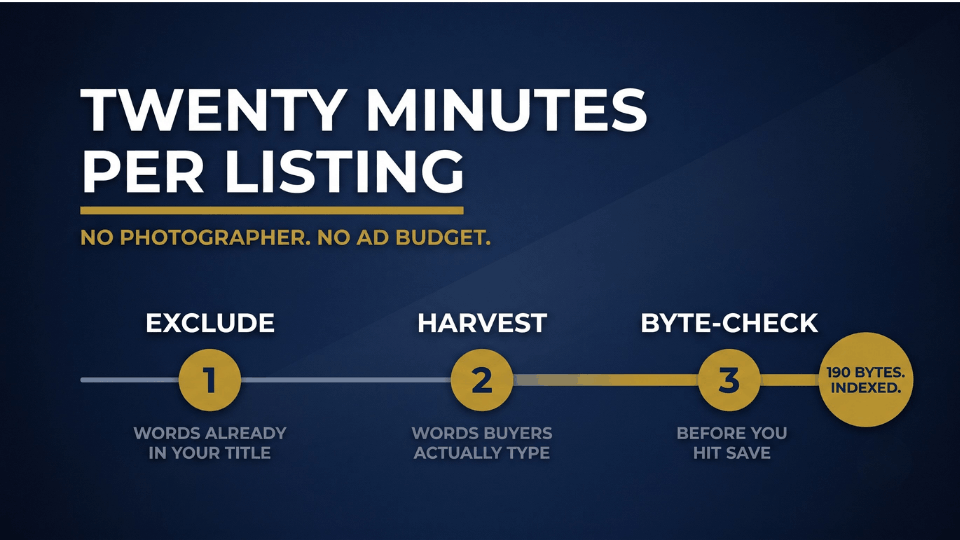
Copy your title, Item Highlights and bullets into a notepad and list every unique word. None of them belong in your backend.
Step 2: Harvest Terms Buyers Actually Use
Your Sponsored Products search term report shows which queries led to orders, and Brand Analytics shows which searches bring impressions to your ASINs. Amazon.in autocomplete reveals how buyers phrase things, and competitor listings spark ideas, minus their brand names.
Step 3: Cut, Order and Byte-Check
Remove excluded words, duplicates, plurals and filler. Keep everything lowercase and separated by single spaces, then paste it into a free UTF-8 byte counter and stop at 190 bytes.
How to Add Backend Keywords on Amazon Seller Central India
Once your Amazon backend search terms are ready, here’s how to add backend keywords on Amazon:
- Open Inventory in Seller Central and select Manage All Inventory.
- Find your product and click Edit.
- Open the Product Details or Keywords tab, depending on your category.
- Paste your terms into the Generic Keyword field, and fill Target Audience or Intended Use if shown.
- Save and note the date so you know when to check indexing.
A flat-file error asking you to reduce generic keyword length means you’ve crossed the limit.
Siddharth Bhatt from Ahmedabad rebuilt the backend for his five best-selling kitchen storage ASINs in one Sunday afternoon. Within a month, organic sessions on those listings rose about 18%, adding roughly ₹42,000 in monthly sales with no extra ad spend.
For a head start, download our [Backend Keyword Worksheet], with a ready exclusion-list template and byte-count formula.
How to Check Amazon Keyword Indexing After You Save
The ASIN Search Test on Amazon.in
The simplest Amazon keyword indexing check is free. Type your ASIN followed by the keyword into the amazon.in search bar. If your product appears, you’re indexed for that term. Test your five most important new terms first rather than all forty.
When to Wait and When to Worry
Backend changes usually take 24 to 72 hours to index. If a term still isn’t indexed after a week, check the byte count, look for promotional or restricted words, and see whether the listing shows an error in Seller Central.
Debjani Roy from Kolkata ran the test on her handloom saree brand five days after an update and found nothing indexed. A pasted ₹ symbol and a few curly quotes, three bytes each, had tipped her over the limit. Removing them got all 22 terms indexed within two days.
Refresh Before Every Big Sale Season
“Diwali gift hamper” means little in March. Revisit your backend every quarter and before the Great Indian Festival, Prime Day and Republic Day sales, adding terms that converted in your latest PPC reports and dropping ones that never earned an impression.
Frequently Asked Questions
What is the backend search term limit on Amazon India?
Amazon.in allows under 200 bytes in the Generic Keyword field, not the 250 quoted in most US guides. English letters and numbers cost one byte each, while Hindi, Tamil and other Indian scripts cost three bytes per character. Aim for about 190 bytes on every listing to stay safely under the limit.
What happens if my backend keywords go over 200 bytes?
Amazon may ignore the entire field, not just the extra words. You get no error email and your listing looks normal, but none of your backend terms help buyers find you. That’s why a proper byte counter matters more than the character count Seller Central shows you while you edit.
Should I repeat title keywords or brand names in backend?
No to both. Words in your title, bullets and Item Highlights are already indexed, so repeating them wastes bytes without improving rank. Brand names don’t belong here, including your own, and competitor brands add policy risk. Use that space instead for synonyms, Hinglish terms and alternate names that buyers genuinely type.
How do I check if my backend keywords are indexed?
Search your ASIN followed by the keyword on amazon.in. If your product appears, it’s indexed for that term. Wait 48 to 72 hours after saving before you test. Paid index-checker tools can help if you manage a large catalogue, but the manual test works well for checking your top listings.
Where do I add backend keywords in Seller Central India?
Go to Inventory, then Manage All Inventory, click Edit on your product listing and open the Product Details or Keywords tab. Paste your terms into the Generic Keyword field, and fill Target Audience or Intended Use whenever your category shows those optional fields. Changes usually index within a few days.
Can I use Hindi or Tamil keywords in backend search terms?
Yes, but use them carefully. Each Hindi or Tamil letter costs three bytes, so one native-script word can use as much space as three English words. Start with transliterated terms like “dabba” or “kadai” written in English letters, which cost one byte each, and add native script only if bytes remain.
How often should I update backend search terms?
Search behaviour shifts with festivals and seasons, so a set-and-forget field slowly loses value. Review them every quarter and before major sale seasons like the Great Indian Festival or Prime Day. Add fresh converting terms from your PPC search term report, remove ones that never earned impressions, and re-check your byte count after every single edit.
Final Thoughts: Put Your 200 Bytes to Work
Your backend field is the cheapest optimisation in your whole listing. It needs no photographer, no designer and no extra ad budget, just about 20 minutes per product. Respect the 200-byte limit, never repeat what buyers can already see, leave brand names out and write in the words Indian shoppers actually type.
Pick your five best-selling ASINs this week and audit them against the four mistakes above. If the real limit surprised you, other parts of your listing probably deserve a second look too. That’s what we work through step by step in our 3-Day Amazon Business Training, from listings to PPC to building a brand that Amazon’s search rewards.
Your buyers are already searching. Make sure they can find you.
