
Last November, Meena Iyer from Hyderabad spent ₹15,000 on professional product photography for her handmade candle line. The images were sharp, the A+ Content looked polished — but her conversion rate barely moved, stuck at 1.8% for weeks. Out of frustration, she recorded a simple 40-second amazon product video on her phone, showing the candle being lit, the wax pooling evenly, and the soft glow filling a room. Within a month, her conversion rate climbed to 2.9%.
Here’s the reality most Indian sellers don’t act on: shoppers who watch a product video on Amazon are 3.6 times more likely to buy. Yet the vast majority of listings on Amazon India still have zero video content. This guide breaks down exactly what your amazon product video should include, what Amazon will reject, and how to get one produced in India — whether your budget is ₹2,000 or ₹30,000.
Why Amazon Product Videos Matter More Than Ever
Amazon’s own internal data shows that adding a video to a listing can boost sales by roughly 9.7%. For a product doing ₹2 lakh per month, that’s nearly ₹20,000 in additional revenue from a single content upgrade.
The Conversion Gap Most Indian Sellers Don’t See
Arjun Mehta from Delhi sells stainless steel kitchenware. His listings relied entirely on images and bullet points for eight months, with conversion hovering around 2.1%. Last October, he added a 45-second demo video showing his kadai on an induction cooktop — the handle staying cool, food releasing without sticking. Within six weeks, conversion hit 3.4%. Roughly 79% of online shoppers say they’d rather watch a video than read a description. On Amazon India, where many buyers are purchasing a category for the first time, that preference is even stronger.
Where Your Video Shows Up on Amazon
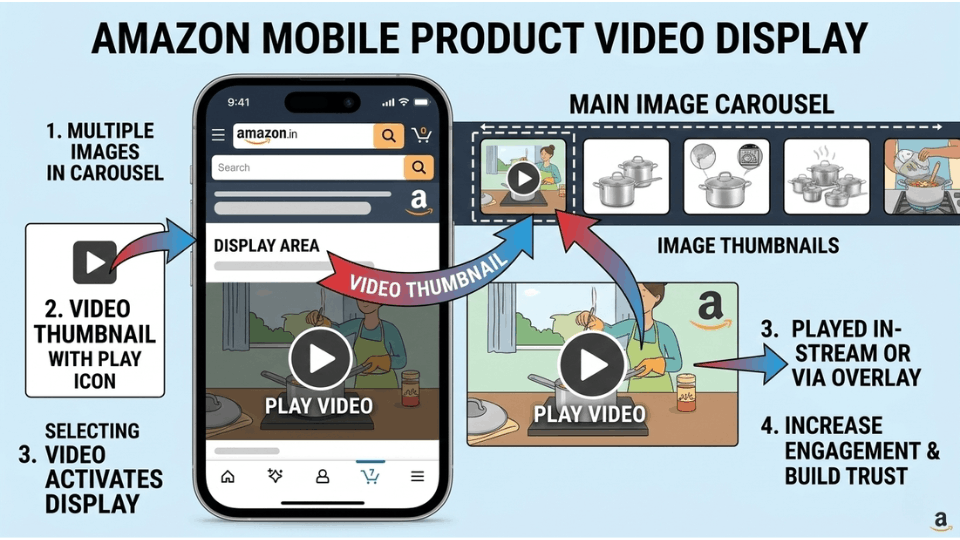
Your video appears in the main image carousel on your product detail page alongside your photos. Brand-registered sellers can also place videos inside A+ Content, on their Amazon Brand Store, and in Sponsored Brands video ads. Non-brand sellers can upload videos that appear in the image gallery and the “Videos for this product” section below the description.
Types of Amazon Product Videos That Actually Convert
Not every video format works the same way. The type you choose should depend on your product category and your buyer’s biggest hesitation.
Product Highlight and Demo Videos
These are the workhorses. A product highlight video calls out your item’s key features, dimensions, materials, and real-world use. If you sell anything with moving parts, multiple functions, or a size that’s hard to judge from photos — a demo video is your strongest asset. Show the product working, not just sitting on a white background.
Lifestyle and Unboxing Videos
Lifestyle videos place your product in the buyer’s world. If you sell fashion, jewellery, home décor, or personal care items, this format helps shoppers picture themselves using what you’re offering. Unboxing videos, meanwhile, build transparency — buyers see exactly what arrives in the box, which reduces the anxiety of buying something unfamiliar online.
Explainer and How-To Videos
Kavita Reddy from Bangalore sold a portable garment steamer on Amazon India. Her listing had solid images, but her return rate was stubbornly high at 14%. The top complaint: customers found it difficult to set up. She recorded a 50-second how-to video walking through the fill-and-steam process. Within two months, her return rate dropped to 9.6%, and her average rating improved from 3.7 to 4.1 stars. If your product comes with a learning curve or repeated customer questions, an explainer video pays for itself in reduced returns alone.
What to Include in Your Amazon Listing Video
The difference between a video that converts and one that gets skipped comes down to a few core elements. These are the amazon listing video best practices that consistently perform.
Lead With the Problem Your Product Solves
You have about five seconds before a viewer decides to keep watching or scroll past. Don’t waste them on a logo animation or slow packaging pan. Open with the pain point — tangled earphones, a cluttered counter, a shirt that wrinkles during travel — then show how your product resolves it. Problem-first framing hooks attention because it mirrors what the shopper is already feeling.
Show the Product From Multiple Angles
Your video should compensate for the inability to pick up and examine a product. Include close-up shots of textures and materials, in-hand shots for scale, and side-by-side comparisons if relevant. This is especially critical for products where size, finish, or build quality are common concerns.
Add Text Overlays and Subtitles
Most Amazon shoppers in India browse on their phones with the sound off. If your video relies entirely on voiceover, you’re losing the majority of your audience. Add clean text overlays that highlight key features, dimensions, or benefits at each point. Think of the text as a silent salesperson guiding viewers through your product’s story.
Keep It Under 60 Seconds
Amazon recommends keeping product videos between 30 and 60 seconds. Shorter videos hold attention better and drive higher completion rates. Focus on one core message per video, and if you have more to say, upload additional videos — Amazon allows up to six per listing.
If you’re looking for a structured way to plan your video content alongside your full listing strategy, our guide on creating eye-catching Amazon listings walks you through each step — from keyword research to A+ Content to video scripting.
What to Skip — Amazon Product Video Guidelines and Rejection Triggers
Amazon reviews every video you upload, and they reject more than you’d expect. Understanding the amazon product video guidelines before you shoot saves you time, money, and frustration.
No Pricing, Promotions, or Time-Sensitive Claims
Any mention of discounts, deals, or pricing will trigger a rejection. Phrases like “50% off,” “limited time offer,” or “cheapest on Amazon” are all violations. Amazon wants product videos to remain evergreen — your video shouldn’t become outdated the moment a sale ends.
No External Links, Competitor Mentions, or Contact Info
Your video cannot include website URLs, phone numbers, email addresses, or social media handles. You also cannot mention competitor brands by name or show side-by-side comparisons with rival products. Keep the focus entirely on your own product.
No Unverifiable Claims or Fake Reviews
Nikhil Desai from Ahmedabad learned this the hard way. His first video for a stainless steel water bottle included the phrase “best quality guaranteed.” Amazon rejected it within 24 hours. He re-recorded with factual claims — “made from 304-grade stainless steel, BIS certified, double-wall vacuum insulated” — and the video was approved in 48 hours. Stick to what you can prove, and avoid superlatives like “best” or “number one” unless you hold an official Amazon badge.
Technical Requirements You Can’t Ignore
Amazon accepts MP4 or MOV format, with a maximum file size of 5 GB and resolution up to 1080p. Audio should be clear and free of background noise. Avoid excessive generic stock footage — Amazon prefers authentic product footage that looks like it belongs to your specific listing.
Do You Need Brand Registry to Upload a Video on Amazon?
This is one of the most common questions Indian sellers ask, and the answer has changed significantly. You no longer need Amazon Brand Registry to upload a product video.
Brand-Registered vs. Non-Brand Sellers
Brand Registry sellers get the full suite of video options: associate a single video with up to 300 ASINs, embed videos in A+ Content, feature them on your Brand Store, and use them in Sponsored Brands ads. Non-brand sellers can still upload videos through Seller Central, but each video is limited to a single ASIN.
How to Upload a Video via Seller Central India
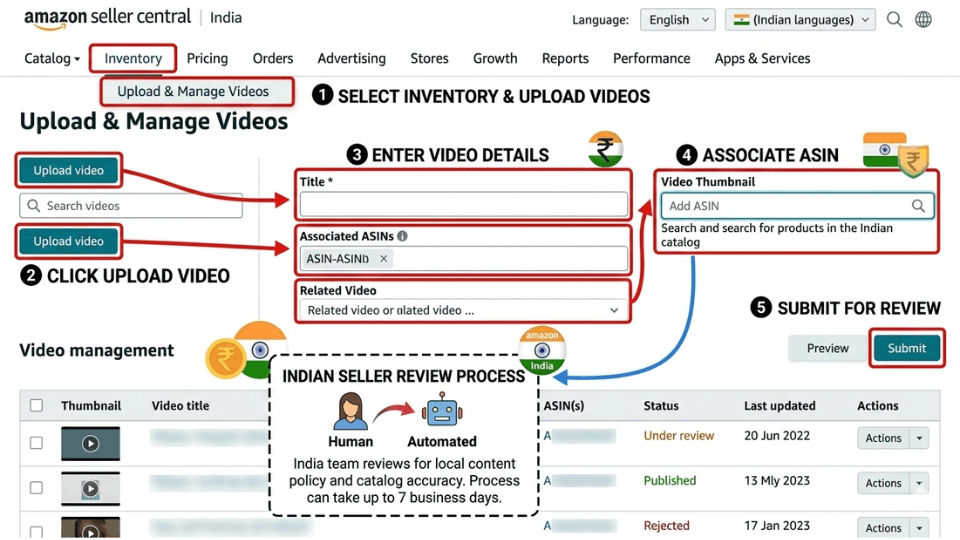
The process to add video to your amazon listing is straightforward. Log in to Seller Central, navigate to Catalog, and select “Upload and Manage Videos.” Click “Upload Video,” select your file, enter a keyword-rich title, assign the relevant ASIN, and upload a thumbnail. Submit for review — Amazon typically responds within two business days. If rejected, you’ll see the reason on the same page and need to re-upload a corrected version.
Building a brand on Amazon India involves more than just videos — it’s a system of listing optimization, A+ Content, advertising, and brand protection working together. Our 3-Day Amazon Business Training walks you through the complete playbook, from your first listing to scaling a profitable brand.
Amazon Product Video Cost — Getting One Made in India
One of the biggest reasons Indian sellers skip video is the assumption that it’s expensive. India offers some of the most affordable video production options in the world, and for most Amazon product videos, you don’t need a professional crew.
DIY With a Smartphone — The Budget Option
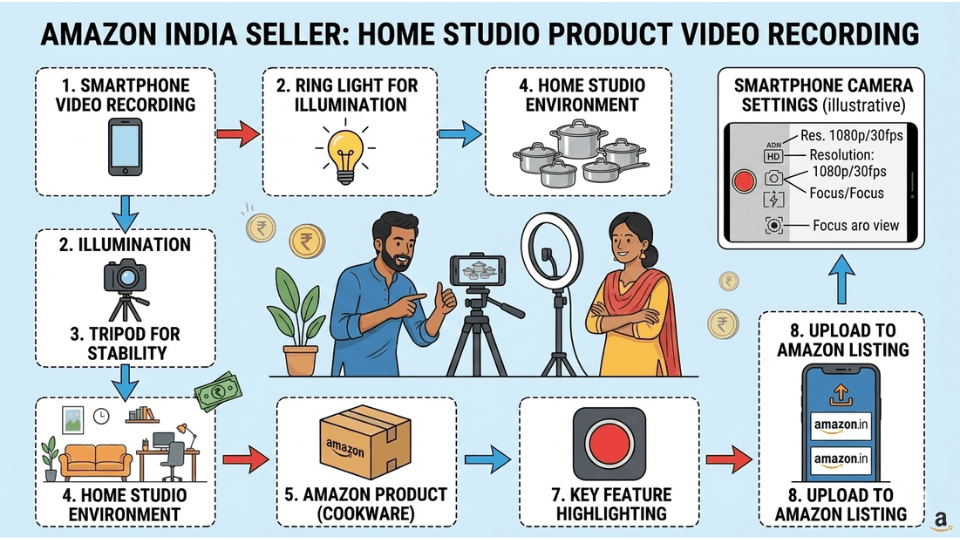
Your phone is already a capable amazon product video maker. Shoot near a large window for natural light, use a basic ring light (₹500 to ₹1,500) for consistency, and prop your phone on a ₹300 tripod. Free editing apps like CapCut or InShot let you trim clips, add text overlays, and export in MP4. Total cost: under ₹2,000. This approach works well for simple product demos, unboxing-style content, and how-to videos.
Freelancers and Fiverr — The Mid-Range Option
If you want a more polished result without studio costs, Indian freelancers on Fiverr and Upwork offer solid amazon product video services. Typical pricing ranges from ₹3,000 to ₹10,000 per video. When evaluating a freelancer, look for Amazon-specific work in their portfolio — someone who has produced e-commerce videos will understand the pacing and compliance requirements that a general videographer might miss.
Professional Studios — The Premium Option
Simran Kaur from Jaipur runs a handmade jewellery brand on Amazon India. She started by shooting her first three videos on an iPhone with a ₹800 ring light. Those videos helped her conversion rate climb by 26%. Encouraged by the results, she invested ₹8,000 per video with a freelance videographer for her next ten ASINs — and the improved production quality pushed her brand perception up noticeably. For sellers scaling across multiple products, professional studios in cities like Delhi, Mumbai, and Bangalore typically charge ₹10,000 to ₹30,000 per video, which includes scripting, shooting, editing, and format optimization for Amazon.
Common Mistakes Indian Sellers Make With Amazon Videos
Even sellers who take the time to create a video often trip over avoidable errors that limit their results.
Copying Competitor Videos Instead of Differentiating
It’s tempting to replicate what your top competitor is doing. But if your video looks identical — same generic zoom-in, same royalty-free music, same vague overlays — you’ve done nothing to stand out. Your video should reflect your product’s specific USP. If your competitor shows the product on white, show yours in a real kitchen. If they skip the unboxing, make that your opening shot. Our guide on differentiating your private label product covers this mindset in depth.
Ignoring Mobile-First Viewing
Over 70% of Amazon India shoppers browse on their phones. If your text overlays use small fonts or your product occupies a tiny portion of a wide frame, you’re losing the mobile majority. Frame shots tight, make text readable on a five-inch screen, and test your video on a phone before uploading.
Skipping Thumbnails and SEO Titles
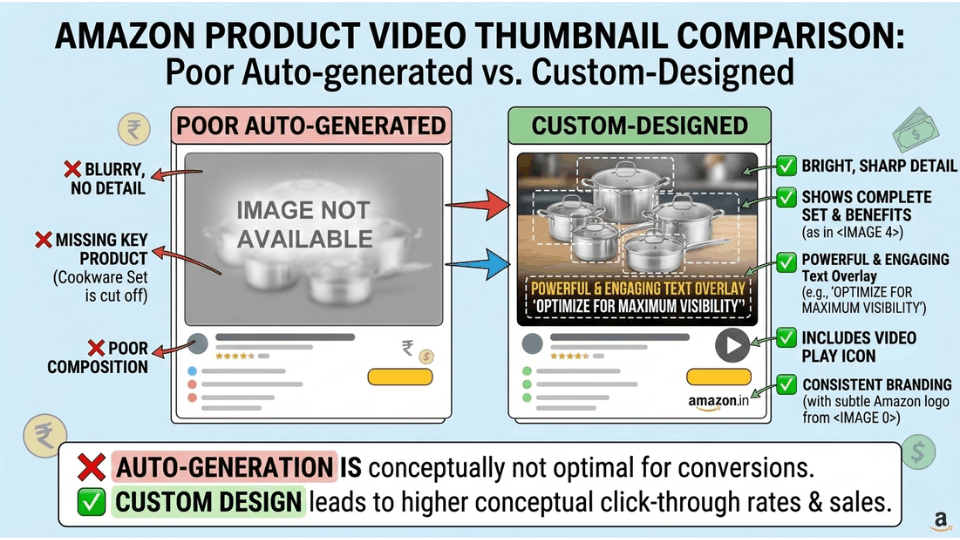
The thumbnail is the first thing a shopper sees before pressing play. A blurry auto-generated frame won’t cut it — upload a custom thumbnail that clearly shows your product. Equally important is the video title, which Amazon’s search algorithm indexes. A title like “Stainless Steel Kadai — Induction Compatible Demo” performs far better than “Product Video 1.” If you want to understand how Amazon’s ranking system uses these signals, our breakdown of how the A9 algorithm works is worth reading.
FAQ
How do I add a video to my Amazon product listing?
Log in to Amazon Seller Central, go to Catalog, and select “Upload and Manage Videos.” Upload your video file in MP4 or MOV format, add a keyword-rich title, assign the relevant ASIN, choose a thumbnail, and submit for review. Amazon typically responds within two business days with approval or feedback.
Do I need Brand Registry to upload a video on Amazon?
No. Amazon now allows all sellers with a Professional account and at least three months of selling history to upload videos. Brand Registry gives you extra features — like associating one video with up to 300 ASINs and using video in A+ Content — but it’s no longer a requirement for basic video uploads.
What are Amazon’s video requirements and guidelines?
Amazon accepts MP4 and MOV formats, up to 1080p resolution, with a maximum file size of 5 GB. Videos should not contain pricing, external links, competitor references, or unverifiable claims. Content must be directly related to the product and should not include promotional language or calls to action that redirect shoppers away from Amazon.
What types of videos work best for Amazon listings?
Product highlight videos, lifestyle videos, unboxing videos, and how-to explainers tend to perform best. The right choice depends on your product — gadgets benefit from demos, fashion from lifestyle shots, and complex products from how-to guides. Shorter videos between 30 and 60 seconds consistently outperform longer ones.
How much does it cost to make an Amazon product video?
Costs in India range widely. A DIY smartphone setup costs under ₹2,000. Freelancers on platforms like Fiverr charge ₹3,000 to ₹10,000 per video. Professional studios in major cities charge ₹10,000 to ₹30,000 depending on complexity. Many successful sellers start with DIY and invest in professional production as revenue grows.
Can I upload videos on Amazon India without Brand Registry?
Yes. Amazon India now supports video uploads for all Professional sellers with at least three months of activity. Without Brand Registry, you can upload one video per ASIN through the “Upload and Manage Videos” section in Seller Central. Brand Registry unlocks additional placements like A+ Content and Brand Store videos.
How long should an Amazon product video be?
Amazon recommends 30 to 60 seconds for maximum effectiveness. The most important content should appear within the first five to ten seconds. If your product requires a longer explanation, consider creating multiple short videos rather than one long one — Amazon allows up to six videos per listing.
Can I use the same video for multiple ASINs?
Yes, if you’re enrolled in Amazon Brand Registry. Brand-registered sellers can associate a single video with up to 300 ASINs. Non-brand sellers are limited to one ASIN per video upload, so you’d need to upload the same video separately for each listing.
Conclusion
Your product images got the shopper to stop scrolling. Your video is what moves them to click “Add to Cart.” Whether you shoot on a smartphone in Chennai or hire a studio in Mumbai, the critical thing is to start. Most competitors on Amazon India still aren’t using video, which means every day you wait is a day you’re leaving conversions on the table.
If you’re serious about building a profitable Amazon business in India — from listing optimization and video strategy to advertising and brand building — our 3-Day Amazon Business Training gives you the complete playbook to launch, grow, and scale with confidence.
